A campaign is ready to launch, but the approved logo is buried in a shared drive, the product video exists in three edits, and nobody can confirm whether the typeface in the landing page is covered by the right license. The designer has a folder named “final,” the developer has another named “final-new,” and legal has a PDF in an email thread that may contain the only usable rights record.
That situation feels like a people problem, but it usually isn't. It's a systems problem caused by scattered files, inconsistent naming, unclear ownership, and rights information that lives outside the asset itself. A structured approach to creative asset management starts by giving every important file a reliable home and enough context to make it usable.

This guide is for designers, developers, agencies, brand operators, and legal or compliance teams who need more than storage. It treats a digital asset library as an operating layer for searchability, approval, rights management, reuse, and authenticity. The aim is informational, not legal advice. Licensing decisions should be reviewed against the relevant agreement and, where necessary, qualified legal counsel.
You'll start with the basic model, then move into the practical work that makes a library reliable: metadata, taxonomy, permissions, version lineage, font licensing, selection criteria, and ongoing stewardship. The important shift is simple. A library isn't successful because it contains every file. It succeeds when the right people can find the right approved asset, understand its limits, and use it confidently.
Introduction to Digital Asset Libraries Without the Chaos
The pressure usually appears at the worst possible moment. A regional team needs a social cut of a campaign video, an agency requests the latest packaging artwork, and a developer asks whether the logo should be supplied as an SVG or a raster file. Each request sounds small, but answering it may require searching cloud folders, messaging a designer, checking an old project board, and asking legal whether usage rights still apply.
The cost isn't limited to minutes spent searching. People download duplicates, recreate assets that already exist, publish outdated versions, or use a file in a market or channel that wasn't covered by its rights. A folder can hold the material, but it can't reliably explain what an asset is, who approved it, where it can be used, or which version supersedes another.
The operational pattern behind the frustration
Consider a product launch with a master image, localized crops, short-form video, product renders, campaign copy, and a custom font package. The creative team sees these as related components. In a scattered repository, they often become unrelated filenames owned by different people.
A digital asset library makes those relationships visible. It can connect the master file to derivatives, label the approved crop, record the market restriction, and expose the font license evidence alongside the typography files. That turns a search request into a controlled retrieval process.
Practical rule: If a team has to ask a person where an asset is, the system probably lacks either usable metadata, clear ownership, or both.
The library also creates a shared vocabulary between disciplines. Designers can find approved source files. Developers can identify production-ready formats. Agencies can receive controlled access. Legal teams can inspect rights records without reconstructing the asset's history from email.
What this guide treats as success
Success doesn't mean eliminating every duplicate on day one. It means creating a dependable path from creation to approval, distribution, reuse, and retirement. That path should remain understandable when the original designer changes roles, an agency contract ends, or an AI-generated derivative enters the workflow.
The practical boundary matters too. This article explains operational patterns and licensing distinctions, but it isn't legal advice. A library can surface evidence and prevent obvious mistakes. It can't replace a review of the actual license terms, territory, medium, audience, or contractual obligations.
What Digital Asset Libraries Are and How They Work
A useful analogy is a well-run physical library. Books sit in a central building, a catalog describes them, membership rules control access, editions show what changed, and a circulation desk gets the right material to the right reader. A digital asset library applies the same logic to logos, photographs, video, audio, documents, templates, design sources, product renders, and other valuable files.
The distinction from ordinary storage is important. Storage answers, “Where is the file?” A library also answers, “What is it, which version is approved, who may use it, and under what conditions?”
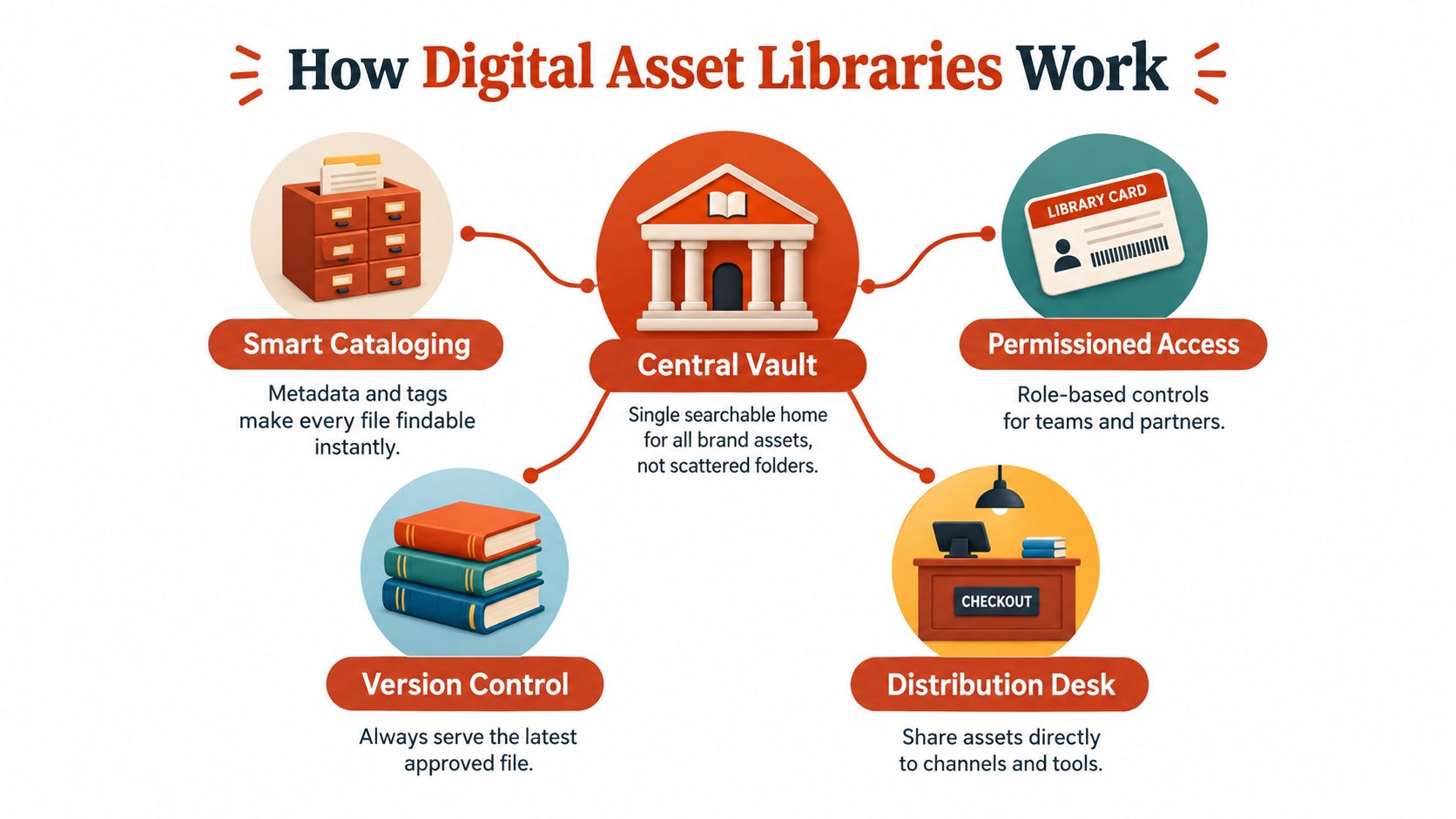
The five working parts
Central repository: A single governed home reduces dependence on personal drives, inboxes, and disconnected project folders. It doesn't necessarily mean every working file belongs there. Teams can distinguish drafts from approved distribution assets while keeping the relationship between them visible.
Structured metadata: Metadata describes the asset beyond its filename. Useful fields might include asset type, product, campaign, region, channel, language, status, owner, creation date, and rights expiry. The goal isn't to collect everything. It's to capture the information people use to search, approve, distribute, and retire files.
Versioning and lineage: Version control records how an asset changed. For a product render, lineage might connect the source model to a rendered master, localized versions, channel crops, and compressed web outputs. This prevents a derivative from becoming detached from the approved source.
Permissions: Role-based access determines who can view, edit, approve, download, or distribute an asset. A partner may need access to campaign exports but not editable masters. A developer may need production formats but not confidential concept work.
Distribution: The library should help people deliver assets into the places where work happens. Depending on the system, that may involve links, downloads, content workflows, or integrations. Distribution rules should preserve approval status and rights context rather than stripping it away.
Library, storage, or full DAM
A lightweight library may provide centralized files, search, basic tags, and sharing. A full digital asset management ecosystem usually adds richer workflows, approval states, audit history, rendition management, integrations, and reporting. Neither model is automatically correct.
A small team may need fast retrieval and clear ownership without enterprise complexity. A global organization with external partners, multiple markets, and regulated content may need stronger controls. For a broader view of selection considerations, Contesimal's DAM recommendations can provide useful comparison context. Teams should still map any recommendation against their own workflows, media types, and rights obligations.
A sound folder structure diagram can help before implementation, but folders shouldn't become the whole operating model. Search, metadata, permissions, lineage, and distribution are what make a library usable at scale.
A digital asset library isn't a warehouse with a nicer interface. It's a decision system for what people may use and why.
Why Digital Asset Libraries Matter for Modern Brand Teams
Brand teams now manage a wide mixture of media across locations, markets, channels, and contributors. The library has to support designers working on source files, developers preparing web formats, agencies producing campaign variations, and legal teams checking rights. When those groups rely on different repositories, every handoff introduces uncertainty.
The market context reflects this operational shift. One 2026 estimate places the digital asset management market at USD 7.51 billion in 2026, with a projected rise to USD 14.42 billion by 2031 at a 13.94% CAGR. Another independent 2026 estimate places it at USD 6.29 billion in 2026 and projects USD 19.36 billion by 2034, reflecting a 15.10% CAGR. These estimates differ, but both describe a multibillion-dollar category with sustained projected growth. (Mordor Intelligence market estimate)
The value is operational, not archival
A library reduces repeated production when people can verify that an approved asset already exists. It also protects consistency by making the preferred logo, color treatment, product image, or campaign template easier to access than an obsolete local copy.
Adoption data points in the same direction. One 2026 industry summary reports that 70% of enterprises use digital asset management solutions, while 55% of SMBs use DAM tools and 85% of marketers say DAM improves operational efficiency. The same summary says 54% of organizations report having implemented a DAM system, and 41% say rising asset volume drove adoption. (Worldmetrics adoption summary)
These figures shouldn't be treated as a promise of a particular result for every organization. They do show that asset libraries have moved into mainstream content operations, where teams judge them by workflow speed, governance, reuse, and access rather than storage alone.
What each stakeholder gains
Designers get a dependable source for approved masters, templates, brand elements, and production formats. They spend less time answering retrieval questions and less effort checking which file is current.
Developers get clearer distinctions between source material and deployable renditions. Metadata can expose format, resolution, color profile, localization, and channel requirements before an asset reaches production.
Agencies receive controlled access to the files relevant to a project. The organization can share approved materials without opening the entire repository or relying on unmanaged attachments.
Legal and compliance teams gain a place to associate licenses, restrictions, approvals, and review history with the assets those rules govern.
Brand integrity depends on the final handoff, not just the creative concept. A team may have excellent visual standards, but those standards weaken when people use an unapproved logo, a retired product image, or a font whose license doesn't cover the destination. A scalable typography brand guidelines workflow should therefore connect visual rules with the assets and evidence needed to apply them.
Metadata and Taxonomy Best Practices That Keep Libraries Searchable
Searchable libraries start with vocabulary that matches how a team works. A filename such as “Summer-final-v3” carries little signal. A record that identifies “Product A, campaign launch, German market, paid social, approved, usage review required” gives a designer, developer, or legal reviewer a workable starting point. The library becomes more than storage. It becomes the operating layer where meaning, permission, and authenticity stay connected.
Enterprise guidance describes metadata as a way to identify asset type, version, media type, and production tool. It also connects permissions with authorized access, modification, and distribution, as outlined in IBM's digital asset management guidance. The practical lesson is to design metadata as a control surface, not a clerical afterthought.
Start with a minimum viable schema
Begin with fields that support real decisions:
- Identity: Title, asset type, description, owner, and source project.
- Context: Product, campaign, market, language, audience, and channel.
- Lifecycle: Draft, in review, approved, superseded, expired, or archived.
- Technical detail: File format, dimensions, resolution, color profile, and production tool.
- Rights: Licensor, license category, territory, permitted channel, expiry, and evidence location.
- Relationships: Parent asset, derivative, localized version, alternate crop, or generated output.
The schema should guide action without turning every upload into an administrative exercise. Required fields need to reflect intended use. A social image may need channel and territory data. A 3D source may need rendering parameters and links to its derived outputs. This selective approach keeps governance useful for contributors while preserving the evidence reviewers need.
Control the vocabulary
Free-text tags create near-duplicates such as “paid-social,” “paid social,” and “social-paid.” A controlled vocabulary limits choices to approved terms and defines accepted names for markets, products, channels, campaign types, asset status, and rights categories.
Taxonomy still needs room to change. If the library cannot represent a new channel or asset type, contributors will create workarounds outside the system. Assign an owner for vocabulary changes, document each term's meaning, and review ambiguous values instead of allowing silent drift.
Teams starting with scattered repositories can use how to organize digital files for general inventory and categorization principles. A DAM taxonomy should extend that foundation with approval, rights, and lineage fields, so a clean folder structure does not become the limit of governance.
Handle complex and AI-generated assets
High-complexity assets, including 3D, CGI, and AI-generated content, need richer relationships. Record source files, derivatives, localized versions, file formats, rendering parameters, resolution, color profiles, licensing terms, geographic restrictions, and approval state. Without those links, users cannot reliably identify the current rendition or determine where a particular version may be used, a concern also addressed in Aprimo guidance on complex digital assets.
AI makes provenance more important. A generated image may depend on a source product render, a prompt, reference material, an editing pass, and human approval. The mechanics of that recognition chain are covered in our guide to how image recognition software works. The library should preserve the chain when it affects authenticity, rights, or brand claims.
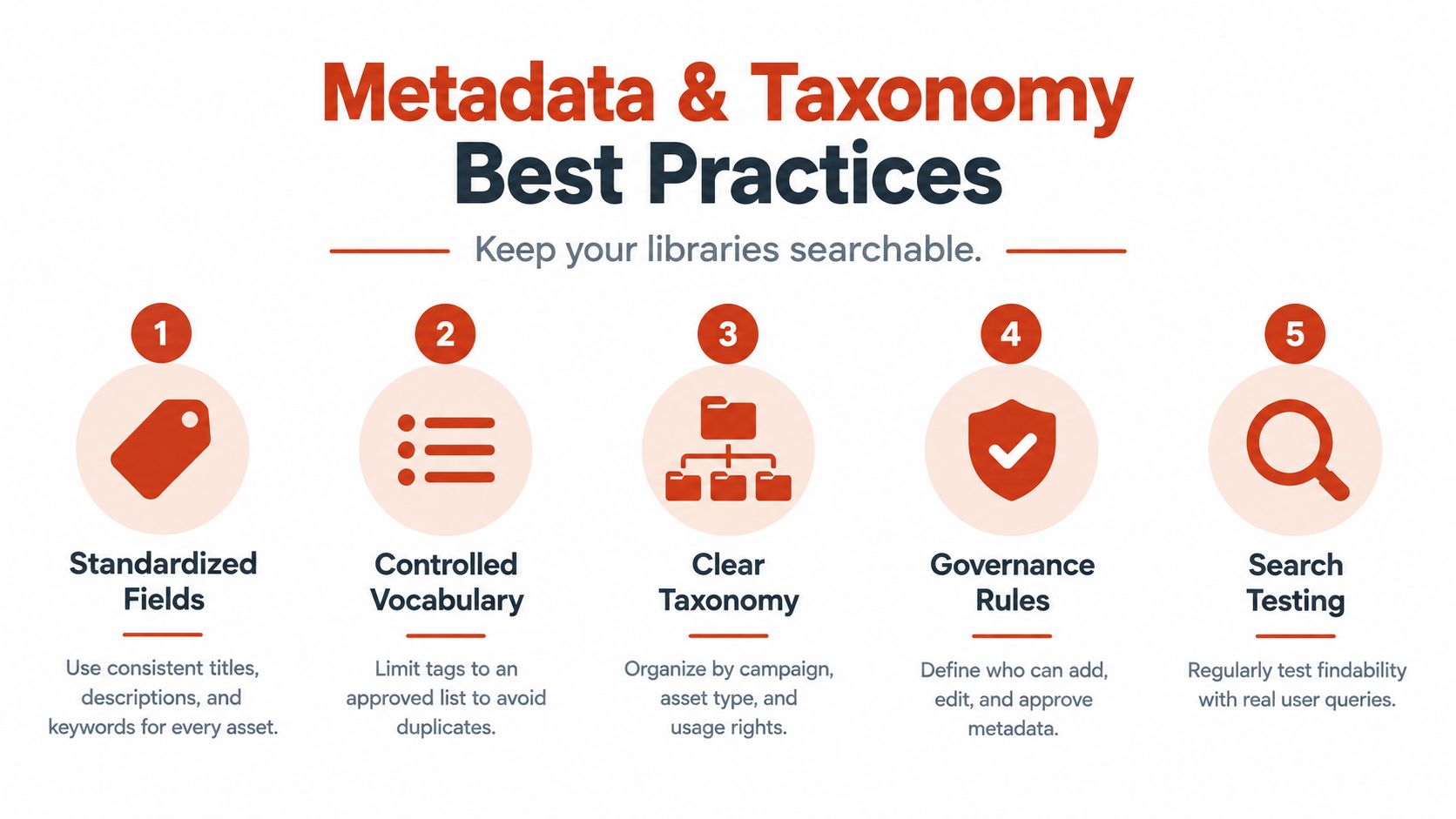
Audit the system through real searches
Metadata quality is measured by retrieval, not by the number of completed fields. Ask a designer to find an approved regional logo, a developer to locate the correct web rendition, and a legal reviewer to identify assets with expiring rights. Record where each person hesitates, which terms they use, and what information is missing.
AI search cannot compensate for weak inputs. Recent industry coverage reports vendor-reported variation in structured metadata, taxonomy adoption, and AI usage. (Forrester's DAM discussion) Those figures are not a universal benchmark. They support a practical conclusion: automation works best when metadata, taxonomy, rights, and provenance are maintained as one operational system.
Integrating Font and License Management Into Your Library
Typography belongs in the asset governance conversation because a font isn't merely a visual preference. It can be a licensed digital asset with conditions that differ by medium, audience, traffic, geography, software, or distribution method. If the font file sits outside the library, its usage rules often disappear from the workflow that publishes it.
The most common confusion concerns desktop and webfont licenses. A typical desktop license allows installation on a computer for use in design applications. A webfont license permits embedding the font in website code. Using a desktop-licensed font as live text on a website generally requires a separate web license.
Treat rights as asset metadata
A font record should identify the family, files, foundry or supplier, license tier, permitted environments, territory, relevant traffic or audience condition, expiry, purchase evidence, and responsible owner. The same model works for stock photography, music, footage, illustration, plugins, and other third-party materials.
Web licensing can also be tied to monthly pageviews rather than seats. Mark Simonson's licensing terms specify webfont delivery through WOFF or WOFF2 files and prohibit converting OTF or TTF files into webfonts or using web-licensed fonts in software, apps, or desktop contexts. Developers should therefore avoid treating a font file as portable permission. The file format doesn't determine the complete scope of the license.
Build an audit trail before a dispute
A practical workflow links the deployed asset to its evidence. For a website, that might include the detected typeface, the self-hosted files, the license record, the review date, and any remediation decision. For a PDF, it might include embedded fonts and the document's intended distribution.
Unauthorized use can create real exposure. A legal summary describes use outside a paid font's designated scope as a licensing violation, while industry guidance emphasizes that desktop, web, and app licenses aren't interchangeable. (Typeface and font copyright overview) This article is informational, not legal advice. The agreement controls, and legal counsel should assess a disputed or unclear use.
Font Checker Pro can scan live URLs, PDFs, images, and zipped font sets, then return exportable reports that identify typefaces, foundries, license tiers, and possible trial or expired rights. It can fit into a library workflow as evidence for design, engineering, agency, and compliance review, but a scan doesn't replace license verification or legal judgment. For a practical operating model, see this font license management guide for digital agencies.
How to Choose and Govern the Right Digital Asset Library
Selection should begin with the work your team needs to control, not with a feature checklist. Inventory the media types, contributor groups, approval paths, distribution channels, integrations, and rights questions that create the most friction. A team handling campaign exports may need a lightweight library, while an enterprise managing complex source files, partners, localized versions, and compliance evidence may need a broader ecosystem.
Compare the operating models
| Capability | Team Library | Enterprise Ecosystem |
|---|---|---|
| Search | Core metadata, tags, and filters | Advanced search, relationships, saved views, and richer indexing |
| Permissions | Basic role-based access | Granular roles, partner controls, approval gates, and audit history |
| Versioning | File history for key assets | Lineage across masters, derivatives, localizations, and renditions |
| Rights management | Manual rights fields and review reminders | Structured license records, expiry workflows, evidence, and reporting |
| Distribution | Controlled downloads and links | Connected delivery into content, creative, marketing, and publishing workflows |
Neither column is superior. Complexity carries administrative cost, so the right system is the one people can maintain. A smaller team with weak metadata discipline may gain more from a simple workflow that everyone follows than from an elaborate platform nobody updates.
Test the library with real scenarios
Ask vendors or internal stakeholders to demonstrate concrete tasks:
- Find the latest approved logo for a specific market.
- Show every derivative linked to a master product image.
- Restrict an agency to approved campaign exports.
- Identify assets whose rights status needs review.
- Distribute a web-ready rendition without exposing the editable source.
- Preserve provenance when a generated asset is revised.
Also define ownership before migration. Someone must approve taxonomy changes, someone must manage rights evidence, and someone must retire obsolete files. A useful library doesn't just store assets. It assigns decisions to named roles.
For commerce teams, channel-specific distribution deserves attention. Guidance on reusing images across Amazon and Shopify can help clarify how one approved product asset may need distinct renditions and rules across sales environments.
Measure stewardship, not vanity
Track whether users find approved assets, whether duplicates decline, whether rights reviews happen on schedule, and whether distribution preserves the correct rendition. Qualitative feedback matters too. If people keep exporting files to personal folders, the workflow has friction that governance alone won't solve.
AI should be planned as an extension of this operating model. Automated tagging and search can help, but only when ownership, vocabulary, approval states, and provenance are clear enough for people to trust the result.
Putting Your Digital Asset Library Into Practice
Start with an inventory, not a migration marathon. Identify the repositories, asset types, owners, active campaigns, high-risk licenses, and files that teams use most often. Separate approved distribution assets from working material, but preserve links between sources and derivatives.
Then define the smallest useful metadata set. Include identity, campaign or product context, market, channel, approval status, owner, and rights status. Assign who can add, edit, approve, and retire records. A short governance agreement is more valuable than an ambitious schema that contributors won't complete.
During the first month, focus on a representative collection rather than trying to perfect everything:
- Map the current state: Record where assets live and which versions teams use.
- Pilot the workflow: Test search, approval, permissions, and distribution with real requests.
- Resolve rights gaps: Attach license evidence and flag unclear usage before publication.
- Review the signals: Examine failed searches, duplicate uploads, stale records, and access exceptions.
- Set a recurring cadence: Schedule metadata reviews, rights checks, and taxonomy updates.
A digital asset library stays healthy through consistent care. It becomes a governance and authenticity layer when the organization can explain an asset's origin, approval, permitted use, and relationship to other versions.
Font Checker Pro scans live URLs, PDFs, images, and zipped font sets to identify typefaces and produce exportable licensing and typography reports for design, development, agency, and compliance workflows. Use Font Checker Pro to add evidence-based font checks to your digital asset library process and invite the right reviewers before assets reach production.