You're reviewing a competitor's website, a new client has sent over an uneditable PDF, or a developer has inherited a stylesheet full of anonymous font-family declarations. The type looks familiar, but “close enough” isn't good enough when a brand system, performance budget, or licensing review depends on the answer.
A font identification tool helps turn that uncertainty into a shortlist of candidates, a resolved font family, or a structured audit finding. The important distinction is that font identification isn't one task. You may be identifying what appears in an image, or verifying what a live website loads and renders. Those paths use different evidence and produce different levels of certainty.
What a Font Identification Tool Actually Does
A font identification tool is software that examines unknown typography and returns a likely typeface or family. Depending on the input, it may inspect a screenshot, PDF, uploaded font file, live URL, page source, CSS, or browser-rendered text. The result can include a candidate name, weight or style, foundry information, confidence score, and licensing details that require further verification.
Start with the evidence you have. If the lettering exists only in a logo image or scanned document, upload the asset and let the system compare glyph shapes. If the text appears as selectable content on a website, submit the URL and inspect the page's declared and loaded font stack. A practical guide to identifying the font used on a website can help you understand what browser evidence to collect before interpreting the result.
The matching layer
Think of the tool as a bridge between manual comparison and specialist type research. Instead of repeatedly zooming into the lowercase “a,” “g,” or “R,” the system extracts visual or technical clues and compares them with a reference catalog.
For image recognition, those clues may include:
- Glyph structure: The shape of individual letters, terminals, counters, bowls, and joins.
- Weight and slope: Whether the sample is light, regular, bold, italic, or mechanically slanted.
- Spacing and rendering: Kerning, anti-aliasing, compression, and the way the type was rasterized.
- Catalog similarity: How closely the sample resembles indexed families and related cuts.
For a live page, the tool performs a different job. It may resolve a declared CSS family, trace @font-face rules, identify the actual font file, and distinguish the intended family from a fallback that appeared because the primary file failed to load.
The reporting layer
A useful result shouldn't stop at a name. Designers need a family and style they can test. Developers need to know which declaration or file produced the rendered text. Compliance teams need a record that connects the finding to a page, asset, date, source, and license question.
That makes four practical outputs especially valuable:
- Candidate matching for unknown lettering.
- Font-family resolution from CSS and loaded resources.
- License flagging that separates identification from permission.
- Exportable findings that another team can review and act on.
The name is only the beginning. A reliable workflow asks whether the identified face is the exact cut, whether the file is in use, and whether the organization has rights for that particular channel.
Two Paths to Identifying Fonts on a Live Page
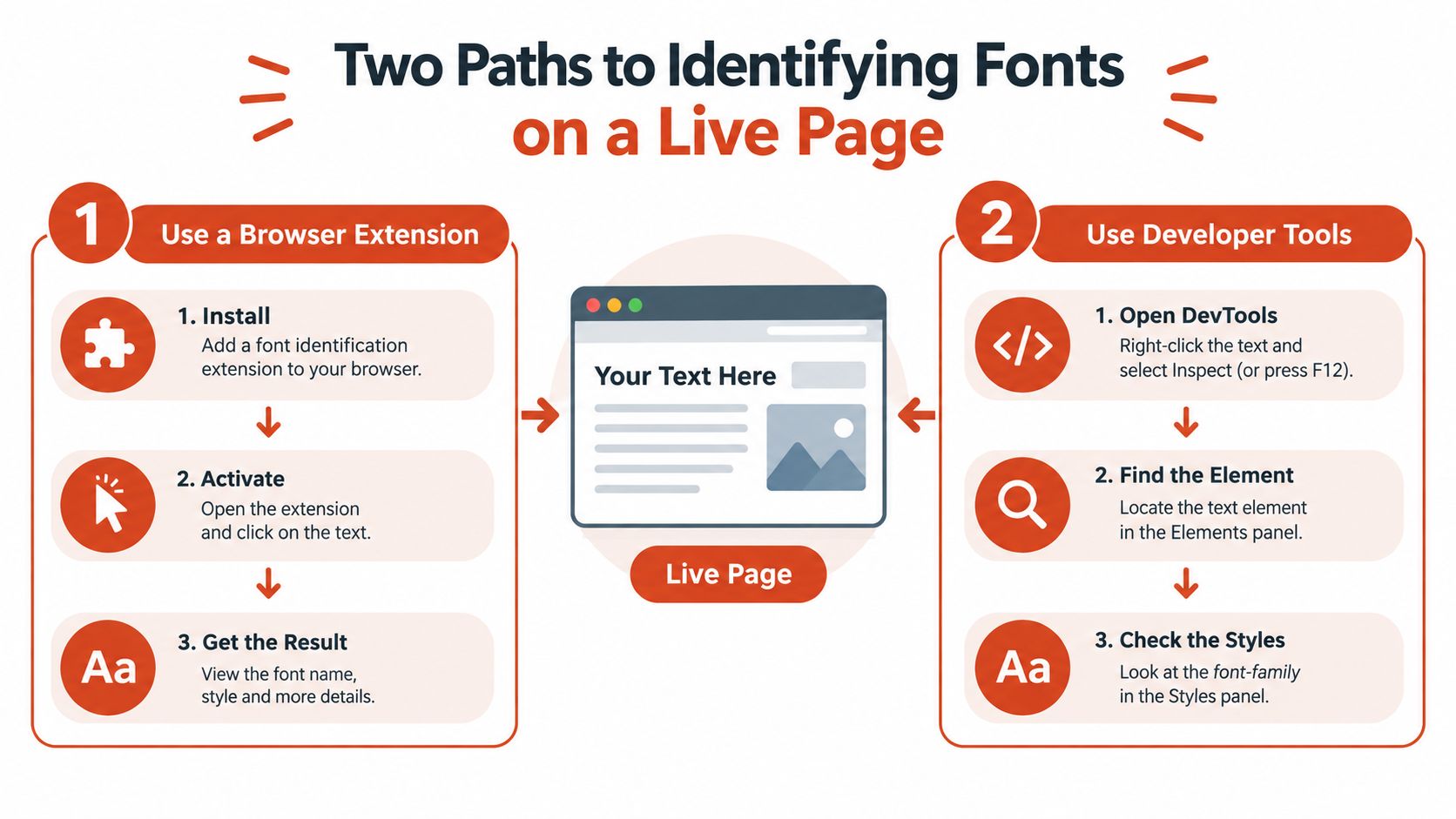
There are two detectives involved in font identification. One reads the building's blueprint, meaning the page markup, stylesheets, scripts, and font resources. The other studies a photograph, meaning a screenshot or rendered image. The first follows technical evidence. The second judges visible shape.
Path A through code and page resources
A live-page scan begins with a URL. The system fetches the page, parses its markup and stylesheets, follows @font-face declarations, checks preloaded WOFF2 resources, and examines how the browser applies font-family rules to visible elements. A deeper implementation can also inspect variable-font axes, such as weight or width ranges, rather than treating every file as a single static style.
This path is usually the most precise because it works from the page's own technical record. It can show that a heading uses a particular family and that the browser loaded a specific file. It can also reveal a mismatch between a declared family and the resource that arrived.
Code scanning has blind spots. A CSS stack may declare a preferred webfont while the browser renders a system fallback because the request failed, the required character subset is missing, or the user's environment lacks support. An overwritten declaration can also hide the rule that matters at the point where text is rendered.
Path B through image recognition
Image recognition starts with what the viewer can see. The system isolates letterforms from a screenshot, normalizes the crop, and compares the resulting shapes against an indexed collection of typefaces. This works when text has been flattened into an image, embedded in a PDF, placed inside a banner, or rendered by a page whose source code is unavailable.
The trade-off is certainty. The image contains the final appearance, but it may not reveal the exact font file, license tier, fallback history, or whether the lettering was modified. The result is therefore best treated as a ranked shortlist, with confidence attached to each candidate. For a focused workflow, font identification from an image is useful when the visible sample is your only reliable evidence.
Use image recognition for unusual visual material, including poster lettering, image-only PDFs, and screenshots of text that can't be selected. If you're exploring decorative lettering for a design direction, a curated reference such as stencil fonts for 2026 can also help you compare the visual category after the tool has produced candidates.
The strongest audit combines both paths. Code tells you what the page intends and loads. Image evidence tells you what users see.
How Confidence Scores and Accuracy Really Work
A confidence score is a triage signal, not a legal conclusion. Many systems express it as a likelihood on a 0 to 100 scale, calculated from the distance between extracted glyph features and catalog references. A high score means the sample resembles a candidate strongly. It doesn't prove that the candidate is the original file or that your organization may use it.
Read the ranking, not just the first result
A recognition system often returns several candidates because related typefaces share structural traits. The first result may be a close match, while the second and third reveal neighboring families with similar proportions, terminals, or stroke contrast.
Pay attention to the gap. A clear separation between the first candidate and the rest supports faster manual review. A tightly packed group means the sample doesn't contain enough distinctive evidence, so you should test several candidates by setting the same text, size, weight, tracking, and rendering conditions.
Research illustrates why clean benchmarks need careful interpretation. A document-image study reported about 95.8% line-level font recognition, with font weight and slope detection reaching up to 99.7%, while typeface and size recognition averaged 96%. Another study reported about 97% recognition on high-quality images, with weight and slope detection above 99.9%. Those results describe controlled conditions, not every screenshot encountered in production. See the research on font recognition accuracy and open-world difficulty for the distinction.
| Factor | Effect on Accuracy | Why It Matters |
|---|---|---|
| Clean, high-resolution text | Improves matching | Distinctive glyph edges remain visible |
| Fallback rendering | Reduces certainty | The visible face may differ from the declared family |
| Variable axes absent from the index | Can produce near matches | The system may compare against the wrong instance |
| Custom-drawn lettering | Often defeats matching | The shapes may not belong to a standard font |
| Anti-aliasing and compression | Adds visual noise | Small glyph details become harder to compare |
| Modified or AI-generated type | Makes attribution uncertain | The source may be a transformed design rather than a cataloged face |
Verify before you decide
Side-load the leading candidates and compare the same characters, not just the overall impression. Check distinctive details such as the aperture of “e,” the tail of “Q,” the ear of “g,” and the junctions in “k” or “R.” A practical explanation of how image recognition software works can make the technical output easier to interpret.
Current benchmarks also show a sharp difference between controlled and open-world recognition. In a 2025 evaluation, Claude-3.5-Sonnet reached about 31% in an easy zero-shot setting, GPT-4o-mini scored 0%, and several open-source models stayed below 10%. In sentence-based recognition, the strongest model approached 67% in multiple-choice mode, while many others remained below 18%. These figures reinforce a practical rule: confidence helps prioritize review, but it shouldn't replace visual verification.
Features That Separate Basic Finders from Audit Tools
A basic finder answers, “What might this be?” An audit tool answers a longer chain of questions: “Where is it used, which file is active, how is it delivered, what rights might apply, and can another team reproduce the finding later?”
The difference isn't just a larger font catalog. It's the amount of operational context attached to the match.
Detection with licensing context
A consumer workflow may return a family name and a place to investigate it further. An audit-oriented workflow maps the identification to foundry records and separates desktop, web, app, and open-source licensing. That distinction matters because a file installed for design work isn't automatically cleared for website embedding.
License intelligence should remain a flag, not a substitute for reviewing the applicable agreement. The tool can surface a likely issue, but your organization still needs to check the licensed entity, permitted channels, traffic terms, territory, modifications, and renewal status.
Delivery and payload analysis
A page may use a self-hosted WOFF2 file, a CDN-served subset, or a variable font with a range of axes. Payload analysis identifies how the browser receives the type and can expose unused glyph ranges, unexpected files, or a declared family that never renders.
That information connects typography to engineering work. Developers can investigate a fallback event, reduce unnecessary payload, or confirm that a staging deployment matches production. Compliance teams gain evidence about the asset that was delivered, not merely the family name written in a stylesheet.
Repeatability and exports
One-off identification suits a designer working on a single image. Recurring scans suit agencies, engineering teams, and organizations managing multiple domains. API and CI integrations can inspect staging pages or production URL lists, while alerts can surface a new face or a changed file after deployment.
Reports also need to match the audience. A PDF supports legal review, CSV works for operational tracking, and JSON can feed CI or internal systems. The following comparison shows the distinction without treating it as a binary category.
| Capability | Basic Font Finder | Audit-Grade Tool |
|---|---|---|
| Input | Usually an image or screenshot | Live URL, image, PDF, and font assets |
| Result | Candidate name or shortlist | Match plus source, usage, and evidence |
| CSS inspection | Limited or absent | Parses declarations and rendered usage |
| License information | General reference | License flags, tiers, and review fields |
| Delivery analysis | Rare | Files, subsets, variable axes, and payload |
| Recurring scans | Usually unavailable | Scheduled monitoring and change alerts |
| Export | Screen result or simple list | PDF, CSV, JSON, and audit-ready records |
| Integrations | Manual workflow | API, CI, and team notifications |
Font Checker Pro is one example of the audit-oriented category. It scans live URLs, PDFs, images, and zipped font sets, then produces exportable findings that combine identification, attribution, licensing flags, performance observations, and audit history. Teams should still validate every rights decision against their own agreements.
Who Uses Font Identification Tools and Why
The same detection engine creates different value for different people. A designer wants visual fidelity, a developer wants deployment evidence, and a compliance lead wants repeatability. Treating all three needs as “find the font” leaves important work unfinished.
The designer inheriting an unfinished system
A designer receives a Figma file from a contractor who's no longer available. Several text styles have been converted to outlines, and the file doesn't document the original family or optical size. The designer uses image matching to identify likely candidates, then compares the family's weight, width, and distinctive glyphs against the outlined artwork.
The deliverable isn't just a name. It's a usable type specification, including the likely family, style, weight, sample comparison, and unresolved uncertainty. That lets the designer rebuild the system without accidentally introducing visual drift.
The developer preparing a release
A frontend developer is rebuilding a marketing site and needs to verify the staging environment. The scan should identify every active face, trace the @font-face declarations, confirm the loaded resources, and show whether a fallback rendered in any important component.
The developer may use the result as a deployment gate. A newly introduced trial file, an unapproved family, or a missing webfont declaration should create a review item before the page reaches production. Performance fields add another layer by showing whether the implementation ships more glyph data than the page needs.
The compliance lead auditing a portfolio
A compliance lead managing acquired brand sites has a different question: what was active, where, and when? A single screenshot can't provide that provenance. The team needs bulk scanning, timestamps, consistent evidence, and a record that can be revisited during a vendor review or internal investigation.
That workflow values repeatability over visual elegance. The report should connect each finding to a URL or asset, source attribution, delivery method, license question, and scan date. It should also preserve changes, because a site can introduce a new landing page or replace a font without notifying the person responsible for licensing.
Each audience should define success before selecting a tool. A designer may accept a ranked shortlist for exploration. A developer needs resource-level evidence. A compliance lead needs a defensible history.
Licensing Gaps Identification Tools Can't Close
A launch review finds a familiar problem: the font displays correctly, the page passes visual inspection, and nobody can show that the organization has the right license. Identification establishes what a file or rendered page appears to use. It does not establish permission, ownership of the license, or compliance with the applicable agreement. Treat this section as general information, not legal advice. Rights decisions should rely on the relevant EULA, purchase record, and legal review where appropriate.
The channel changes the license question
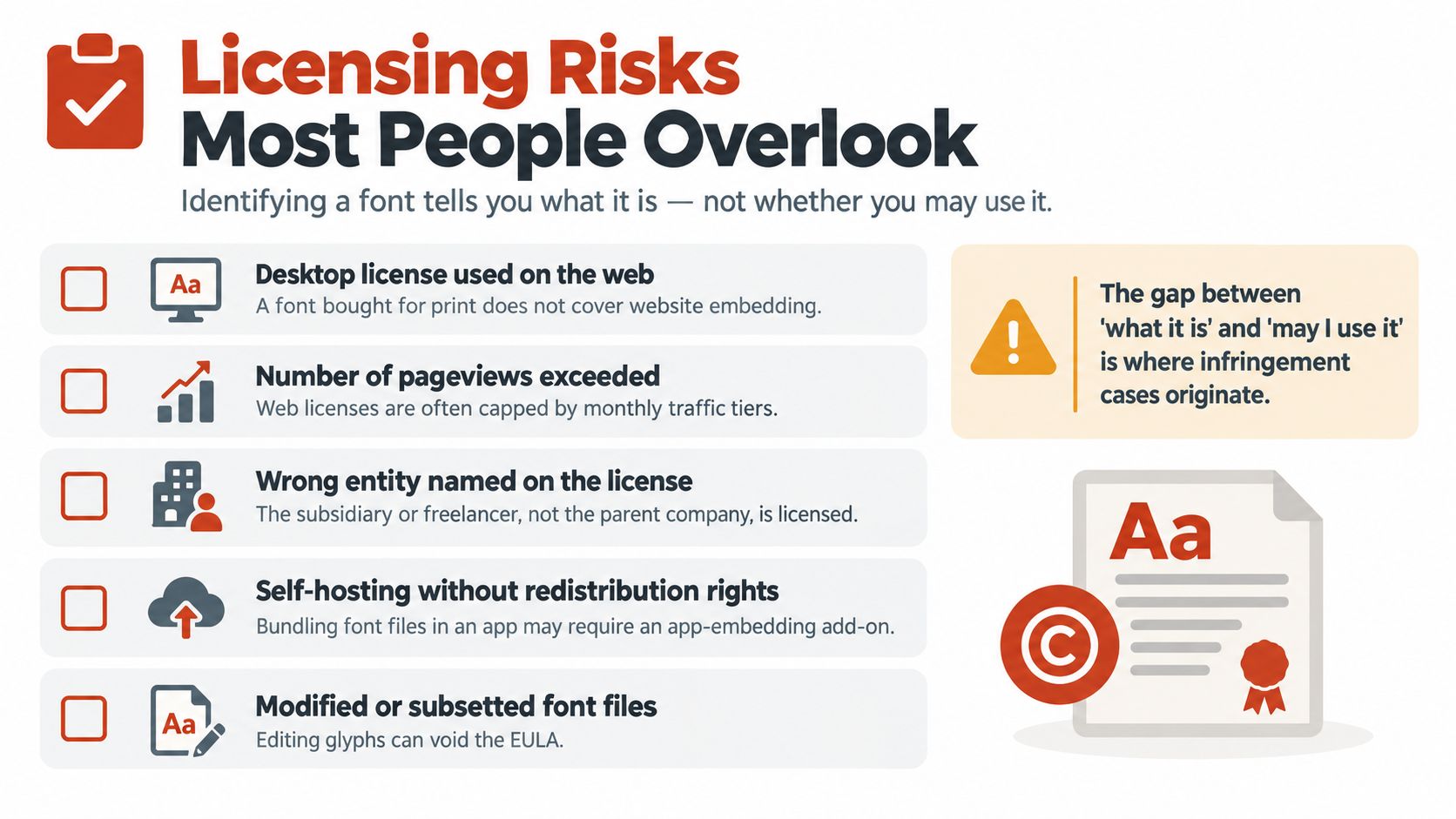
Font licensing follows the delivery channel. A desktop license generally permits local installation for design work and static outputs such as print or images. A webfont license generally permits embedding through CSS or @font-face. Web licensing is often tied to traffic or pageviews rather than device count. For a full breakdown of license tiers and current terms, see this font licensing guide for designers and developers.
Common gaps include:
- A contractor buys a desktop license, then uploads the font files to a public site.
- A rebranded subdomain inherits a font without inheriting the license record.
- A mobile app embeds a file covered only for desktop use.
- A PDF includes an embedded trial font that nobody reviews before distribution.
- A modified or subsetted file no longer fits the original agreement.
The detection workflow can identify a family and flag a likely channel mismatch. It cannot infer every contractual condition from the glyphs or determine whether the licensed entity matches the organization deploying the file.
Open-source still has conditions
Open-source fonts can allow broad use, but each license sets its own requirements. Some permit modification and redistribution under defined terms. Others require notices or restrict how files may be distributed. “Open source” describes a starting category, not universal permission.
The same distinction applies to personal, small-business, and enterprise tiers from a foundry. The family name may be correct while the licensed entity, installation count, delivery channel, or traffic allowance is wrong. Keep the license record beside the identification result so a reviewer can compare observed use with the actual terms.
Legal exposure is real
Foundries and type publishers commonly state that unlicensed use can create civil or criminal liability, depending on the jurisdiction and circumstances. According to FontReport, U.S. statutory damages range from $750 to $30,000 per infringed work, up to $150,000 when willful. Consult legal counsel before applying those figures to a specific dispute.
A useful report separates three findings:
- Identity: This appears to be a particular family or candidate.
- Usage: This file or declaration is active on a particular page or asset.
- Permission: The organization holds the rights required for that use.
Identification workflows usually support the first two. Permission requires documentation, contract interpretation, and judgment. A clean match can therefore begin a licensing review, but it cannot close one by itself.
How to Choose or Evaluate a Font Identification Tool
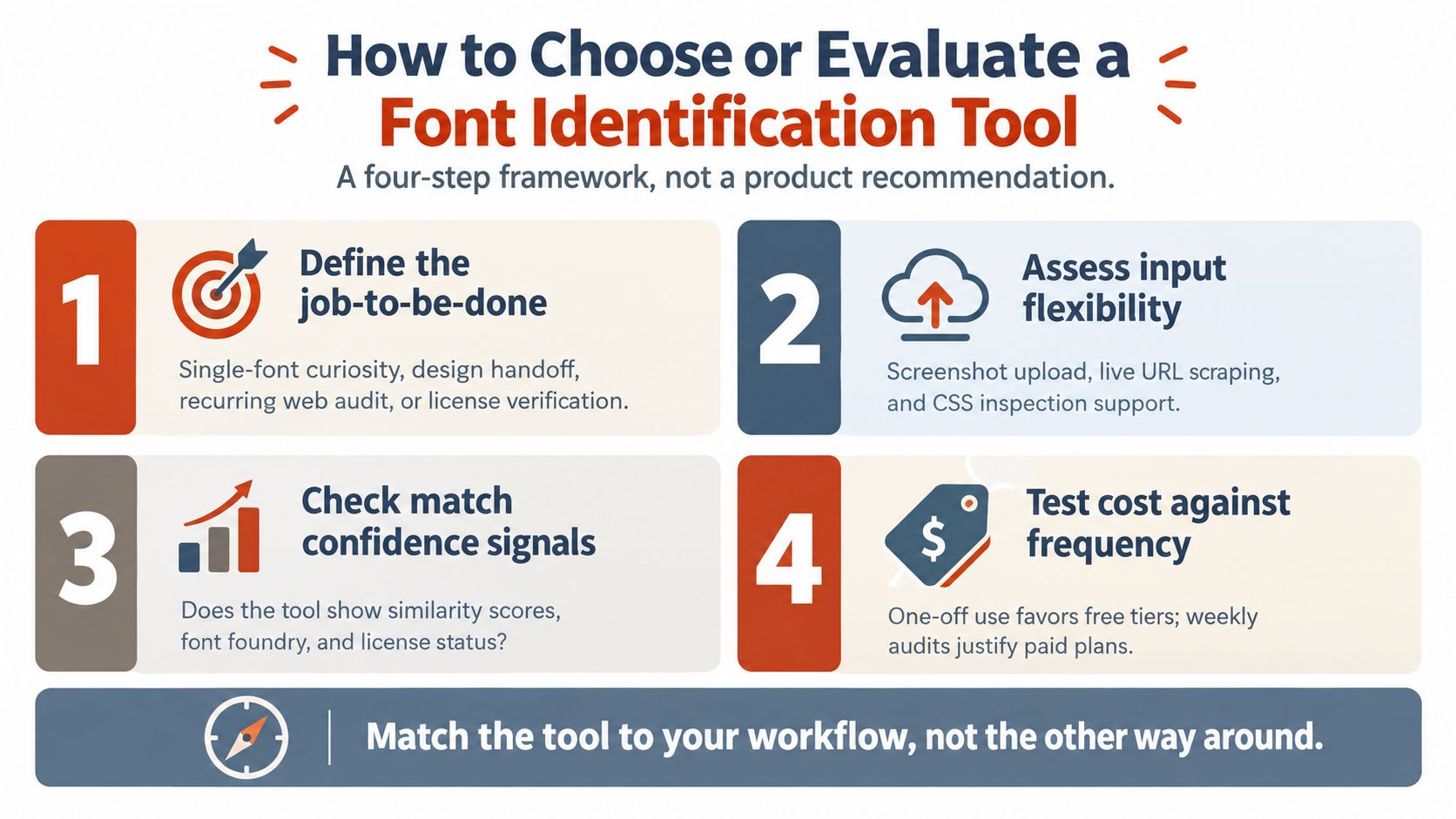
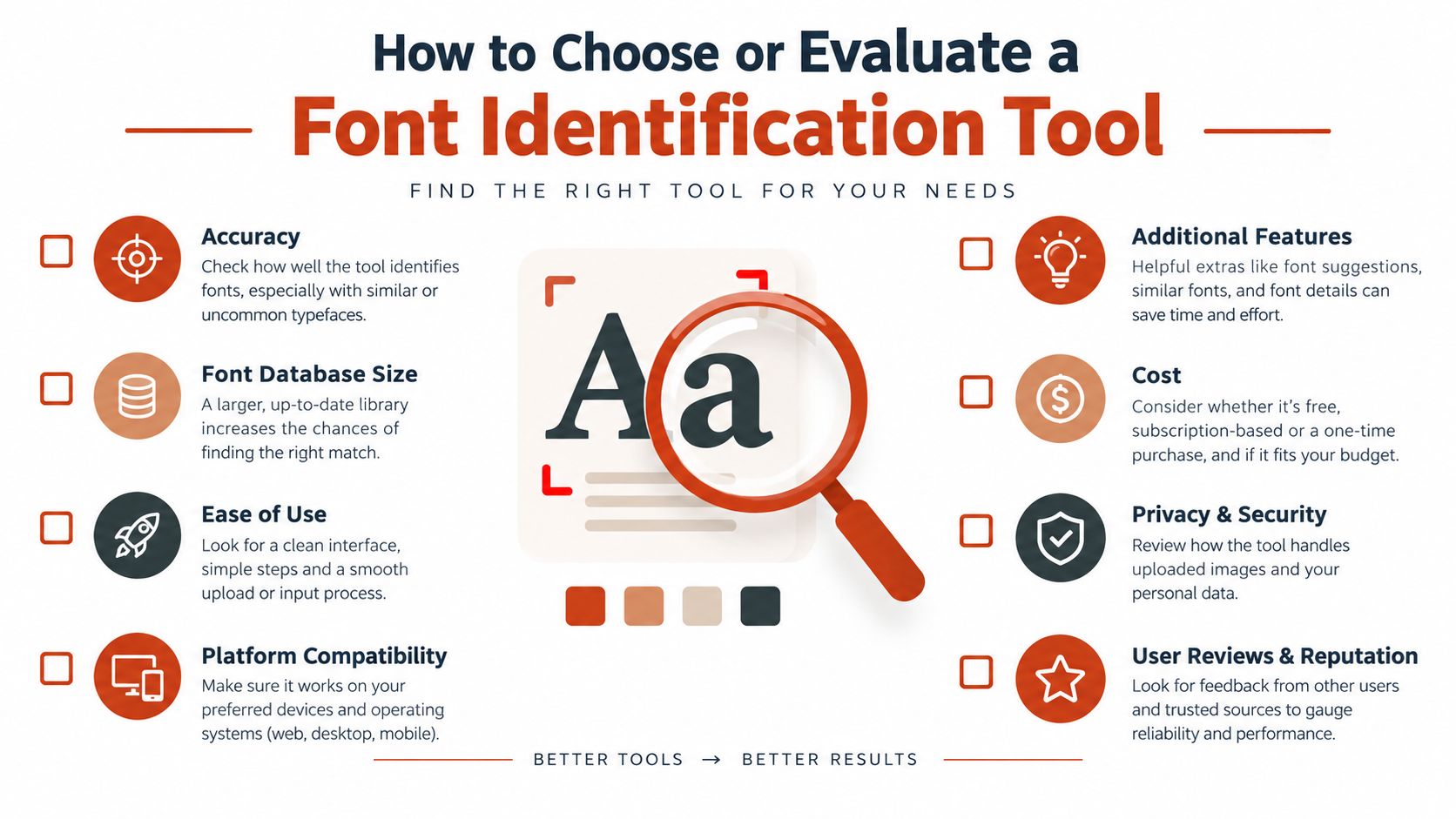
Choose the workflow before choosing the interface. A fast image matcher can be exactly right for a designer identifying a poster, yet unsuitable for a compliance lead checking a group of live domains. Start by writing the decision the tool must support.
Define the job
Classify the primary need as one of four types:
- Single-font curiosity: Identify a family from a screenshot.
- Design handoff: Reconstruct family, style, weight, and optical behavior.
- Recurring web audit: Track changes across staging or production URLs.
- License review: Connect observed usage with rights records and unresolved questions.
Reject any tool that can't produce the evidence your decision requires. A name-only result won't support a deployment gate or an audit trail.
Examine the detection method
Ask how the system gathers evidence. Does it traverse CSS and markup, inspect loaded payloads, recognize glyph shapes, analyze PDFs, or combine several methods? Does it explain confidence scores and return more than one candidate when the evidence is ambiguous?
Benchmark design can conceal important limitations. One recent FontBench evaluation tested font family, size, style, and color across 26 fonts, four scripts, and three difficulty levels, while related work on 15 common Latin fonts identified a failure mode where vision-language systems confuse rendered font features with the text content itself. Read the FontBench research on typographic property recognition before assuming that strong results on simple Latin text will transfer to stylized or multilingual material.
Stress-test rights intelligence
Use known sample pages and assets, then check whether the tool distinguishes desktop-only, web-only, trial, and unresolved licensing states. It should expose uncertainty rather than labeling a family “safe” without evidence.
Open-set recognition deserves particular scrutiny. A 2026 benchmark covering 1,242 fonts and 42,794 images reported 90.52% closed-set accuracy but only 62.25% open-set accuracy on a real-world subset. The same research reported near-ceiling results on established closed benchmarks, including 99.96% on one closed set and 97.00% on a Japanese dataset. That gap shows why a large catalog, open-world testing, and confidence calibration matter. See the open-set visual font recognition benchmark for the reported comparisons.
Test operational fit
Check export formats, API limits, CI or webhook support, scan scheduling, database freshness, and the way the tool records evidence. Run a pilot on your own domain and assets, then track false positives, missed fonts, fallback detections, and time saved. The right choice should fit the workflow you already operate, rather than forcing every team to interpret the same result in the same way.
For a broader comparison framework focused on website auditing criteria, see this guide to choosing a font checker for a website.
Font Checker Pro scans live URLs, PDFs, images, and zipped font sets, returning exportable reports with font identification, source attribution, licensing flags, payload observations, and audit history. If you need to connect visible typography with what a page ships, visit Font Checker Pro and test the workflow on your own assets before making a design, deployment, or compliance decision.