A charming holiday script isn't production-ready just because it looks right in a mockup. A Christmas handwriting font can create warmth, personality, and a handmade signal, but it can also reduce legibility, slow a page, fail on missing glyphs, or expose a team to licensing problems.
This roundup evaluates eight sourcing and implementation approaches by visual use, deployment model, licensing scope, and performance. You'll find pairing examples, specimen-image guidance, web-versus-desktop checks, and practical loading considerations. The strongest choice usually follows a simple path: choose the visual personality, match it to the medium, verify the license, then test loading and fallback behavior.
The category is broad enough to require judgment. One major font index lists 378 free Christmas handwriting fonts, alongside 1,508 fonts in its broader Christmas category, so seasonal handwriting is a substantial design niche rather than a novelty (1001 Fonts' Christmas handwriting directory). The options range from playful brush lettering to formal calligraphic scripts, but those styles aren't interchangeable.
This article is informational, not legal advice. Licensing terms change, and teams should confirm current conditions with the relevant foundry or rights holder before publishing, distributing files, or handing assets to a client.
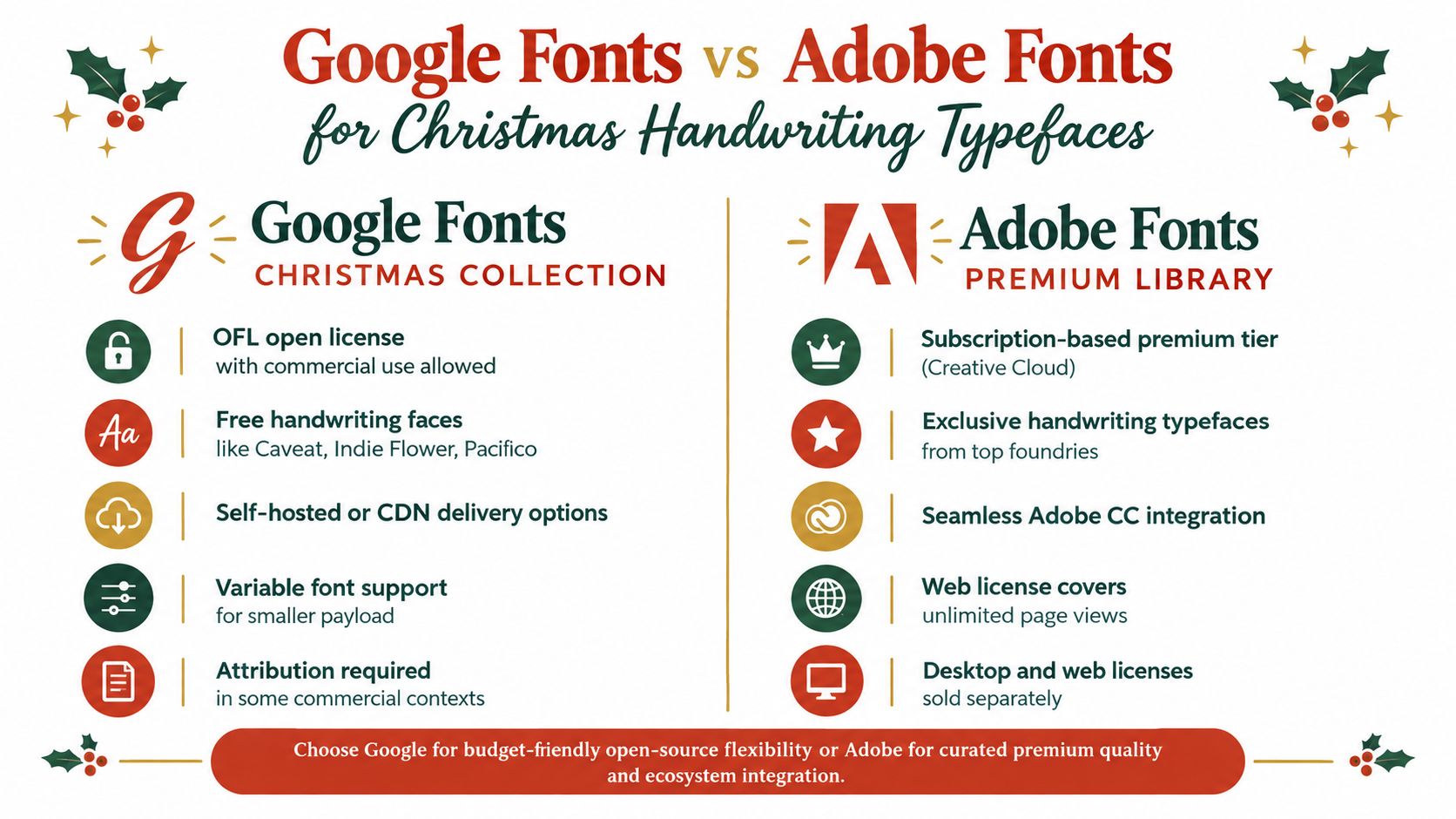
1. Google Fonts Christmas Handwriting Collection
An open-source handwriting collection is useful when a holiday campaign needs a personal visual style without an immediate marketplace purchase. Informal casual scripts can suit greeting-card headlines, short promotional messages, nonprofit seasonal campaigns, and selective e-commerce accents. Their irregular rhythm adds warmth, but long paragraphs and dense interface copy still need a more readable text face.
Verification is the key work. Open-source distribution may permit commercial use, yet the applicable SIL Open Font License or another license can still govern modification, redistribution, attribution, and included files. Record the family, version, license text, and project uses before the font reaches production. For a practical explanation of formats and compliance, consult this guide to Google Fonts formats and compliance. This article is informational, not legal advice. Confirm current terms with the rights holder when the project involves redistribution, client delivery, or unusual outputs.
Verify the asset before deployment
Match the visual use. Reserve the handwriting face for a greeting, campaign title, product callout, or short social graphic. Use a neutral sans serif for navigation, product details, checkout content, and longer paragraphs.
Confirm glyph coverage. Test names, accented characters, currency symbols, connected strokes, unusual capitals, and holiday copy. Review the same short headlines on representative phones, where small sizes can change the script's shape and spacing.
Configure web delivery. Set
font-display: swaporoptional, test the fallback stack, and subset the files to the character ranges the project needs. These choices reduce unnecessary transfer and make the fallback behavior visible before launch.Check the live result. Scan every campaign URL, not only the design file, and confirm that the delivered font matches the approved asset. Keep license records with the deployment notes so a later handoff does not separate the files from their conditions.
The advantage is quick access to distinctive seasonal lettering. The risk is treating a library label as proof that no review is needed. Verify the source, scope, glyphs, and browser behavior together.
2. Adobe Fonts Premium Handwriting Library
When a holiday campaign must move from a desktop mockup to a live site and print PDF in the same week, a subscription-based premium handwriting library creates separate rights questions. It can provide polished brush, script, and hand-lettered styles for campaign titles, seasonal packaging concepts, social graphics, and web pages, but the subscription model does not make every output interchangeable.
Start with the actual production path.
- Map each output. List browser pages, desktop artwork, printed collateral, exported PDFs, app screens, and files supplied to clients. The same typeface may require different permissions across those formats.
- Separate activation from delivery. Desktop access may let an individual designer create artwork. It does not automatically authorize font files on a public server, inside an application, or in an editable client package.
- Record the scope. Note the subscription plan, account owner, project, domains, and permitted users. Keep those details with the campaign files rather than relying on a library label.
- Plan for continuity. If the subscription changes or ends, identify an approved replacement and check how its spacing affects headlines, buttons, and exported artwork.
Agencies should pay particular attention to handoffs. A designer might activate a family for a concept, a developer might prepare browser delivery, and a production partner might send a PDF to a printer. These steps involve different files and may fall under different terms.
Test the fallback before launch. Compare the approved handwriting face with a compatible system font on desktop and mobile browsers, checking line breaks, connected strokes, and headline width. A fallback rarely preserves the same personality, yet it can prevent missing text and broken spacing if access changes.
Use this Adobe Fonts licensing guide for 2026 as an informational starting point, not legal advice. Confirm current terms directly with the subscription provider, and keep separate records for browser delivery, desktop installation, print, and exported documents.

3. Premium Marketplace With Licensing Tiers
A premium marketplace can broaden visual exploration, but seasonal lettering is not automatically suitable for every output. A script that works on a Christmas card may create problems in a public website, application interface, presentation, or client handoff.
Premium marketplace purchases are commonly organized by intended use and distribution. Rather than repeating a desktop-versus-browser warning, map each deliverable to the license tier before checkout. The same font may require different permissions for a public site, a PDF, an app, or editable artwork passed to another organization.
Check the output before purchase
Use this short checklist during selection:
- Public site: Verify browser embedding, permitted domains, and any traffic or usage conditions.
- PDF or print file: Confirm that exporting or embedding the font is allowed, especially when the file will leave your organization.
- App: Check whether the license covers distribution inside software and whether each platform has separate terms.
- Client handoff: Determine whether the client, contractor, or production partner needs its own license. Confirm whether editable files may contain the font.
- Internal design work: Record permitted users and devices, then restrict installation to the people covered by the purchase.
A practical example is an agency creating a holiday campaign. The art director may need the font for layouts, the developer may need a web license for the public site, and the client may need separate permission to edit campaign files. Treat those as separate decisions, not as one automatic entitlement.
Record the receipt, license wording, font version, project name, intended outputs, and approval notes together. A font-buying guide can help structure that record. Licensing terms vary by foundry and use case, so confirm current wording directly with the seller. This is informational guidance, not legal advice.
Premium marketplaces work well when you need distinctive lettering and clear purchase options. They become expensive or risky when teams choose a font first and define distribution later. Evaluate visual fit, file behavior, alternate characters, pairing, and the permissions required for every finished asset.
4. DaFont Free Resource Library
A free resource library can surface unusual handwritten styles quickly, from rough brush lettering and playful display faces to novelty scripts that curated collections may omit. Use it for early visual exploration, internal moodboards, and noncommercial experiments, then verify the file before it enters production.
The download price says little about permission. Each uploaded family has its own notice. Some allow personal use only, while others permit commercial work with conditions or require clarification from the creator. A no-cost file is not automatically cleared for a client website, retail campaign, paid advertisement, or printable product.
A common failure occurs when a designer downloads a personal-use-only file during a deadline, places it in client artwork, and sends the editable file without checking its terms. Trial versions can also remain in shared repositories after a team adopts a production font.
Build a source register before approval
Record these fields as soon as the font enters the project:
- creator
- download page
- license wording
- file version
- intended medium
- any permission email
Use the record to test the actual deployment:
- Commercial status: Read the creator's specific license notice instead of inferring permission from the download label.
- Web rights: Confirm embedding permission and check domain, traffic, or file-hosting restrictions.
- Print rights: Verify that commercial print distribution is covered.
- Glyph testing: Review accents, punctuation, numerals, and symbols before approving a headline.
- Live verification: This free-resource licensing guide offers a practical framework for reviewing ambiguous downloads.
If the wording remains unclear, pause production and contact the creator or select a family with clearer terms. Keep written permission with the project record, not only in a personal inbox.
Free libraries work best as idea sources, not automatic production libraries. For commercial work, obtain explicit permission or choose a properly licensed alternative. Confirm the font's visual fit, file behavior, permitted medium, and distribution rights before delivery. This guidance is informational, not legal advice.
5. Monotype Library Subscription for Corporate Licensing
A festive script is not automatically a suitable corporate asset. Large organizations need font access that works across designers, developers, agencies, business units, and output formats. An enterprise library subscription can centralize approved families while defining which teams, projects, and channels may use them.
The visual decision still comes first. A Christmas handwriting font may suit a short retail headline but fail in product interfaces, long copy, or multilingual campaigns. Check its legibility, available glyphs, file formats, and rendering before treating broad access as approval.
The deployment model determines the license scope. Confirm whether the agreement covers web delivery, desktop installation, print production, internal systems, client work, and self-hosting. A desktop permission commonly supports creating static graphics, but it may not authorize distributing raw font files to a website, app, agency, or customer. Review the foundry's font licensing management terms for terminology, then use this guide to license types and their web, desktop, and self-hosting implications. This information is practical guidance, not legal advice.
Test the subscription against a real campaign
For a retailer running the same script on three regional domains plus in-store signage, map each domain and print run to the contract schedule before approving the specimen. Check whether regional entities, contractors, agencies, and self-hosted files fall within the permitted organization.
Record the approved family, covered channels, account or user limits, renewal terms, and any excluded uses. Then compare the planned implementation with those entries. A live-site review can catch an embedded file or domain that the original design approval missed.
Subscription access reduces fragmented purchasing, but it does not remove deployment decisions. Treat the font as a governed software asset, test its visual performance in each Christmas touchpoint, and document the scope before release. That combination protects consistency without assuming that one subscription covers every use.
6. Fontspring Indie Foundries and Direct Licensing
Choose an indie-foundry script when you need irregular brush texture or custom lettering that a large catalog may not provide. An indie-foundry marketplace can help you discover that work while keeping the purchase connected to a specific designer or foundry.
Before pairing the font with a campaign, test its actual visual range. A family may offer an expressive display style but few weights, incomplete language support, or limited alternates. A script that suits a short English greeting may fail in multilingual layouts, changing product names, or reusable content templates.
The main trade-off is character versus operational coverage. Distinctive texture can strengthen packaging, social graphics, or a seasonal logo, while narrow glyph support and inconsistent spacing can create extra production work.
Use the specific foundry agreement to confirm web embedding, traffic thresholds, client projects, resale, app use, editable deliverables, and whether a desktop-plus-web bundle is required. A bundled license still may exclude a channel your campaign needs.
Document the handoff
Record the purchase and deployment details in one project file:
- Design scope: Note the installed files, permitted users, print outputs, and editable source-file rules.
- Delivery scope: Note the web files, approved domains, embedding method, traffic terms, and renewal or upgrade requirements.
For a client logo or PDF, state whether the client must purchase the font independently. For developer handoff, verify that web files came from the licensed package rather than a trial download.
Direct licensing can provide stronger provenance and more distinctive lettering, but permission remains tied to the specific product and use. Keep the receipt and agreement with the project. Before launch, compare the deployed files and channels with that record. This information is practical guidance, not legal advice.
7. Variable Fonts and Performance-Optimized Handwriting Collections
A variable font can consolidate multiple design axes, such as weight or width, into one font resource. That can help a responsive holiday campaign use a controlled range of styles without maintaining a separate static file for every variation. It also gives designers more flexibility when a headline needs to fit different screens.
Variable technology doesn't make a typeface automatically lightweight. A handwriting family can still contain extensive glyph ranges, decorative alternates, or features the campaign never uses. The implementation needs measurement, not assumption. Subset the font to the required Unicode ranges, test the actual text, and avoid loading styles that never appear.
Use a readable companion face for most interface and body content. A variable script may be excellent for a hero line, a seasonal badge, or a short promotion, but long copy magnifies irregular spacing and connected forms. Trend coverage for current font styles also points toward restrained use of handwritten typography, particularly where legibility and a human visual signal need to coexist.
Measure the real experience
- Loading behavior: Use
font-display: swaporoptional, then inspect the transition from fallback to final font. - Glyph range: Remove unused language ranges only when the campaign's language requirements are known.
- Axis testing: Review extreme weight and width values in actual browsers, not just a design application.
- Network conditions: Test on slower mobile connections and observe whether the headline remains readable before the font arrives.
- Site profiling: Apply practical site speed monitoring guidance alongside a font-specific payload review.
Licensing still applies to variable fonts. A commercial foundry may distinguish web, desktop, app, or self-hosted rights regardless of file format. Performance optimization reduces technical waste, but it doesn't expand legal permission.
8. Self-Hosted Font Services and Custom Licensing Agreements
Self-hosting gives an organization direct control over font storage, versioning, and browser requests. It suits secure environments and custom brand systems, and removes dependence on a third-party delivery service. The trade-off is compliance risk: a license covering hosted delivery may not permit files to be stored on your own infrastructure.
Get written confirmation from the foundry before deploying a commercial font yourself. Confirm approved domains, file formats, caching methods, traffic scope, internal access, and whether agencies or subsidiaries may manage the deployment. Store the signed agreement with the exact production files.
Trial files require particular attention. A developer may use one during implementation and leave it in place after launch. A later designer may upload a revised file with different licensing terms without updating the inventory. Version control and access restrictions keep those changes visible.
Make self-hosting auditable
- File control: Store files in a versioned repository and record checksums or equivalent release identifiers.
- Permission control: Restrict uploads and modifications to approved team members.
- Deployment mapping: Link every hosted file to its foundry, license record, domain, and project.
- Recurring review: Schedule audits for unauthorized additions, expired rights, and obsolete trial files.
- Asset scanning: Upload a zipped font set to FontCheckerPro when inspecting a self-hosted collection before release.
Deployment mapping should cover staging, production, campaign microsites, and internal tools. A file can be correctly licensed for one location while remaining unauthorized in another. Review the repository against live assets after major redesigns, agency handoffs, and font updates.
The legal stakes are practical. Guidance from a U.S. legal practice notes that unauthorized installation, use outside the licensed context, or use on too many workstations can lead to infringement claims. Under U.S. law, willful infringement may reach statutory damages of up to $150,000 per infringed work (typeface and font copyright guidance). This information is not legal advice. Consult qualified counsel about the law applying to your organization and deployment.
Christmas Handwriting Font Options Compared
| Option | Implementation Complexity | Resource Requirements | Expected Outcomes | Ideal Use Cases | Key Advantages |
|---|---|---|---|---|---|
| Google Fonts Christmas Handwriting Collection | Low; use CDN or self-hosting with basic license checks | Minimal budget; standard web development resources | Fast deployment, good compatibility, and low licensing costs | Budget-conscious websites, nonprofits, seasonal campaigns | Free, open-source, performant, and easy to integrate |
| Adobe Fonts Premium Handwriting Library | Low to moderate; requires Adobe integration and license management | Creative Cloud subscription, design tools, and subscription tracking | High-quality typography with reliable commercial web delivery | Professional design teams, agencies, and branded campaigns | Curated premium fonts, Adobe CC integration, unlimited web page views within scope |
| MyFonts Premium Marketplace | Moderate to high; requires selecting and managing separate license tiers | Per-font budget, license registry, and compliance oversight | Greater style uniqueness with perpetual usage rights | Agencies, e-commerce sites, and projects needing specialized fonts | Large selection, one-time purchases, and flexible licensing options |
| DaFont Free Resource Library | Moderate; each font requires individual license and quality review | Minimal budget but significant verification and testing time | Low-cost experimentation with variable quality and legal certainty | Personal projects, prototypes, and noncommercial designs | Extensive variety, zero-cost access, and no subscription requirement |
| Monotype Library Subscription | High; requires enterprise procurement, provisioning, and governance | Significant recurring budget, legal review, and compliance management | Scalable, organization-wide font access with centralized control | Large enterprises, global agencies, and high-volume creative teams | Broad premium library, centralized licensing, scalability, and support |
| Fontspring Indie Foundries and Direct Licensing | Moderate; requires reviewing designer-specific terms and purchases | Per-font budget, purchase records, and license tracking | Distinctive typography with generally clear licensing | Boutique agencies, freelancers, and small-to-medium businesses | Unique designs, transparent terms, and support for independent foundries |
| Variable Fonts and Performance-Optimized Collections | Moderate to high; requires CSS fallback, axis testing, and performance tuning | Front-end expertise, browser testing, and performance monitoring | Smaller payloads, fewer requests, and responsive typography | Mobile-heavy campaigns, high-traffic sites, and performance-focused projects | Reduced file size, flexible styling, and improved loading performance |
| Self-Hosted Font Services and Custom Licensing Agreements | High; requires licensing confirmation, hosting, security, and version control | Hosting infrastructure, technical expertise, audit tools, and legal oversight | Greater delivery control and customizable performance optimization | Enterprises, secure networks, and custom brand implementations | Full control, reduced third-party dependency, and advanced optimization options |
Choose the Script, Then Prove the Deployment
The strongest Christmas handwriting font choice is rarely the most decorative option. It's the face that expresses the campaign's personality while surviving the actual medium, language set, loading sequence, and rights review.
Use this decision sequence:
- Shortlist by role. Decide whether the font is for a greeting, logo, hero headline, product badge, invitation, social graphic, or body copy. A brush script may suit a short headline, while a neutral sans serif should usually carry navigation, product details, forms, and longer text.
- Test pairings early. Compare the handwriting face with the intended text family, especially at mobile sizes. Look for collisions between looping capitals, punctuation, numerals, and dense interface elements.
- Create separate license records. Record desktop installation and web embedding independently. Desktop licenses are generally for installing fonts on computers to create static assets, while webfont licenses cover browser embedding through HTML and CSS such as
@font-face; these are different products (font licensing basics). - Check usage thresholds. Web licenses may be tied to monthly pageviews or traffic volume, and teams may need to upgrade when a site exceeds its licensed level (webfont licensing guidance). Don't treat a one-time purchase as universal permission.
- Confirm handoff and self-hosting. Ask whether the client, printer, contractor, agency, or subsidiary needs a separate license. Confirm that self-hosting is explicitly allowed before placing files on your infrastructure.
- Subset carefully. Load only the required styles and glyph ranges, but preserve every character needed for the campaign's languages, names, symbols, and legal copy.
- Test fallback behavior. Inspect the page before the webfont loads and after it swaps in. Check line breaks, button widths, headline wrapping, and text visibility on representative devices.
- Keep evidence. Save receipts, agreements, file versions, deployment locations, screenshots, and audit results with the project record.
Handwriting-style fonts appear on only about 5% of websites, which reinforces their role as a specialized choice rather than a default digital text category (font usage statistics). That rarity can help a campaign feel distinctive, but it also makes testing more important. Teams have less reason to assume that a decorative script will behave like a common system face.
When a defensible inventory matters, scan the live URL, PDF, image, or zipped font set with FontCheckerPro. It can identify typefaces, attribute foundries and license tiers, flag trial or expired assets, inspect self-hosted files, and report performance details such as payload, unused glyph ranges, and FOUT or FOIT impact. Exportable PDF, CSV, and JSON reports can support designers, developers, agencies, and compliance teams, while recurring scans help monitor changes after launch.
The broader font market is projected to grow from $5.2 billion in 2025 to $7.8 billion by 2034 at a 4.8% CAGR, while sans serif fonts hold the largest reported share at 35.2% of global revenue, according to font market projections. Those figures describe the broader market, not Christmas handwriting fonts specifically. For seasonal design, the practical conclusion is narrower: use handwriting where it adds meaning, keep readable typography in charge of information, and prove that the final files are both technically and legally fit for purpose.
This article is informational, not legal advice. Licensing terms vary by foundry, service, file format, territory, subscription, and deployment model, so confirm the current agreement with the rights holder or qualified counsel before launch.
Font Checker Pro scans live URLs, PDFs, images, and zipped font sets to identify typography, review licensing signals, and measure webfont performance. Visit Font Checker Pro to audit a Christmas handwriting font before it moves from a seasonal mockup into a live campaign, client handoff, or production repository.