A client sends you a finished PDF and asks a simple question. Which fonts are in it, and are we allowed to reuse them? You open the Fonts panel, copy the names, and you're tempted to reply immediately. Don't. That list is a starting point for an audit, not an answer you can defend.
Why Detecting Fonts in a PDF Is Harder Than It Looks
Most audits start under pressure. A designer needs to recreate a document, a developer needs matching web fonts, or a compliance lead needs evidence before approving distribution. Everyone expects Detect Font from PDF to mean reading a name off a list. In practice, that name may describe a complete embedded font, a small subset, a reference with no font program, or nothing reusable at all.
A Name Is Not Identification
A PDF can name a typeface without carrying its outlines. It can also carry outlines for only the characters used on its pages. Text may use a Type 3 font, custom encoding, or glyph procedures instead of a conventional font file. In other files, someone has converted text to outlines or flattened it into an image, so no font object remains to identify.
Those differences matter because the follow-up questions diverge fast. Can the PDF render on a machine without the font installed? Can another team edit new text in the same design? Does the embedded data prove licensing permission, or merely show that someone embedded it? A single family name can't answer any of those questions reliably.
Treat every font name as a claim. Your job is to find the evidence behind it, or record that the evidence is missing.
What a Proper Audit Buys You
A defensible audit separates four outcomes instead of blending them into one confident label:
- Embedded subset detected: A font program exists, but only for glyphs used in the document.
- Family inferred: Names or visual characteristics suggest a family, without complete corroboration.
- Font unavailable: The PDF references a name but carries no embedded program.
- Text rendered as outlines or image: There's no live text or font resource to recover.
That separation protects design, engineering, and legal teams from false certainty. It also changes the conversation with a client. You're no longer guessing which font someone probably used. You're documenting what's present, what's missing, and what can't be proven from the file.
Extraction also isn't identification. Pulling data out of a PDF doesn't establish that the complete font was present, that the internal name is trustworthy, or that reuse is permitted. A careful auditor reports the fragment, the evidence, and the confidence level. Anything stronger needs provenance outside the PDF.
The Technical Layer Behind PDF Font Detection
Fonts live inside PDFs as resources tied to pages and content streams. A page dictionary points to font dictionaries, and each font dictionary records a subtype, a BaseFont name, encoding information, and usually a FontDescriptor. The descriptor is where you learn whether the file contains an embedded program through a FontFile, FontFile2, or FontFile3 stream.
Embedding, Subsetting, and the Standard Fonts
Full embedding copies the complete font into the PDF, so the document can render consistently without the original typeface installed. Subset embedding stores only character outlines used, which keeps files smaller but prevents reliable reconstruction of the complete character set. If you're creating PDFs rather than auditing them, learning how to embed fonts in PDF helps you understand why producers choose subsets and how those choices limit later editing.
PDF readers historically guarantee 14 standard fonts, covering four Helvetica variants, four Times variants, four Courier variants, Symbol, and ZapfDingbats, as described in guidance on subsetting and the standard PDF fonts. A detector must separate those built in resources from font programs that are embedded. Otherwise, your report inflates embedded coverage and hides substitution risk.
PDF/A-1 was standardized as ISO 19005-1 in September 2005 and required documents to be self-contained so they could render without relying on fonts installed on a future system, according to an archival overview of the PDF/A-1 standard. That's why a defensible audit inspects embedded programs instead of trusting visible names. A substitute font can use different outlines and metrics even when the recorded name looks familiar.
Font States Inside a PDF
| State | What It Means | Audit Implication |
|---|---|---|
| Fully embedded | Complete font program is stored in the PDF | Strong rendering evidence, still check permissions |
| Subset embedded | Only used glyphs are stored, often with a subset prefix | Good for viewing, limited for editing or reuse |
| Unembedded | Name exists without a font program | Substitution risk, report as metadata only |
| Standard font | Reader supplies one of the guaranteed resources | Don't count it as embedded evidence |
Treat a missing stream seriously, but describe it accurately. It means the PDF hasn't supplied the binary evidence. It doesn't, by itself, prove which font the creator saw on screen.
A Practical Detection Workflow You Can Follow
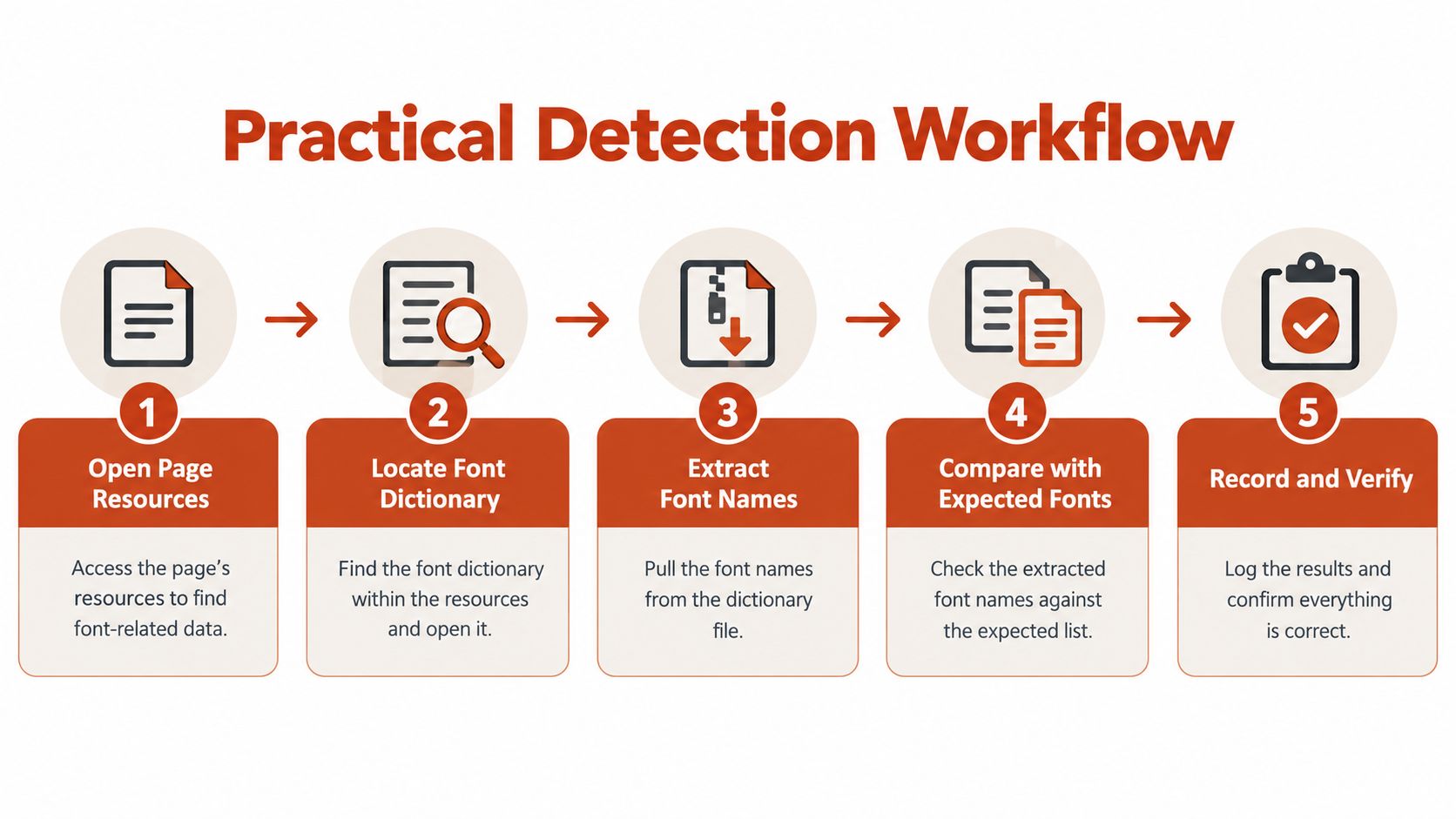
Start with structure, not appearance. Enumerate every page's resource dictionary, then recursively traverse Form XObjects, because fonts can be referenced indirectly through nested content. Teams that stop at top level resources will miss fonts used in placed artwork, repeated headers, and imported page fragments.
Record, Normalize, Then Classify
For each resource you find, capture the evidence before interpreting it:
- Record the raw resource: Preserve subtype, BaseFont, encoding, object reference, and FontDescriptor details.
- Check for a program: Look for FontFile, FontFile2, or FontFile3 in the descriptor.
- Normalize the name: Remove a subset prefix, typically six uppercase characters followed by a plus sign, while retaining the original name.
- Classify the result: Mark it fully embedded, subset embedded, or unembedded.
Adobe's PDF API reference for embedded font streams defines an embedded font as font data stored as a stream inside the PDF. A missing stream should therefore be reported as metadata-only, not treated as proof that the typeface is absent. That wording keeps your report precise. It also tells the next reviewer exactly what evidence is lacking.
Next, cross-check the normalized BaseFont against naming tables inside the embedded program when they're available. Flag mismatches for manual review instead of silently choosing one name. A subset's internal tables may be incomplete or rewritten, so family and style metadata can be less reliable than the same data in a complete font.
Confirm the Font Is Actually Used
Don't finish at the dictionary. Inspect ToUnicode mappings and text showing operators to confirm which resources draw visible text. PDFs can retain unused font objects, and active fonts can have poor character mapping. Your report should distinguish declared resources from fonts proven in use.
Print handoffs make this verification practical rather than academic. The Print Warehouse printing advice is a useful reminder that production files move between teams and suppliers, where substitution becomes visible only after output. Catch an unembedded font during audit, not on press.
For the recovery side of this process, a detailed guide to PDF font extraction and embedded font audits covers how extracted evidence should be checked rather than assumed reusable. Save page numbers, resource names, and object references with every finding. Without them, another auditor can't reproduce your result.
Troubleshooting Inaccurate or Incomplete Results
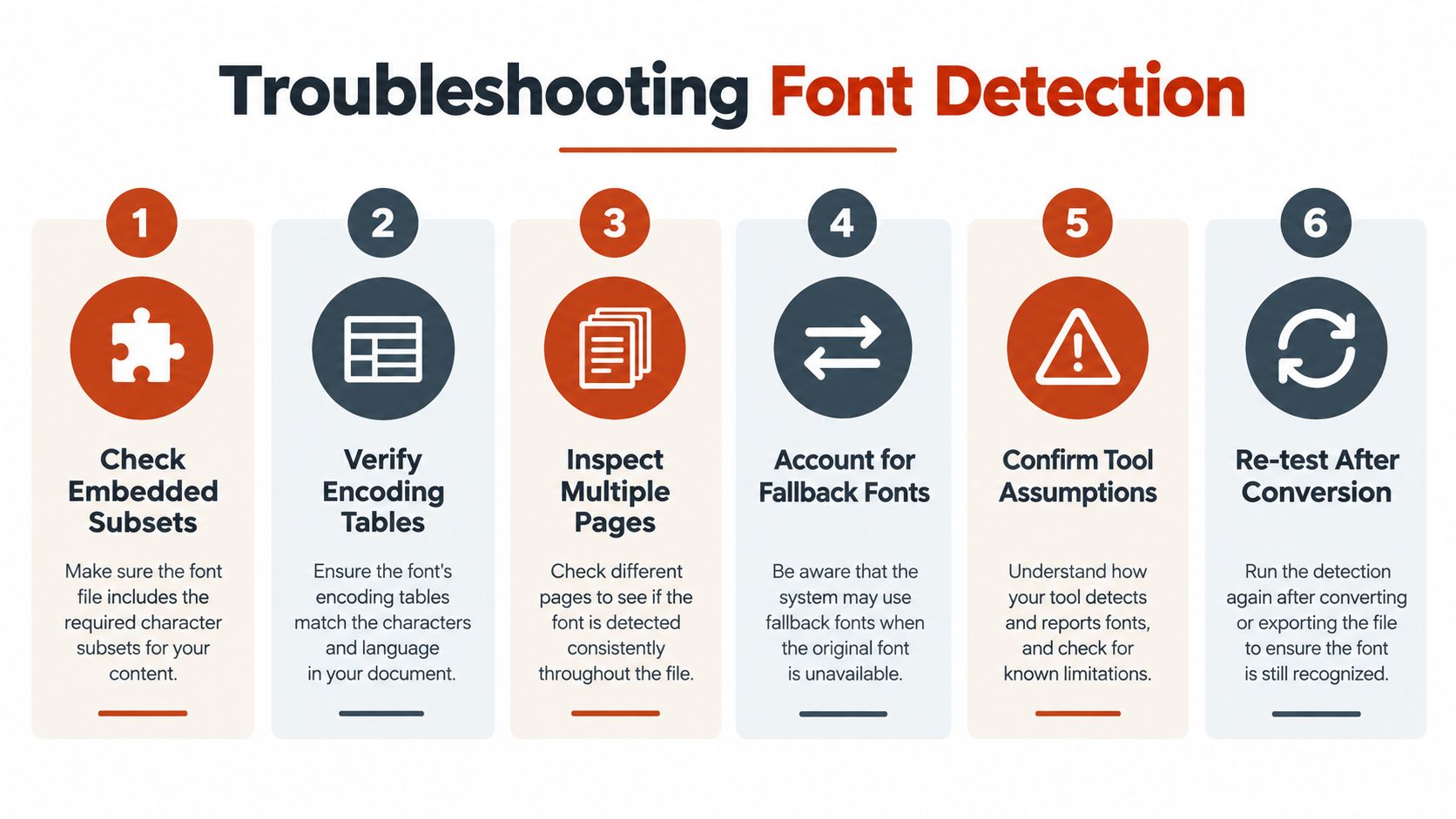
Overclaiming is the principal failure mode in PDF font identification. A tool may return one neat family name when the file supports only a fragmentary conclusion. Your report needs uncertainty classes, not false precision.
Cases That Should Stay Unresolved
A detector should return unresolved or an evidence-ranked candidate for Type 3 fonts and outlined text rather than fabricate a family name, a position consistent with Adobe guidance on embedded and substituted PDF fonts. Type 3 glyphs can be defined procedurally instead of through a reusable font file. Outlined text is just vector shapes, so there's no font object to recover.
Custom encodings and missing ToUnicode maps create a different problem. You may identify the embedded program but still be unable to map glyph codes to characters confidently. Keep that limitation separate from font identity. Mixing the two produces reports that look complete while failing search, extraction, and accessibility checks.
Reporting rule: If you can't point to a font program, naming consistency, and text evidence, don't present the family name as settled fact.
Subsets, Prefixes, and Name Mismatches
Stripping a subset prefix helps you group related resources. It doesn't prove two subsets came from the same original font, especially when production software has rewritten metadata. Compare internal names, glyph coverage, encoding, and the pages where each subset appears before merging records.
Use confidence dimensions in the final report:
- Resource usage: Is the font invoked by actual text operators?
- Binary availability: Does the descriptor contain an embedded stream?
- Naming consistency: Do BaseFont and internal tables agree?
- Encoding quality: Can glyphs map unambiguously to characters?
- Text evidence: Does extracted text match the visible content?
Preserve raw PDF object numbers for every disputed item. That's what lets a second reviewer verify your reasoning. When rendering looks wrong after detection, a practical fix guide for PDFs with fonts not displaying properly helps separate substitution and embedding faults from ordinary viewer problems. Don't force unresolved artwork into a font inventory. A clear unresolved entry is more valuable than an invented answer.
Connecting Detection to Font Licensing Reality
Detection tells you what's inside a PDF. It doesn't tell you whether the use is authorized. Keep those findings in separate columns, because technical presence and commercial permission are different questions.

Desktop Rights Are Not Web Rights
Desktop licenses generally cover installation on a computer for design applications, print, and static images. Web licenses cover serving fonts through website code to visitors. A font that's legitimate on a designer's workstation may therefore be unauthorized for self-hosted web delivery. File format doesn't change that analysis.
Monotype's font format licensing guidance states that a WOFF2 file still requires a web-font license, and changing a file into a browser-oriented wrapper does not create the right to serve it online. The same logic applies in reverse during PDF handoffs. Extracting a font, converting it, or placing it behind an @font-face rule changes the distribution context without changing the underlying rights.
Embedded PDF data needs the same caution. Adobe's font product terms on subset embedding allow desktop fonts to be embedded for printing and viewing when subsetted and protected against misuse, while stating that no other embedding rights are implied. A correctly rendering PDF can still need licensing review before editing, conversion, redistribution, or web reuse.
Reconcile Evidence With the EULA
For each detected font, compare the foundry, license tier, permitted media, users, domains, products, and any traffic or server limits. Check whether the PDF contains only a viewing subset, because that subset may be inadequate for editing and is not itself a reuse license. Reconcile the technical record with invoices, subscriptions, and the controlling EULA. This guidance is informational, not legal advice.
FontCheckerPro fits at the evidence stage by identifying fonts in PDFs and exporting an audit record for design, engineering, or compliance review. Use that type of output to decide which files warrant a license check. For the commercial analysis that follows, a complete guide to font licenses for commercial use provides a broader checklist. Never call a font free or safe based only on detection. Unlicensed use can create replacement costs, settlement exposure, and urgent redesign work, even when the original embedding was unintentional.
Accessibility and Text Semantics After Detection
A PDF can display the right typeface and still fail the people who need to search, copy, or listen to its contents. Font identity is visual evidence. Accessibility depends on whether glyph codes connect to meaningful characters in a usable reading order.
Check Mapping, Tagging, and Reading Order
PDF text commonly works through glyph codes, so extraction depends on standard encodings, ToUnicode maps, font cmap data, and sometimes ActualText. Missing or incorrect mapping can produce broken copy and paste, failed search, and poor screen reader output. Complex scripts are especially vulnerable when semantic text isn't represented correctly.
Extend your font report with separate semantic checks:
- Unicode mapping: Does every visible text run extract as the intended characters?
- ActualText and tags: Do they support meaning and logical reading order where glyph data is insufficient?
- Outlined or Type 3 text: Does the construction block assistive technology despite looking correct?
- Interactive structure: Do links and tagged content remain usable after remediation?
That last point matters during document repair, and LiveDocument's PDF hyperlink guide is relevant context when teams rebuild interactive PDFs without breaking their underlying structure. Don't let a linking or tagging fix overwrite carefully checked font resources without a fresh audit.
Font found is not the same as text understood. Report identity and semantics as separate findings.
Scanned documents add an OCR layer that can hide these distinctions. The visible page may be an image while searchable text sits underneath in another font resource. An explanation of image text recognition from OCR to AI clarifies why recognition output shouldn't be confused with the original typesetting. Record which layer you detected, visible glyphs, hidden OCR text, or both. Accessibility reviewers need that distinction to fix the right problem.
What a Defensible PDF Font Audit Actually Delivers
A strong report gives another reviewer enough evidence to reach the same conclusion. It doesn't promise that detection proves ownership, non-infringement, accessibility, or reuse rights. The applicable EULA controls licensing questions, and this article is informational, not legal advice.
Minimum Contents of the Report
- Font evidence: Raw and normalized names, subtype, page usage, and object references.
- Embedding state: Fully embedded, subset embedded, standard, or metadata only.
- Confidence: Naming consistency, binary availability, encoding quality, and text evidence.
- Semantic findings: ToUnicode quality, extraction results, tags, and reading order concerns.
- Open actions: Fonts requiring provenance documents, license reconciliation, or manual review.
Automation should collect and organize that evidence at scale. Human reviewers should resolve mismatches, outlined text, unusual encodings, and any decision that depends on contract language. That's a reasonable division of labor, and it prevents a scanner from becoming the legal authority it isn't.
Maintain the sequence of files, scans, decisions, and approvals behind each report. An overview of audit trails and their purpose explains why that record matters when a client or foundry asks how a conclusion was reached. Ask any tool for exportable evidence, repeatable scans, and clear unresolved states. If it gives you only family names, it hasn't delivered an audit.
Run a proper Detect Font from PDF audit before you reuse, convert, or ship a client's document. Font Checker Pro scans PDFs, live URLs, images, and zipped font sets, then exports structured reports your design, engineering, and compliance teams can review and retain.