A compliance team scans hundreds of contracts, design files, or archived forms. The extraction finishes quickly, the search index looks complete, and everyone moves on. Months later, someone discovers that a blurred character changed a monetary term, a handwritten annotation disappeared, or a font in a brand asset was identified with unjustified certainty.
That's the central risk with image text recognition software. It can turn pixels into searchable text, but it can also produce a plausible-looking answer that nobody checks. The most useful way to evaluate it isn't to ask which tool claims the highest accuracy. Ask whether it performs reliably on your documents, shows uncertainty clearly, and leaves evidence that another person can audit.
Why Image Text Recognition Software Matters More Than Ever
Image text recognition software now sits behind workflows that users rarely see. A legal team searches scanned agreements, an accounting process reads invoice fields, a developer extracts text from screenshots, and a brand team checks type from a campaign image. In each case, the software converts visual information into something a computer can search, classify, compare, or route.
The danger appears when the output looks clean enough to trust. A scan can contain a faint minus sign, a superscript, a damaged letter, or a table cell that shifts into the wrong column. The system may not stop. It may return confident-looking text, and that text can flow into a database, a report, or a compliance decision.
Practical rule: Treat OCR output as an interpretation of an image, not as a perfect transcription of reality.
The field has grown beyond basic scanning. Teams now expect document structure, multilingual recognition, table handling, searchable archives, API access, and evidence for disputed results. That makes the choice of software an operational decision, not just a technical one.
A useful overview of the underlying process is available in this guide to image recognition software and how it works. By the end of your evaluation, you should be able to decide whether a lightweight OCR engine is sufficient, whether your workflow needs document intelligence, and when confidence scores and audit trails are essential. You'll also have a practical way to test candidates against the documents that cause trouble, rather than the clean examples that flatter every system.
What Image Text Recognition Software Actually Does
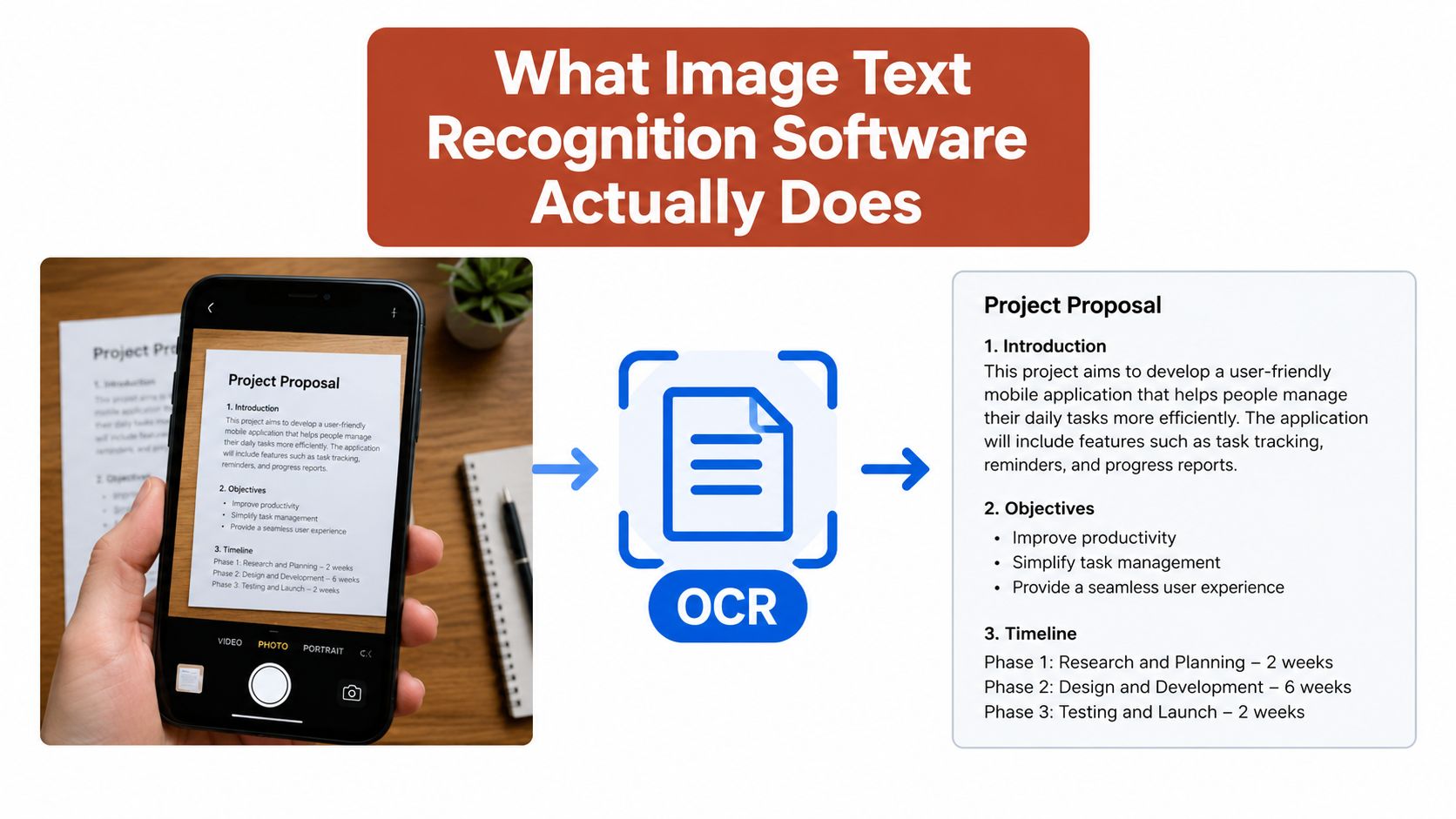
Think of the software as a librarian who can read a photograph of a page aloud to a computer. The librarian first finds the words, distinguishes them from borders and illustrations, decides where reading starts, and then records the result in a format another system can use.
The input may be a raster scan, a phone photograph, a screenshot, or an image-only PDF. The output may be plain text, positioned text with coordinates, structured fields, searchable metadata, or ranked visual matches. Those outputs serve different purposes. A person searching an archive needs readable text, while an accounts workflow needs reliable fields such as invoice numbers and totals.
The process usually involves several stages:
- Preprocessing adjusts contrast, removes noise, corrects rotation, or separates pages.
- Text detection locates regions that appear to contain words or characters.
- Recognition converts visual shapes into letters, numbers, punctuation, or symbols.
- Post-processing restores reading order, applies language rules, and maps results into a usable format.
- Validation checks confidence, coordinates, fields, or relationships against business rules.
From laboratory research to document infrastructure
A major milestone came in 1974, when Ray Kurzweil founded Kurzweil Computer Products and pushed development of omni-font OCR. The finished reading machine was unveiled on January 13, 1976, and by 1978 the company had begun selling a commercial OCR program, with LexisNexis among the early customers digitizing legal and news documents, as described in this history of optical character recognition.
That history explains why OCR is now treated as a foundation rather than a novelty. It supports indexing, accessibility, automation, and downstream analysis. Modern systems add visual reasoning and layout awareness, but the basic job remains the same: infer text from visual marks.
Recognition still isn't understanding. A system can read the words in a contract without knowing which clause creates an obligation. It can detect a table without correctly understanding the relationship between a heading and its cells. For practical guidance on extracting text from image-based PDFs, see this resource on PDF text detection, OCR, and font reports.
The Core Technologies Behind Text Recognition
Modern products combine several capabilities. Separating them helps you understand why a system that performs well on typed pages may struggle with a photograph, a logo, or a complex design.
Classic OCR
Classic OCR focuses on characters arranged in relatively predictable lines. It segments a page, identifies shapes, and maps them to letters or symbols. Early systems depended heavily on constrained fonts and clean layouts. Modern systems are much more flexible, but they still perform best when the source has strong contrast, consistent spacing, and an obvious reading order.
This layer works well for searchable scans, typed forms, receipts, and straightforward screenshots. It may be enough when the output is used for human search and occasional review. It becomes less suitable when a single character changes a legal, financial, or operational result.
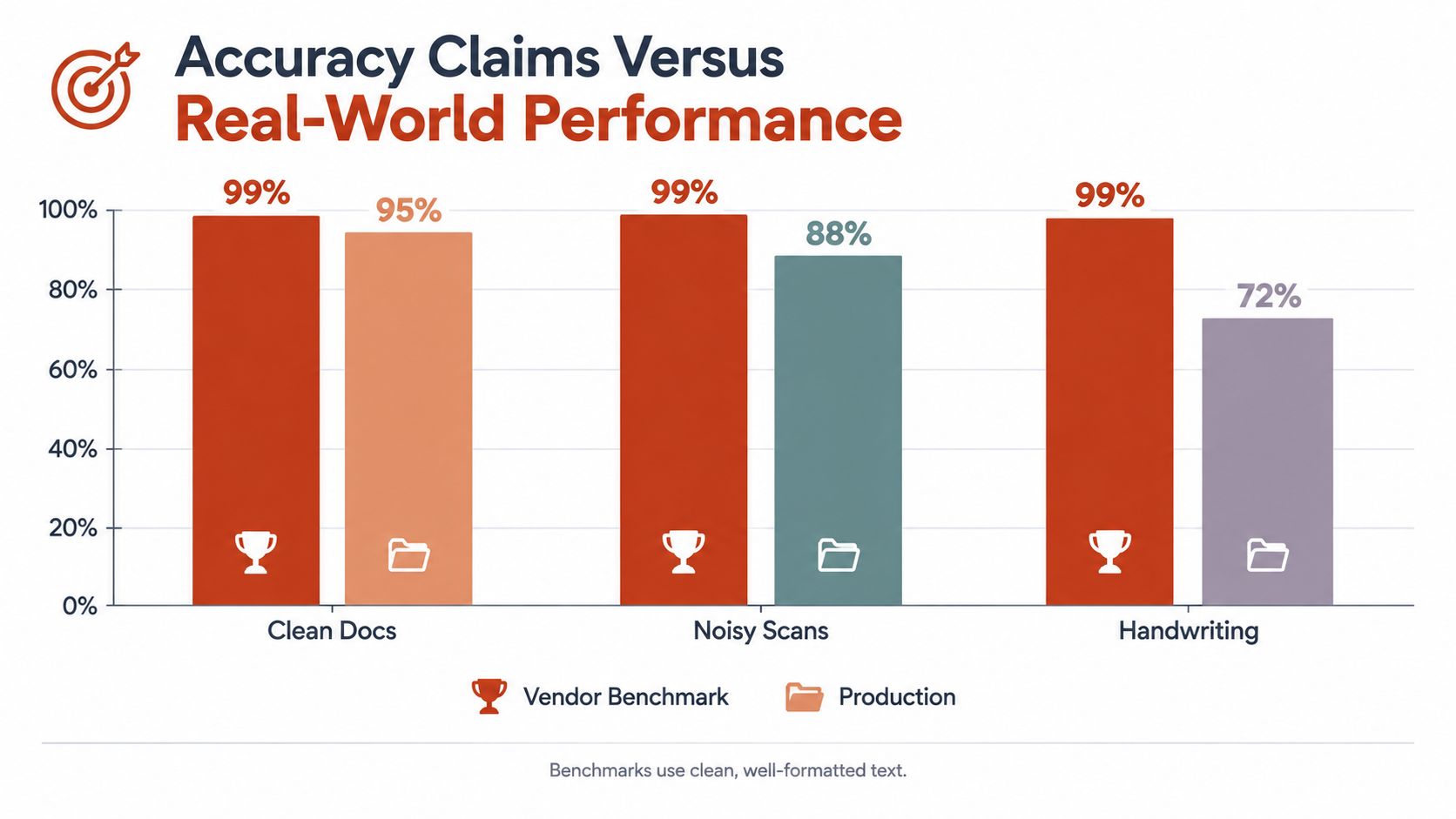
The commercial demand is substantial. Recent estimates put the global OCR software market in the mid-teens of billions of dollars in 2025, with projections ranging from about USD 17.58 billion to USD 45.61 billion by 2032, depending on the report and methodology. Leading OCR tools can exceed 99% accuracy on clean typed text, but that figure describes a controlled condition, not every production image, as discussed in this OCR accuracy analysis.
Scene text detection
Scene text detection handles words embedded in less orderly images. Examples include a product label photographed at an angle, a screenshot with multiple interface elements, a billboard, or a design composition where text follows a curve.
The system must first locate text among other visual objects. It may need to handle unusual backgrounds, partial occlusion, perspective, decorative lettering, or mixed orientations. Detection and recognition are separate problems. Finding the text region correctly can matter as much as interpreting the characters inside it.
Machine learning matching
ML-based matching compares visual features against an indexed library and returns ranked candidates. This is the principle behind image-based font identification. Instead of transcribing a word, the system asks which typeface best explains the observed letterforms.
A font identification workflow should return more than one unexplained answer. Font Checker Pro matches typefaces against an index of over 61,000 families and reports 99.4% accuracy on common faces, with top matches and confidence scores according to the publisher's product information. That kind of result is useful only when the image quality, letter shapes, and confidence level remain visible to the reviewer.
These layers often operate together. A system may detect a text region, recognize the characters, preserve their position, and then compare the visual form with a type library. A practical guide to image text recognition APIs and typography audits shows why the final result should include context and evidence, not just a single label.
Accuracy Claims Versus Real-World Performance
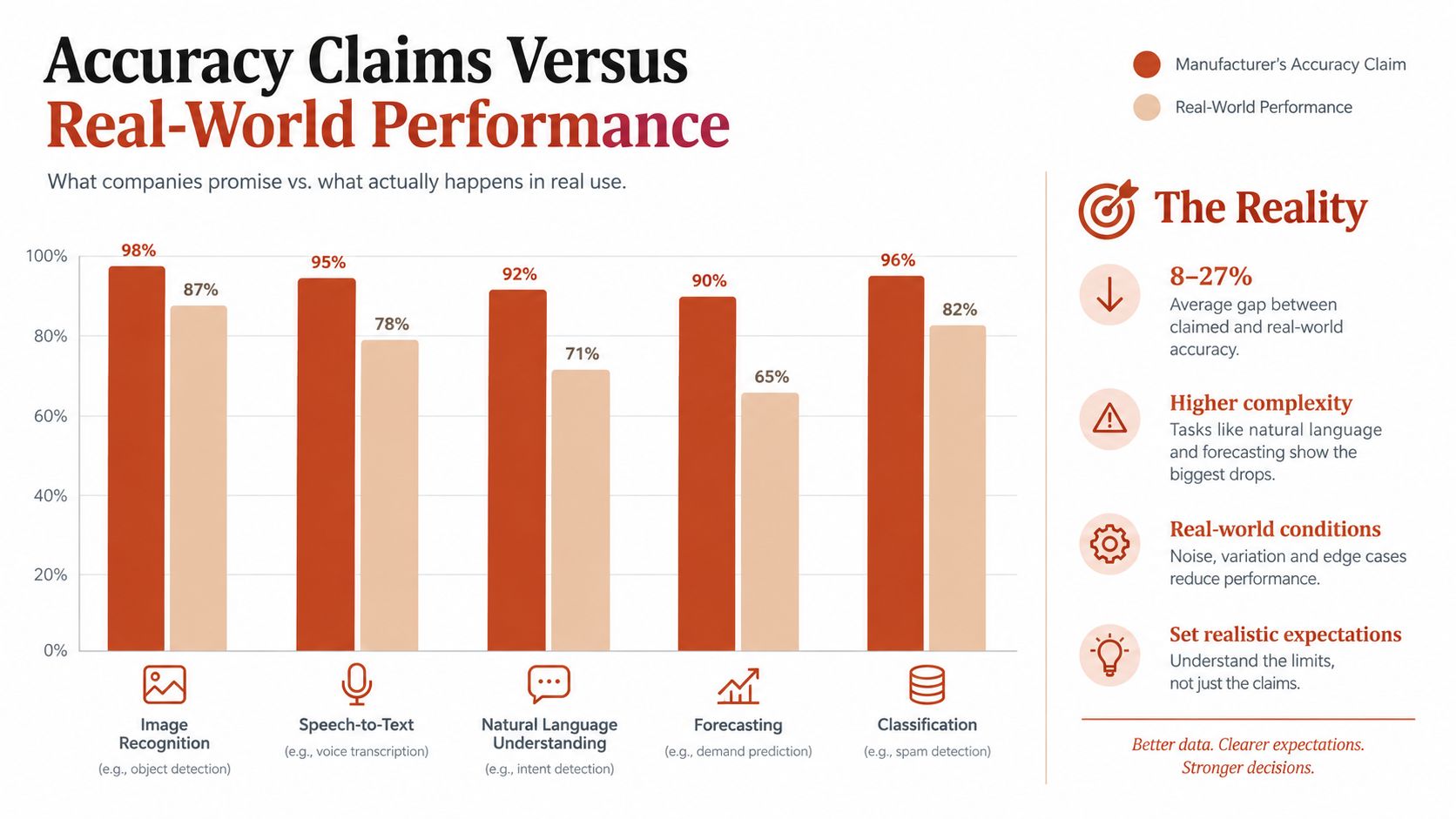
A clean benchmark can make image text recognition software look nearly infallible. The same system may struggle with a crooked scan, faint ink, heavy compression, a folded page, or handwriting. Accuracy is therefore a property of the document conditions, not a permanent label attached to the engine.
Printed text on a clear page is a friendly test. Real files behave more like a damaged photocopy than a new book. Blur can join neighboring characters, noise can add marks, and unusual layouts can change reading order. Tables and charts add another layer because the system must preserve which values belong to which headings, rows, or columns.
Why engine choice changes the result
A large benchmarking experiment on 18,568 documents reproduced with 43 noise variants found that cloud document-AI services substantially outperformed a popular open-source engine, particularly on noisy inputs. Adding noise increased error rates across all tested engines, according to the benchmarking study of OCR under noise.
That result is useful for comparison, not a universal buying rule. Server-side systems may provide stronger preprocessing, language models, and layout handling. A locally run engine may give an organization more control over sensitive files. The right choice depends on document quality, supported languages, response time, cost, deployment rules, and what an incorrect result could trigger.
Test the documents that embarrass your process
A demonstration usually uses cooperative files. Build your own evaluation set from the opposite end of the range: the faintest scan, the most compressed image, the hardest table, the least common script, and forms containing handwriting or stamps.
Track error types separately. A missing comma, an incorrect digit, a broken table relationship, and an uncertain font match can have very different consequences. Check whether the system supplies confidence scores, preserves the original file, and records the output and review history. Those controls turn a plausible transcription into evidence that a reviewer can inspect and defend.
A reliable evaluation asks, “Where does this fail, and will we know when it does?”
Common Use Cases and Where the Technology Struggles
A straightforward OCR engine is useful when the source is printed, the layout is simple, and a person can review exceptions. That covers many archive searches, basic form intake, internal document lookup, and text extraction from uncomplicated screenshots.
Consider an invoice with a clear heading and several printed fields. The workflow may only need the supplier name, date, reference number, and total. If the output is used to help a person find or verify the record, plain OCR can be appropriate.
The requirements change when the image itself carries structure or when an incorrect result triggers an automated action.
Matching capability to the document
- Searchable legal archives: Text recognition may be sufficient if the team reviews low-confidence pages and preserves the original scan.
- Accounting forms: Field extraction, validation, and positional awareness matter more than a simple text string.
- Design and brand checks: Scene text detection and visual matching help identify text and typefaces inside screenshots, logos, and campaign assets.
- Multilingual records: Language and script coverage must be tested directly, especially where the workflow includes non-Latin writing.
- Complex reports: Tables, charts, columns, annotations, and key-value relationships call for document understanding rather than plain transcription.
Recent coverage of document intelligence describes systems that preserve layout, detect tables, extract key-value pairs, and process multiple languages in one pass. The same document AI platform market analysis also identifies persistent weaknesses in poor-quality scans, handwriting, complex layouts, and limited standardization across document formats.
The blind spots buyers often miss
Handwriting is still difficult because characters vary within and between writers. Low-resource languages and historical material can have limited training coverage, inconsistent spelling, or degraded source images. A model that reads clean printed English well may not deserve the same confidence on a handwritten form in another script.
Charts and tables create a separate failure mode. The words may be individually correct while the relationships between labels, values, and cells are wrong. For compliance work, that's a structural error, not a cosmetic one.
Use document intelligence when the workflow depends on layout, fields, tables, or multiple content types. Keep simple OCR for simple inputs, but add confidence thresholds, human review, and provenance whenever the result can affect a decision.
How to Evaluate and Compare Text Recognition Tools
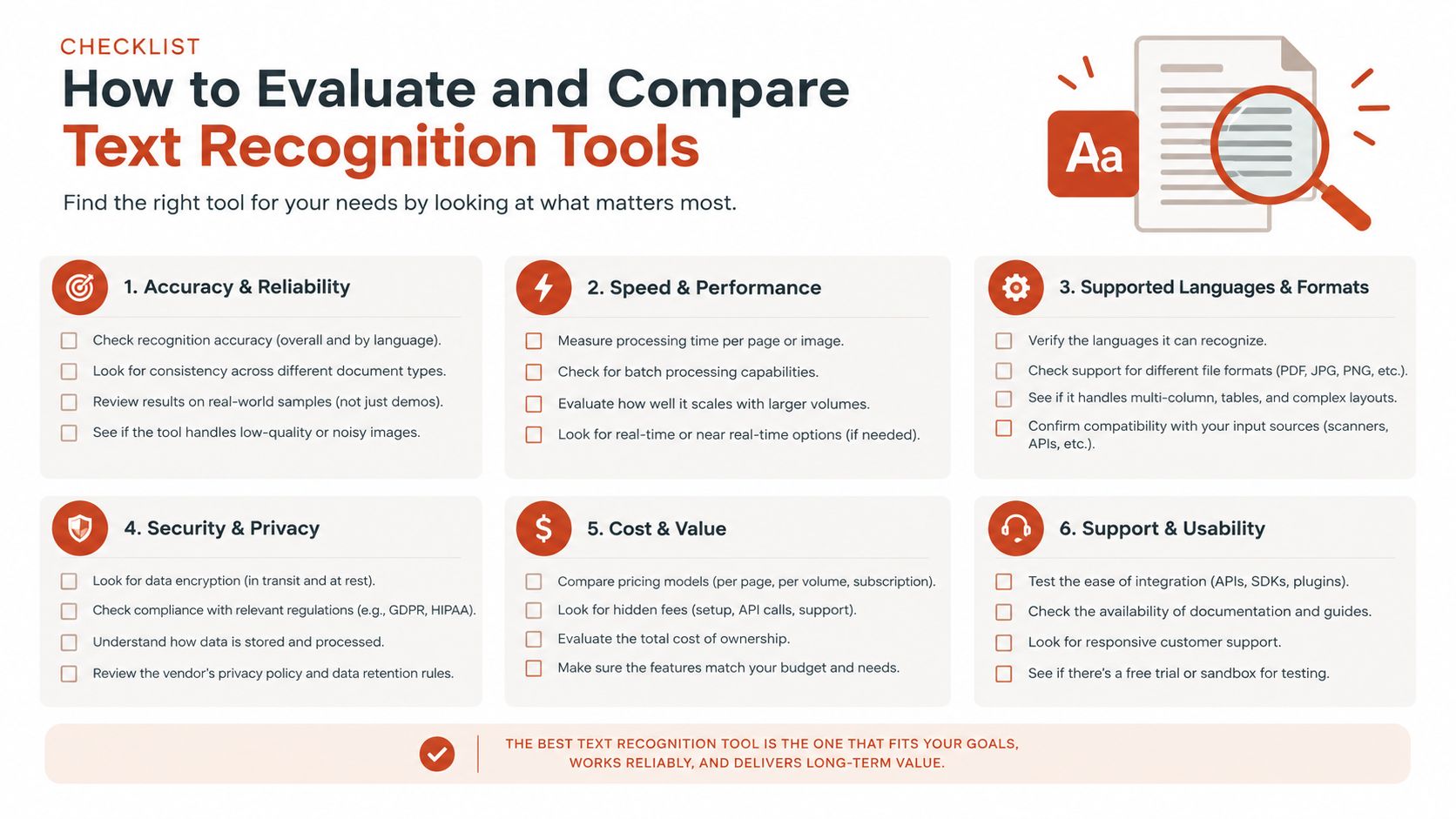
A scanned form may look clear to a person yet produce unusable data because of faint print, skew, compression, or an unfamiliar script. Evaluate tools with the documents your workflow receives. Build a representative sample containing routine files, difficult files, and failure-sensitive files. Have a person create verified reference outputs, then compare both the recognized words and whether each value reached the correct field.
The OCR-Robust benchmark (812 samples) covers documents, receipts, handwriting, charts, tables, and diagrams. Its results show that clean-image accuracy may not predict performance after corruption, with charts and tables declining more sharply than document-like inputs. The findings are reported in the OCR-Robust benchmark.
A practical comparison framework
Run every candidate under identical conditions. Include blur, noise, compression, rotation, low contrast, unusual layouts, and the scripts used by your team. Record errors by type, not only as one overall accuracy score. A system that reads words correctly but connects a value to the wrong label can still create a serious operational error.
| Criterion | Question It Answers | What Good Looks Like |
|---|---|---|
| Tolerance to poor inputs | Can it handle our worst images? | Results remain usable under blur, noise, compression, and skew, with failures made visible |
| Language and script coverage | Does it read our actual material? | Documented support is checked against your own samples, including non-Latin scripts |
| Layout handling | Does it preserve meaning? | Reading order, columns, tables, and fields remain connected |
| Output format | Can downstream systems use the result? | Plain text for search, structured JSON or CSV for operations, and coordinates where needed |
| Confidence scoring | Will reviewers see uncertainty? | Scores or thresholds identify items requiring human verification |
| Audit trail | Can we defend the result later? | The original file, output, process details, corrections, and exportable reports remain linked |
Check API access if files move through a pipeline, continuous integration process, or batch queue. Confirm that the interface returns structured data, page coordinates, confidence values, and errors rather than only a text blob. Test rejected files and partial results too. Those responses determine whether an exception can be reviewed or disappears without a trace.
For small teams assessing cost and operational fit, the guide to OCR software for small businesses offers evaluation context. The same discipline applies to text analysis software tools, including image-based font identification. A match is easier to defend when reviewers can inspect the source image, confidence, alternatives, and report history.
Test the exception path before approving the happy path. If low-confidence results vanish into automation, the workflow is not ready for sensitive work.
Privacy, Compliance, and Licensing Considerations
Legal and compliance teams should evaluate where processing occurs before they compare recognition quality. A cloud API can simplify deployment and may offer advanced processing, while self-hosted or on-premise processing can provide tighter control over sensitive personal, client, or regulated data.
Ask concrete questions:
- Where are uploaded images processed?
- How long are files and extracted results retained?
- Are inputs used for service improvement?
- Can administrators control deletion and access?
- Can the system export processing history and reviewer actions?
- Does the deployment meet internal data residency requirements?
The right answer depends on the material and the organization's obligations. A document containing personal information may require a different architecture from a public marketing screenshot. Don't approve a workflow based only on a privacy summary. Review the contract, retention settings, access controls, and operational procedures with the relevant specialists.
Recognition accuracy also affects compliance. If extracted text feeds a legal review, eligibility decision, invoice approval, or asset register, retain the original image alongside the output. Store confidence values, detected regions, corrections, and the identity or role of the reviewer who approved an exception.
Typography creates a related licensing issue. Desktop licenses typically cover static outputs such as reports, PDFs, presentations, graphics, and printed materials. Web licenses govern fonts embedded into websites and may be based on monthly page views or traffic volume. Using a font outside its license scope can lead to copyright infringement claims and retroactive licensing demands from foundries, as explained in this institutional font licensing guidance.
A desktop-licensed font used in a static image is not the same as a font served in website code. Teams researching the surrounding obligations can review truelabel licensing resources, then confirm the actual license terms with the foundry or rights holder.
This information is educational and operational in nature. It isn't legal advice. For a compliance-sensitive deployment, involve qualified legal counsel and document the reasoning behind your licensing and data-handling decisions. A practical compliance documentation guide for teams can help organize the evidence that reviewers need.
Choosing the Right Solution for Your Workflow
Use a short decision path.
If your files contain clean, printed text in a simple layout, a lightweight OCR engine may be enough. Add human review for low-confidence results and preserve the source image.
If your documents contain tables, multiple columns, key-value fields, handwriting, or several languages, choose a document intelligence system that preserves layout and returns structured output. Test the difficult scripts and layouts directly rather than relying on a language list or general benchmark.
If the workflow supports legal, compliance, licensing, or automated decisions, require confidence scoring, provenance, audit trails, and exportable reports. The system should show what it recognized, where it found it, how certain it was, and what a reviewer changed.
Never approve a product because one accuracy number sounds impressive. Test your own documents, include degraded samples, and verify that failure is visible. Whether you're extracting invoice text or checking a typeface in a design file, defensible results come from transparent recognition that leaves a trail, not from a one-click promise.
Font Checker Pro analyzes live URLs, PDFs, images, and zipped font sets, returning typography findings with image-based font matches, confidence scores, and exportable reports for legal, operations, and engineering workflows. Visit Font Checker Pro to assess whether its audit and reporting features fit your image recognition and font compliance process.