A campaign goes live, a developer inherits an old repository, and a legal reviewer asks a deceptively simple question: which fonts are we using, and where did the right to use them come from? The answers are often scattered across design files, websites, PDFs, app packages, vendor folders, invoices, and expired trial downloads. By the time someone notices the gap, the typeface may already be embedded in customer-facing code and reused across several markets.
A digital asset audit gives that problem an operating model. It identifies what exists, where it appears, how it performs, what contract governs it, and whether the available evidence can withstand review. This article is informational, not legal advice. Licensing decisions should be confirmed against the applicable agreement and, where necessary, reviewed by qualified counsel.
The Reality of Managing Typography at Scale
Typography drift rarely begins with a visible failure. It starts with a campaign microsite, an agency handoff, or an older component library reused during a redesign. A mobile application may contain an embedded font that no one can trace to an approval record, while a regional website loads a different file from another source. Each choice may appear reasonable alone. Together, they form an unmanaged asset estate with unclear ownership and incomplete evidence.
The scale is substantial. One industry overview of website font usage and licensing risk reports that over 60% of global websites use custom or non-system fonts. It also estimates the global font market at about $1.05 billion in 2022 and projects 5.8% CAGR growth for custom typefaces through 2030. Every additional family can introduce another license scope, delivery context, performance question, and ownership record.
Why manual spot checks fail
Manual review can work for a small, stable project. It becomes unreliable as assets move between design, development, agencies, and legal teams. A reviewer may inspect the homepage and miss a landing-page template, PDF download, subdomain, or application package. Someone else may confirm that a font file exists without checking whether the organization has permission to embed it on the web.
A spot check also produces weak evidence. It records what one person saw at one moment, rather than showing which assets were examined, who owned them, what use was permitted, and which files supported the conclusion.
Practical rule: Treat every font deployment as a record with an owner, a source, a permitted use, and supporting evidence.
A defensible audit inventories font files and references, maps each use to its deployment context, checks licensing indicators, evaluates technical behavior, and preserves the evidence behind each finding. The resulting record should let a designer remove an unauthorized asset, let a developer correct a loading issue, and let legal or compliance teams verify what was checked and when.
Typography therefore belongs in the governance control layer. The audit limits the chance that an unverified asset moves from a campaign file into production and creates a repeatable monitoring process for migrations, vendor changes, and new product launches. It turns discovery into evidence packaging, with records that can be reviewed again as the digital estate changes.
Legal Stakes and Licensing Complexities
A font purchase grants defined rights, not unrestricted use. The boundaries may depend on users or machines, software type, delivery method, audience, website traffic, and the legal entity that acquired the license. Those distinctions turn typography into a measurable compliance liability.
A typical desktop license permits installation on a computer for design software. A web font license permits embedding in website code and may use monthly pageviews or traffic tiers as its pricing basis. One foundry's licensing terms show this distinction, with web licenses priced by monthly pageviews and desktop licenses by user count. See the font copyright 2026 guide to compliance audits for entity and scope considerations.
| License Type | Pricing Model | Common Restrictions |
|---|---|---|
| Desktop | Number of users or machines | Installation scope, permitted software use, redistribution limits |
| Web | Monthly pageviews or traffic tiers | Embedding method, traffic limits, approved formats, domain or project scope |
File format can carry its own restriction. Some foundry terms require web fonts to be served in WOFF or WOFF2 and prohibit converting OTF or TTF files for web use. A deployment can therefore work technically while breaching the contract. Developers should confirm the permitted files and delivery method before converting or self-hosting an asset.
The commercial terms also require careful reading. A Monotype guide to font licensing distinguishes desktop installation from web embedding. The audit record should translate that distinction into operational checks: where the font is installed, where it is served, which domains or products use it, and whether the authorized scope still matches current use.
What makes the exposure expensive
The risk is not limited to a missing invoice. An organization may have bought desktop rights but deployed the file on a public website, exceeded a user allowance after staff growth, or continued using a trial copy after a campaign ended. These failures often arise during handoffs, acquisitions, redesigns, and agency transitions, when files outlive the context in which they were approved.
A defensible review records the license tier, permitted deployment, measurable threshold, renewal status, legal owner, and evidence location for every material font asset. It should also preserve the relevant agreement, purchase record, filename, deployment URL, and reviewer decision. That evidence lets legal teams assess exposure without reconstructing the audit from email threads.
The practical trade-off is clear. Restricting an asset may delay a launch or require a replacement, while leaving the issue unresolved can create continuing contractual and operational risk. Treat the decision as a controlled exception, document who accepted it, and set a date for remediation or renewed permission. Typography then becomes a monitored control with evidence, rather than an assumption buried in a brand folder.
Building Your Audit Framework and Checklist
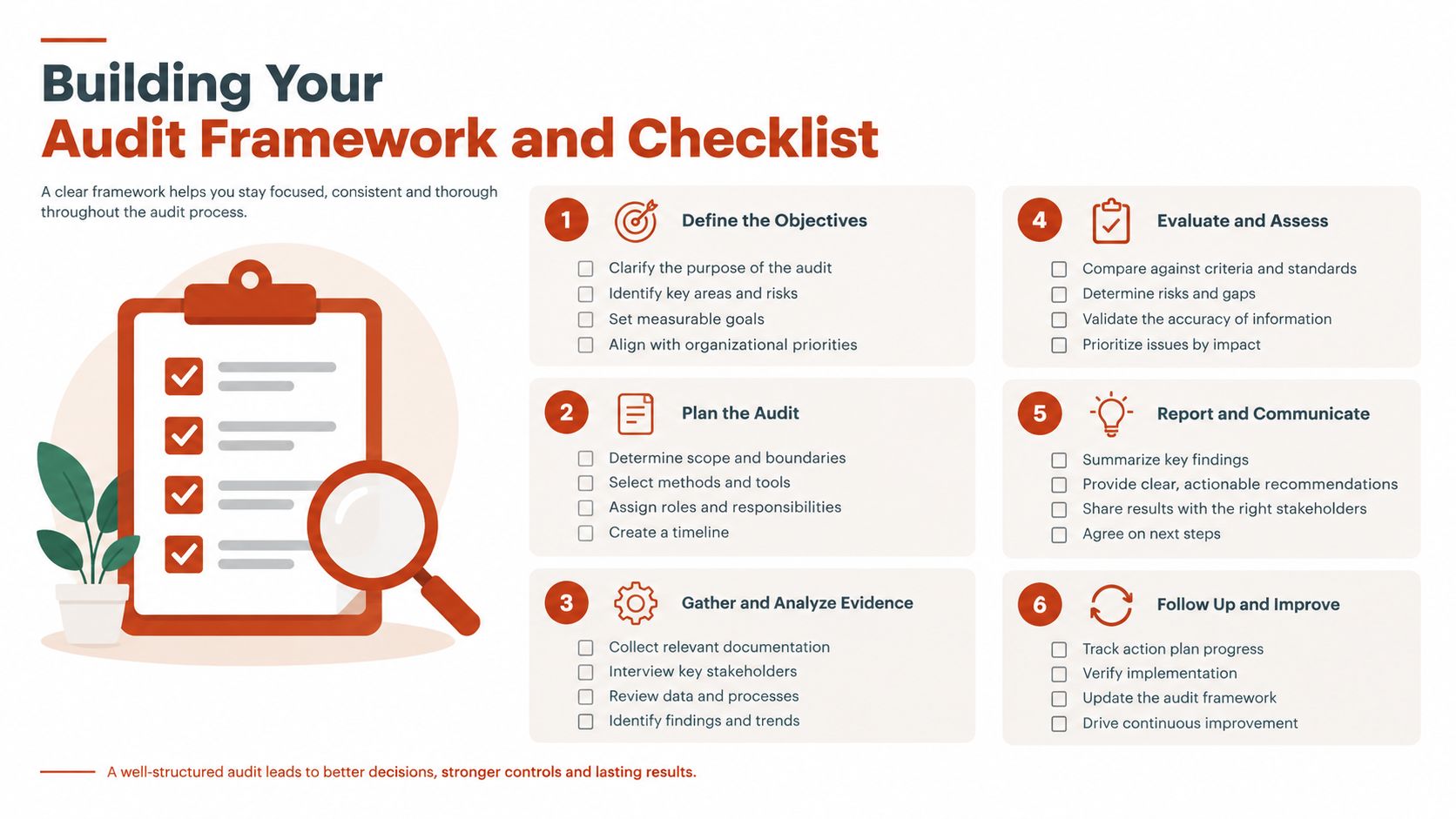
Start with scope, not software. Define the properties, applications, campaigns, documents, and repositories that matter for the review period. Include public URLs, staging environments where practical, downloadable PDFs, mobile application packages, design-system repositories, agency deliveries, and locally installed font collections.
A workable six-step process
Create the inventory. Record every observed family, style, file format, source path, property, product, and responsible team. Don't rely on a brand guideline as the inventory. It may describe approved typography while production contains legacy or unauthorized files.
Trace the source. Identify whether each font comes from a CDN, a local file, an API, a design application, an agency package, or an embedded application resource. Capture the actual filename and location, not just the family name displayed in a design tool.
Collect the contract record. Gather EULAs, invoices, purchase confirmations, subscription records, renewal notices, amendments, and correspondence that clarifies scope. Link each document to the asset and the legal entity that acquired it.
Map the deployment. Separate desktop installation, web embedding, application distribution, document embedding, social creative, and client delivery. The same family may be authorized in one context and unsupported in another.
Assign a disposition. Mark each item as verified, needs evidence, requires a license change, should be removed, or needs legal review. Temporary system fallbacks can keep a release moving, but they shouldn't become a silent permanent substitute for resolving the record.
Obtain sign-off. Design confirms intended use, engineering confirms technical deployment, and legal or compliance confirms the interpretation of the agreement. Store the decision with a timestamp and an accountable owner.
The practical website font audit guide is useful when the first pass focuses on live sites. For larger programs, use a shared register with fields for asset identity, source, deployment, license scope, evidence status, technical status, owner, and next action.
A short intake meeting prevents predictable omissions. Design knows which files are intentional, engineering knows what production serves, procurement can locate commercial records, and legal can identify clauses that require interpretation. No single team can establish the complete picture alone.
Tooling and Automated Continuous Monitoring
A manual audit answers a point-in-time question. Continuous monitoring answers whether the answer is still true after a deployment, vendor handoff, redesign, or license change. The difference matters because a clean review can become obsolete as soon as a new stylesheet, campaign page, or application build reaches users.
| Manual spot-check | Automated monitoring |
|---|---|
| Useful for a small, stable scope | Suited to changing portfolios |
| Depends on reviewer memory and coverage | Repeats defined checks consistently |
| Produces findings that may age quickly | Can detect drift after releases |
| Often ends in a report folder | Can feed operational and engineering workflows |
Automation shouldn't remove judgment. It should reserve human attention for exceptions. A practical workflow scans live URLs, PDFs, images, and zipped font sets, then records detected typefaces, source indicators, licensing signals, and technical findings. Font Checker Pro can perform those scans and return exportable reports for legal, operations, and engineering workflows.
Making monitoring part of delivery
Engineering teams can run a scan after a build or before a major release. A JSON result can become a CI check, while a REST API can pass findings into an internal workflow. Operations teams may prefer CSV for registers and remediation queues. Legal teams often need a readable PDF that preserves the reviewed scope, timestamps, findings, and evidence references.
Alerts should be tied to actions rather than noise. Useful triggers include a newly detected family, a changed font URL, an expired license record, an unrecognized self-hosted file, or a production deployment that introduces a font absent from the approved register. Route those alerts to the person who can resolve the issue, not to a shared inbox that no one owns.
The REST API workflow for font audits and compliance provides a practical model for connecting scan results to internal systems. The strongest setup combines automated detection with a documented exception process. A team member can accept a known change, attach the supporting license record, and close the alert without losing the original finding.
Performance Hygiene and Technical Validation
Typography is both a rights issue and a performance liability. A font can be properly licensed yet poorly delivered, or technically efficient yet deployed without the required permission. The audit should test both dimensions instead of allowing one to hide the other.
Late-loading webfonts can create FOIT, where text remains invisible, or FOUT, where fallback text appears and later swaps. Those transitions affect perceived stability and can contribute to CLS risk, particularly when the fallback and webfont have different metrics. The Chrome guidance on font display performance recommends examining loading behavior rather than treating font CSS as an isolated declaration.
A practical validation pass
Begin with the rendered page, not the source repository. Inspect computed styles to identify the fonts users see, then compare those results with CSS declarations and network requests. A declared family may never load, while a fallback or injected stylesheet may introduce a different file.
Test the page with an empty cache and throttled conditions, including a Slow 3G simulation, then review the sequence of text paint, font request, font response, and layout movement. Use Lighthouse or WebPageTest timing analysis to identify delayed requests and unnecessary variants. The goal isn't to remove every custom font. It's to understand which resources create user-visible cost and whether the chosen behavior matches the product requirement.
Glyph subsetting is another useful control. Analyze the characters used, then generate subsets with tools such as Glyphhanger or Subfont where the license permits that workflow. The font subsetting guide for faster, safer websites provides relevant implementation guidance. Keep the original licensed files and the generated subset connected in the evidence record, because optimization doesn't erase the need to prove the source and permitted use.
A good report brings these findings together:
- Observed use: Which family and style rendered, where, and under what conditions.
- Delivery path: Which request, CSS rule, or embedded resource supplied it.
- Performance behavior: Whether loading created invisible text, fallback swaps, excess payload, or layout movement.
- Remediation: Whether the answer is a font-display change, subset, preload adjustment, fallback revision, or licensing review.
Evidence Packaging and Defensible Reporting
Finding a font is not the same as proving the organization can use it. A screenshot of a purchase page may identify an order, but it may not establish the licensed entity, covered products, user scope, web traffic allowance, renewal status, or relationship to the exact file deployed in production.
Evidence quality is the harder problem. Practitioner guidance on digital-asset auditing and evidence of control highlights the need to evaluate relevance and reliability across technical environments and intermediaries. It also makes an important distinction: proof of control isn't automatically proof of ownership. The same reasoning applies to typography. Possessing a file, or proving that a team can access a vendor account, doesn't by itself establish the contractual right to deploy that file.
Build the record as a chain
For each finding, preserve the reviewed URL or package, scan date, file hash where available, detected family and style, source path, relevant contract document, reviewer, decision, and remediation history. Keep the original observation even after a problem is fixed. Otherwise, a later reviewer can't tell whether the asset was absent, removed, or missed.
Use formats for their intended audiences:
- PDF: A review package for legal, compliance, leadership, or an external auditor. Include scope, methodology, findings, evidence references, and open exceptions.
- CSV: An operational register for owners, renewal dates, deployment contexts, and remediation status.
- JSON: A machine-readable record for CI pipelines, release gates, and internal systems.
Timestamped evidence matters because web content changes. Capture the specific page, request, or package examined, then store the report with the related source documents. If a foundry asks about a deployment later, the team should be able to show what was observed, what agreement applied, who assessed it, and what changed afterward.
A useful audit trail framework treats decisions as part of the record, not as explanations reconstructed from email. That approach also improves handoffs. A new legal reviewer can follow the evidence without relying on the memory of the developer who made the original deployment.
Establishing Recurring Schedules and Governance
Typography governance fails under launch pressure unless the operating rhythm is defined in advance. Set a baseline inventory, then schedule recurring scans for live properties and controlled repositories. Monotype recommends a quarterly or annual font usage audit, as noted in its font licensing compliance guidance. Choose the cadence according to deployment frequency, repository changes, and licensing risk. Waiting for a dispute or year-end review leaves gaps in ownership and evidence.
Set the operating rhythm
Add an event-based review whenever a material change affects assets, agreements, or production delivery:
- New vendor onboarding: Confirm delivered files, contract ownership, and permitted client or product use.
- Major site deployment: Scan the release and compare detected fonts with the approved register.
- Rebrand or redesign: Reconcile new families, retired assets, templates, and application packages.
- License renewal or expiry: Recheck every deployment covered by the changing agreement.
- Team or agency transition: Transfer evidence, ownership, and open exceptions before access ends.
Maintain an exception queue alongside the recurring schedule. 2026 audit outlook guidance identifies incomplete inventories, missing custody documentation, and weak reconciliation across wallets, custodians, exchanges, and general ledger records as readiness gaps in digital-asset environments. It also discusses custody, private key management, and IT general controls. The typography equivalent is practical: keep the asset inventory current, preserve evidence, and reconcile production use with the approved record.
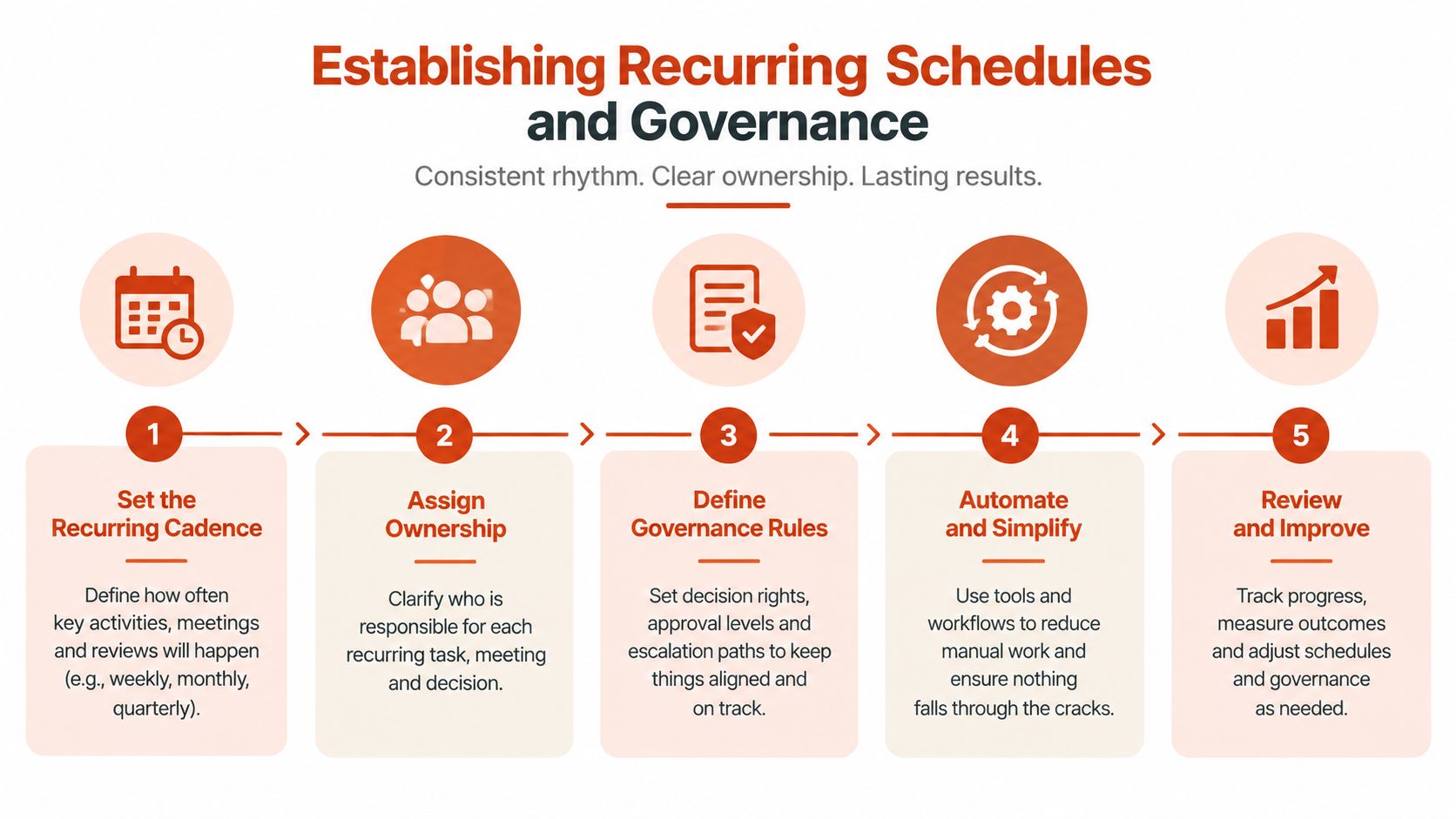
Assign ownership by decision type. Design owns intended brand use, engineering owns delivery and performance, procurement owns commercial records, and legal or compliance owns interpretation and escalation. Review open exceptions at each governance meeting. Closing an exception requires a documented decision, supporting evidence, and a named owner for any follow-up.
The durable control loop is discover continuously, validate technically, reconcile against license terms, preserve evidence, and escalate ambiguity early. That model makes typography measurable across compliance, performance, and operational ownership.
Font Checker Pro scans live URLs, PDFs, images, and zipped font sets, then produces exportable PDF, CSV, and JSON evidence for legal, operations, and engineering teams, with recurring monitoring options. Visit Font Checker Pro to review how its scanning and reporting workflow fits your portfolio.