The Japanese brochure looks right on your screen, but the recipient sees empty boxes in a customer's name. Or the kanji look perfect, yet copying a paragraph produces nothing and searching for a visible word returns no result. You've got a PDF Japanese font problem, but the screen proof alone won't tell you which kind.
Treat visible text, usable text, and licensed distribution as separate checks. A reliable handoff needs all of them. The practical approach is to inspect the PDF's font resources, test its text mappings, and read the license for the way the document will be shared.
Symptoms, Causes and Fixes at a Glance
Japanese PDF symptoms, likely causes and first fixes
| Symptom | Likely cause | First fix |
|---|---|---|
| Empty boxes where kanji should be | Font not embedded, or subset missing those glyphs | Re-export with embedding and a subset containing those glyphs |
| Text copies correctly but glyphs are blank in a desktop PDF reader | OpenType-CFF outline problem reported in some CJK cases | Re-export as embedded TrueType CIDFontType2 and retest |
| Line breaks or spacing shift on another computer | Font not embedded; substitute font has different metrics | Embed the exact face and check metrics in the target viewer |
| Glyph shapes look like a different typeface | Viewer substituted a compatible font with a different design | Embed the original font instead of relying on system fallback |
| Copy and paste returns garbage or nothing | Missing or incorrect ToUnicode mapping | Re-export with Unicode mapping and verify by text extraction |
| Search finds no Japanese words | ToUnicode absent, or CMap mismatch | Re-export with Unicode mapping, then check the descendant CIDFont and CMap |
| Vertical text runs horizontally or punctuation sits wrong | Wrong writing mode or CMap for vertical text | Set vertical writing in the source and confirm a vertical CMap is used |
Read these as diagnostic starting points, not final verdicts. Empty boxes suggest a coverage or embedding problem; blank glyphs with correct copied text suggest a rendering problem. Changed spacing or character design points toward substitution.
Separate rendering from extraction
Check three things: the text displays, copying returns the expected characters, and the file behaves the same way in a second viewer. Each test examines a different layer of the document, so a pass on the first proves nothing about the other two.
Blank glyphs in one reader while text still copies point to that reader's handling of the outline format. The same failure across several readers points to embedding, coverage, or mapping inside the file. Either way, open the font resources and inspect them; the screen proof settles nothing on its own.
Practical rule: A correct screen proof confirms what that viewer displayed. It doesn't confirm what another system can render or extract.
A PDF can show correct glyphs while its text layer maps to nothing usable, so record appearance and extractability as separate results. For documents whose text layer is uncertain, run a deliberate PDF text-detection and font-report workflow rather than treating what you see as evidence of searchable text.
Fix the export before patching the output
Start with the authoring application. Enable full font embedding where the license permits, avoid subsetting a Japanese face that recipients may legitimately edit later, and confirm the export preset preserves Unicode text.
For a finished, read-only document, a complete and correct subset is appropriate. Full embedding repairs neither an incorrect mapping nor missing editing rights.
Re-export rather than expecting a viewer to reconstruct missing font resources. Then repeat the same checks. Record the affected text, the viewer used, the export preset, and the file version, so the next test compares an actual change rather than a different document.
Why Japanese Text in PDFs Breaks More Often
A Latin font is like a pocket dictionary; a Japanese font is more like a library. The PDF must carry the right material and the correct addressing system, not just a recognizable name on the cover.
Japanese documents can depend on kanji variants, kana forms, punctuation, symbols, and compatibility characters. That scale explains why inspecting the font name alone isn't enough.
The character collection matters
The Adobe-Japan1-0 collection began with 8,284 character IDs, developed in late 1991 or early 1992. The specification expanded to 8,359 in Adobe-Japan1-1, 8,720 in Adobe-Japan1-2, and 9,354 in Adobe-Japan1-3, as documented in the Japanese character-collection history.
That same history records Adobe-Japan1-4 adding 6,090 glyphs to reach 15,444, with development completed on February 21, 2000. Adobe-Japan1-5 reached 20,317, while Adobe-Japan1-6 added 2,741 to reach 23,058, completing coverage of JIS X 0212-1990 and U-PRESS.
These aren't interchangeable inventories. A document's unusual personal name or variant character deserves an explicit coverage check, even when the surrounding paragraph looks ordinary.
Portability requires more than a matching name
CIDFont technology was built for large Chinese, Japanese, and Korean glyph inventories, and its design supported cross-platform PDF exchange. When the original font wasn't embedded, a viewer could substitute a compatible face so the document would still open.
Substitution gets the file displayed. A substituted face can carry different glyph designs, metrics, or mappings, so a clean screen view says nothing about whether the underlying text will extract correctly on another system. The visible page and the usable text layer are separate checks, and passing one proves nothing about the other.
- Record the collection: Identify which character collection the PDF expects.
- Record the subset: Establish what the exported file carries.
- Check exceptional characters: Compare names, variants, and specialized symbols against the source.
The reported typeface name is a starting label. The collection, subset, encoding, and coverage determine whether the exported text survives the handoff.
How to Check Embedding and Text Mapping
A PDF can show the right kanji on screen and still return garbage when a system copies, searches, or reflows it. Treat display and extraction as two separate audits. Run this sequence on the exported file before sending, with the source document open so you can compare real characters rather than judge whether the output looks plausible.
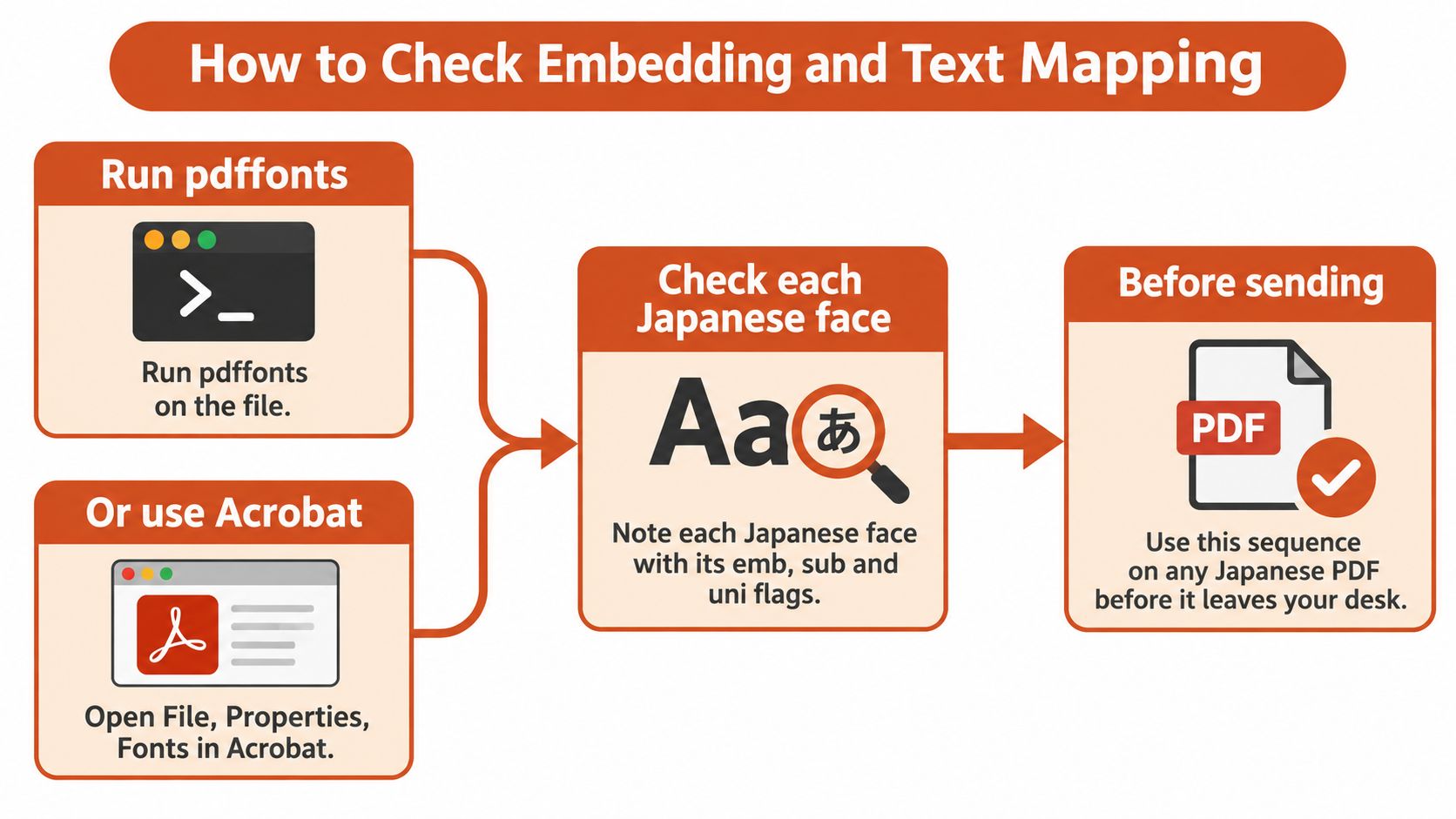
Inspect the font resources
Inventory the faces. Use a font-listing utility or the document properties panel in your PDF viewer to review font names and embedding status. Record the embedded, subset, and Unicode-mapping flags separately; a graphical font list is not a substitute for inspecting the mappings.
Confirm the expected Type 0 composite font and its descendant CIDFont. Japanese text typically uses this structure to address a large glyph inventory, rather than relying on ordinary single-byte font codes.
Check
CIDSystemInfoand coverage. Confirm the expected collection, such as Adobe-Japan1, and verify that the embedded resources cover every character used in the document, including the troublesome names.Match the encoding CMap to the writing direction. Horizontal and vertical layouts need appropriate mappings; inspect punctuation placement as well as the direction of the text.
Inspect the
/ToUnicodestream. Confirm that it exists for each relevant face and maps the document's codes to the intended Unicode text, rather than accepting presence alone as proof of correctness.
The PDF specification draws the distinction clearly: the encoding CMap translates character codes to CIDs for display, while ToUnicode supplies the reverse route that extraction depends on. That split is why a document can render perfectly and still fail the text check.
Test what the mappings return
Copy a Japanese paragraph into a plain-text editor and compare it character by character with the source. Include punctuation and any mixed Latin text, not just the main kanji.
Search for a difficult character. Use a rare kanji or a JIS X 0213 character already present in the source, then verify that the search result identifies the correct occurrence.
Score the outcome. Pass only when embedding, CID consistency, coverage, and extracted text all hold at once. An embedding flag alone is not a pass, and Identity-H or Identity-V should not appear on non-embedded fonts.
For a repeatable inventory process, use this guide to detecting fonts from a PDF. Keep identification separate from validation: knowing the face does not establish that its mapping works.
An embedded subset can pass the visual check and still fail the text check.
For accessibility work, add language-tagging and screen-reader checks on top. Correct Unicode mapping is groundwork; it does not certify that a screen reader announces the document in the right order or the right language.
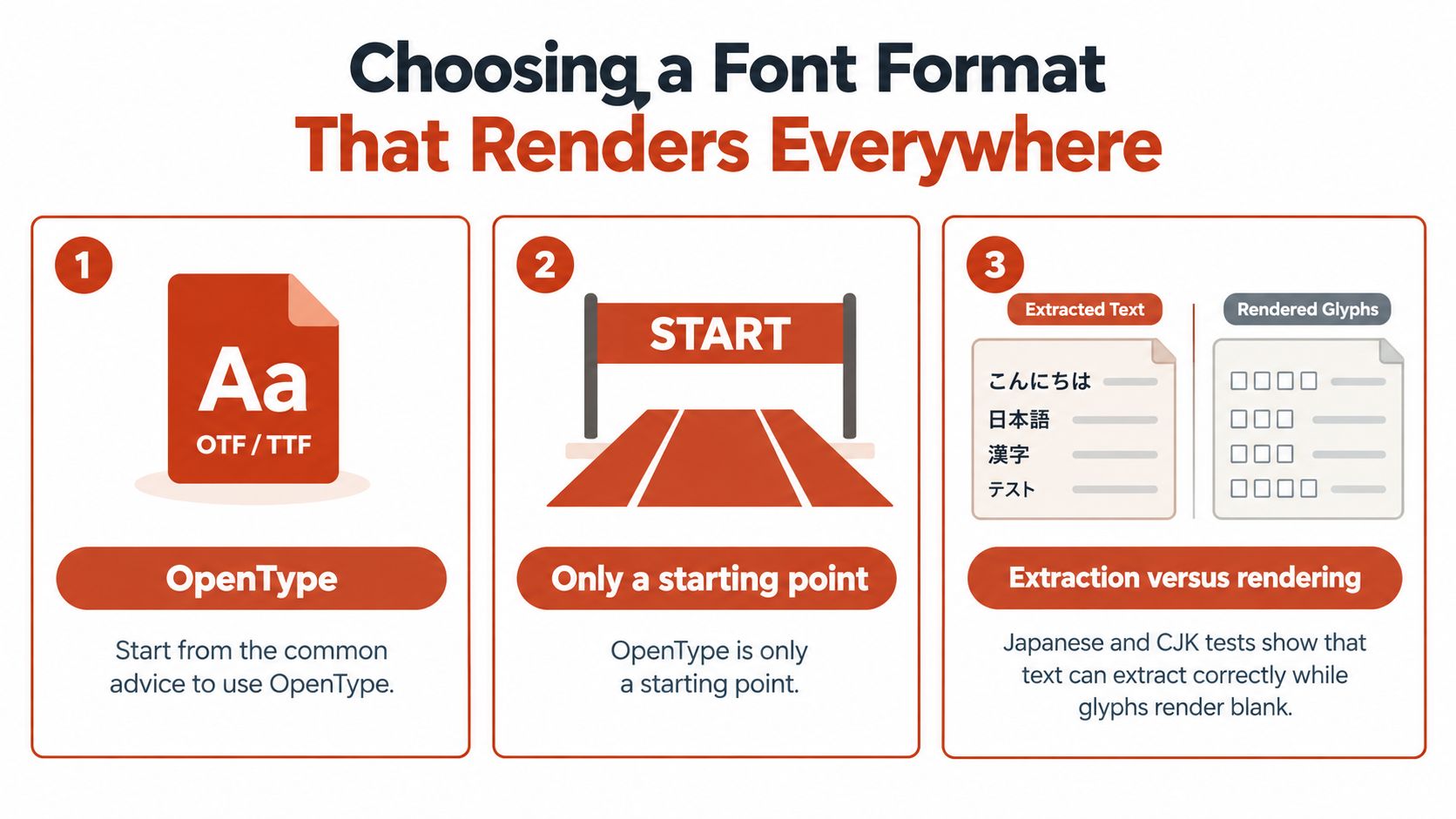
Choosing a Font Format That Renders Everywhere
“Use OpenType” narrows the field; it does not prove the file will render or extract. Judge the exporter by the PDF font structures it writes: CIDFontType0C for CFF outlines, CIDFontType2 for TrueType outlines, and a ToUnicode CMap that returns the same characters you placed.
Japanese PDF font formats and their trade-offs
| Format or approach | Outline and structure | Known risk | Use when |
|---|---|---|---|
| OpenType CFF (CIDFontType0C) | Cubic outlines, compact files | Rasterizer differences can separate visual output from extracted text | Default choice once it passes the test matrix |
| TrueType CIDFontType2 | Quadratic outlines, embedded as CIDFontType2 | File size and behavior vary by toolchain; verify after export | Controlled fallback after the same tests pass |
| Variable font exported as is | Several weights in one file | PDF toolchain may not preserve variation | Avoid for final PDFs |
| Static instance of a variable font | A fixed weight per file | Must be regenerated for each weight | Use when PDFs must match across viewers |
| Reliance on installed CJK language pack | Depends on system fonts, not the file | Older readers without the pack may substitute glyphs | Internal use on known machines only |
Test the exporter and viewer together
Treat visible text and usable text as separate results. A page can draw every kanji on screen and still fail copy, search, or downstream parsing if the CID and ToUnicode paths disagree. When a CFF export extracts cleanly but leaves missing glyph tiles on a required viewer, keep the same source and regenerate through a TrueType CIDFontType2 path, then rerun the full matrix. Use that switch as a controlled fallback, not a verdict on CFF.
For variable sources, export static instances for final PDFs and confirm the exact weight reached the file. The outline decision sits upstream of the CMap checks, so compare choices with the practical OpenType versus TrueType decision guide after you know which viewers must pass.
Build a representative test file
Use one page from the actual job: horizontal and vertical text, rare kanji, JIS X 0213 characters, mixed Latin and punctuation, and a line reserved for copy testing.
- Viewer coverage: open the identical export in a desktop viewer, a browser PDF viewer, a mobile reader, and print preview.
- Functional coverage: record rendering, extraction, search, line breaks, and screen-reader behavior.
- Generator coverage: store exporter settings beside each result so a pass is reproducible.
Before release, run the two-candidate test: export CFF and TrueType versions of the same page, then require clean glyphs and character-for-character copied text on every viewer your audience uses.
Desktop, Web and Document Licenses Compared
A desktop purchase doesn't automatically cover every destination for the same typeface. Creating a Japanese PDF, hosting font files on a website, and distributing an editable template are three separate uses, and the font name in your InDesign menu doesn't tell you which of them your contract allows. The EULA does.
License types that apply to Japanese PDF fonts
| License type | What it covers | Typical limit | Japanese PDF implication |
|---|---|---|---|
| Desktop | Installing OTF or TTF files on licensed computers for design, print, and PDF production | Named, licensed users | Creating the PDF is usually covered; hosting the font files isn't |
| Web | Serving WOFF or WOFF2 files through @font-face |
Page-view tier per licensed domain, billed annually | Covers website font serving, not automatically downloadable PDF embedding |
| Electronic document | Embedding in e-books, e-magazines, and interactive PDFs | Licensed per title or publication | Confirm whether editable distribution is allowed |
| Embedded-only PDF | Viewing or printing a read-only PDF | Recipients cannot extract or edit the font | Editable templates may require recipients' own licenses |
| Desktop file converted to web font | Repackaging desktop OTF or TTF files for the web | Usually prohibited unless expressly permitted | Check the license before conversion |
Match permission to the distribution surface
A desktop license is a machine-count agreement: it permits installation on the specific licensed computers named in the contract, and its authority ends there. A web license covers a different act, serving font files through CSS. EULAs commonly prohibit repackaging desktop OTF or TTF files into WOFF or WOFF2 unless a clause expressly allows it, so converting a licensed Japanese desktop face for a landing page is itself a permission question, not a format question.
The question for a PDF isn't whether the document sits on a website. It's whether you're distributing a document containing permitted embedded resources or serving the underlying font files for web typography. A brochure PDF offered for download falls on the document side of that line; a @font-face link pointing at the same face does not.
The desktop and web font licensing comparison separates these questions clause by clause. Treat the font name and the screen proof as irrelevant here. Only the signed agreement and its embedding clause settle permission.
Licensing boundary: Technical ability to embed, extract, or convert a font doesn't establish permission to do it.
Preserve a usable procurement record
Record the licensed users, permitted domains, page-view or visitor limits, supplied file formats, renewal date, and whether PDF distribution is view-only, printable, or editable. Japanese typefaces often ship as separate desktop, web, and document packages, so retain the exact files tied to each purchase rather than a single folder of mixed deliveries.
When a foundry flags unlicensed use, its first request is the purchase record. Remedies follow the agreement rather than a fixed schedule: some contracts set an underpayment rate per unlicensed seat or domain, others require retroactive licensing and removal of the distributed files. A team that can produce its license terms within a day handles that request differently than a team guessing at what it bought.
This is general information, not legal advice. The governing EULA controls, and counsel should resolve uncertain distribution rights before delivery.
Worked Example and Pre-Send Checklist
A hypothetical agency handoff, not a reported client case. A studio ships a Japanese parts catalog as a print-ready PDF. Every page displays correctly in two viewers, and the print proof matches the screen exactly. The failure only surfaces after delivery: the client's support team searches the file for known product names and gets zero hits, and text copied from the document pastes as unreadable glyphs.
The engineer opens the file internals. The Japanese face is embedded and subset correctly, so the visual layer is sound. What the export dropped was the ToUnicode mapping for the CID-keyed font: every glyph still draws, but nothing in the file maps back to characters. I have seen this exact split pass repeated rounds of visual review because nobody thought to copy a line of text.
The team then reads the project's EULA. In this example, it permits embedding for viewing and printing but does not authorize the editable file the client wants to send regional offices for localization. The agreement itself draws the line that matters here: embedding a font so a document can be read is a separate permission from embedding it so recipients can edit with it.
Resolve the technical and permission failures separately
The designer re-exports with permitted embedding and a working ToUnicode map, then repeats the extraction and print-preview tests. Separately, the team purchases the editable-document permission before releasing the catalog, including any seat rights the agreement requires for the receiving offices.
Two failures shared one cause: everyone trusted the screen proof. Correcting the export would not have widened the license, and a wider license would not have restored the text layer.
Make the handoff reproducible
Run the structure check. Confirm embedding, the expected Type 0 and descendant CIDFont structure, a consistent CID collection, and working ToUnicode mappings for every Japanese face in the file. Retest the characters that failed before, not the cleanest paragraph.
Test what the audience will do. Open the file in their viewers, search it, copy from it, run an extraction pass. Record rendering results and text results separately, saved with the file version, so a reviewer can tell a visual pass from a functional one.
Review the actual distribution method. Viewing, printing, editing, publishing on a site, or bundling into an e-book each carries different license implications. A font inventory or exportable audit report supports that review, but an automated finding is not a legal interpretation.
Archive the evidence. Keep the PDF properties, export settings, governing EULA, and test log in the project record, with the approved deliverable attached, so nobody sends the earlier failed export by mistake.
Where embedded-resource inspection is part of the process, follow a controlled PDF font extraction and audit workflow. Inspection should establish what the file contains, not become an unapproved route to reusing font software.
Release the file only when the technical results and the distribution permissions both match the intended handoff, with the governing EULA settling any permission question.
Font Checker Pro accepts PDFs, identifies their typefaces, and exports findings that support a font and licensing audit. Visit Font Checker Pro to inventory your Japanese PDF's fonts, then keep the report with your mapping tests, viewer results, and EULA review.