A PDF font is Unicode-ready only when it's embedded and every character code it uses maps to a Unicode value, usually through a /ToUnicode CMap. That means the popular advice to just embed your fonts and approve the proof isn't enough, because embedding proves the shapes can travel, not that the file knows what those shapes mean.
Why a PDF Can Look Right and Still Fail
A legal team approves a 40-page agreement that matches the signed draft exactly. Weeks later, someone searches for one clause and gets nothing, then copies a paragraph and pastes question marks. Nothing looked wrong at sign-off, and that's the point.

Visual correctness and text correctness are separate tests. The embedded font draws the shapes, while the text layer must state which Unicode characters those shapes represent. The W3C position on PDF text resolution is that visual rendering alone is not sufficient, and PDF text must resolve through a /ToUnicode CMap, a predefined encoding, or character-name mappings.
This affects designers signing off artwork, developers generating PDFs in pipelines, compliance teams relying on searchable text, and screen-reader users who never see the page. If you're deciding how you'll pull text back out later, comparing methods for detecting text in PDFs and reporting on fonts helps you set the right expectation before export.
A Unicode-ready PDF Unicode font is embedded and maps each character code to Unicode.
The requirements, lifecycle decisions, common failures, an inspection procedure, and licensing checks that follow all come back to that sentence. From now on, run a text check alongside every visual check.
What Makes a PDF Font Unicode-Ready
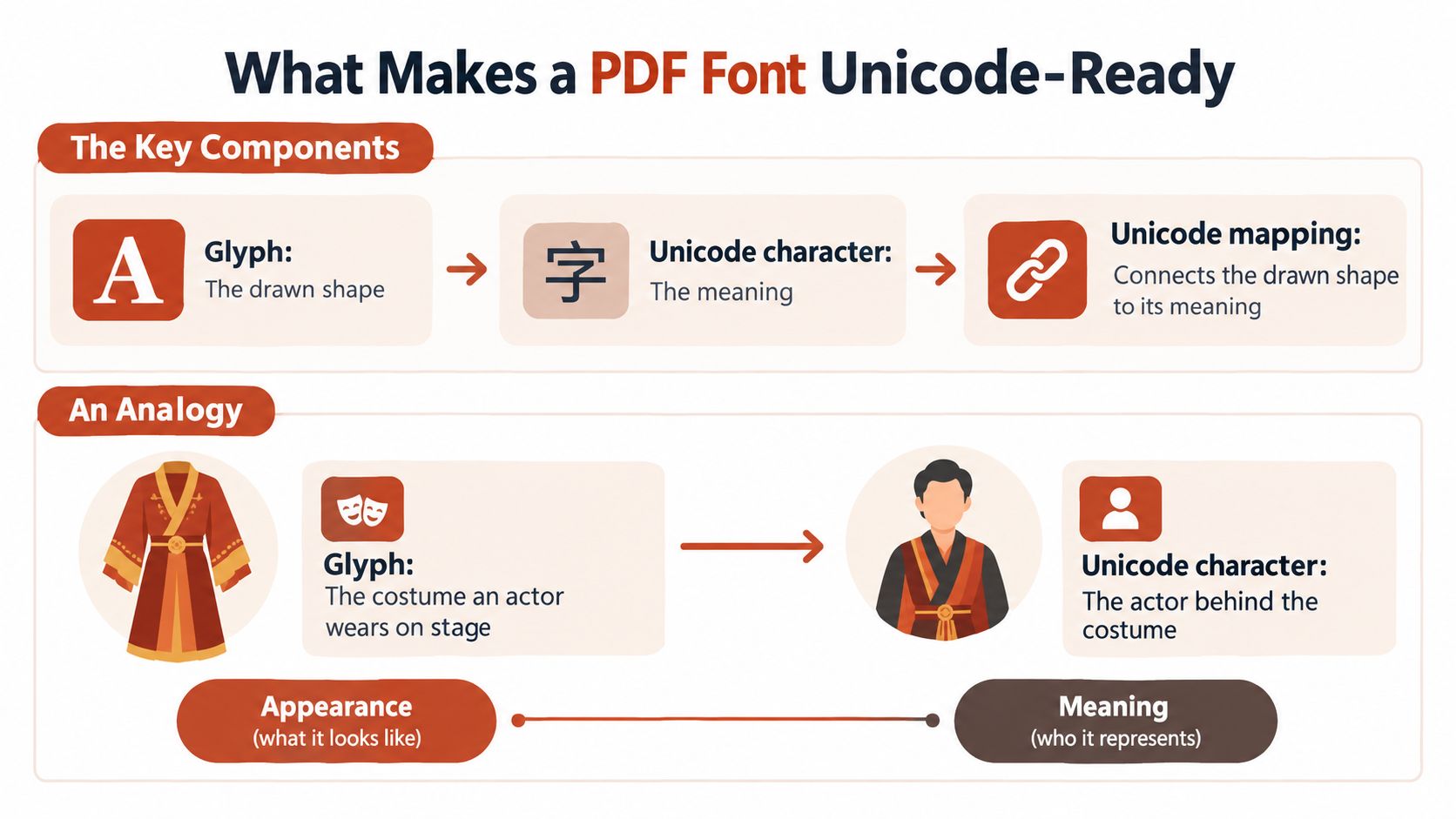
Think of a stage. The glyph is the costume an actor wears, the visible shape the audience sees. The Unicode character is the role being played, the meaning. The /ToUnicode CMap is the cast list that says which costume belongs to which role, and without it, someone reading the program can't tell who was who.
That shared numbering matters at scale. Unicode 15.0 contained 149,186 characters across 161 writing systems, and Unicode began in 1991 with Unicode 1.0 covering more than 7,000 characters, as traced in the Unicode version history in the core specification. One numbering system lets files move between operating systems without each font inventing its own.
The Components in Reading Order
| Component | What it stores | What it controls |
|---|---|---|
| Embedded font program | Glyph outlines in TrueType, OpenType or Type 1 form | Shapes drawn on the page |
| Encoding or Differences array | Mapping from byte codes to glyph names | Which glyph a given code draws |
| Type 0 font with CIDFont | Multi-byte character codes and CID glyph selection | Large scripts such as Chinese, Japanese and Korean |
| /ToUnicode CMap | Code-to-Unicode pairs using bfchar and bfrange in UTF-16BE | Copy, search, indexing and screen-reader output |
| Adobe Glyph List | Glyph name to Unicode value pairs | Meaning of Type 1 text when no ToUnicode map exists |
First, the embedded font program supplies the outlines, so the reader doesn't need the font installed. Next, the encoding or Differences array turns the byte codes in the content stream into glyph names, which decides which shape gets drawn. Displayed text isn't stored as Unicode by default, because content-stream bytes are interpreted through a font encoding and then mapped to glyphs, which is why reliable searchable text requires a /ToUnicode CMap in the font dictionary.
For large scripts, a Type 0 font acts as an indirection layer. Its encoding CMap converts bytes into CIDs, and the descendant CIDFont uses those CIDs to select glyph descriptions, but that CID-to-glyph relationship alone doesn't identify the intended Unicode character, as the PDF font descriptor specification notes on composite fonts explain. Unicode recovery is a separate step, and it's the step people skip.
Then comes the /ToUnicode CMap, pairing each code with a UTF-16BE value using bfchar for single pairs and bfrange for runs. If it's missing, readers fall back in order, first to the encoding dictionary and Differences array, then to glyph names read through the Adobe Glyph List, then to treating the raw code as a Unicode code point. Each step is less dependable than the last, especially for subsetted, composite, CID-keyed, or Type 3 fonts.
Keep that table nearby. It doubles as your inspection checklist later, because every row is something you can verify in the file.
Embedding Versus Subsetting by Document Lifecycle
Suppose your document never uses a dollar sign. A subsetted font leaves that glyph out because it stores only the glyphs used at export time. Full embedding stores the entire character set instead, which is why full and subset embedding are described as the two principal forms of PDF font embedding.
You'll recognize a subset in a font list by its tag, a short prefix before the name, as in ABCDEF+Calibri. That tag is a useful warning label. It tells you the file carries only what was needed on export day.
The Lifecycle Risk
A subset can't display characters it doesn't contain. So a later edit, a merged file, a translation, or a reused template can fail the moment new text needs a glyph that wasn't in the original subset. Nobody notices at export, because everything on the page renders fine.
Large repertoires change the conversation. For CJK and other big character sets, subsetting is the norm and embedding the entire set isn't standard practice, since Type 0 or CJKV fonts must be subset rather than fully embedded. So the key question isn't full versus subset in the abstract, but which glyphs must remain available for the document's future.
Matching the Mode to the Document
| Document lifecycle | Embedding mode | ToUnicode map | Edit risk after export |
|---|---|---|---|
| Final print-only artifact | Subset | Advisable | Low |
| Searchable archive | Subset covering every used glyph | Required | Low to medium |
| Accessible public record | Subset with full coverage of used characters | Required | Low |
| Editable template or form | Full embedding where the licence allows | Required | High if subset |
| Multilingual master | Full embedding, or CJK subset with spare glyphs | Required for each script | High |
Read the table by asking what happens after export. A final print artifact is finished, so a subset is fine and keeps the file lean. An archive or public record won't be edited, but it must be searched or read aloud, so the map is essential. A template or multilingual master is a starting point for future work, so glyphs you haven't used yet still matter.
Three questions before you export: Will the text change? Will it be searched or read aloud? Will it be translated? A yes to any of them raises the bar.
If the text will change, you need glyphs beyond today's page. If it'll be searched or read aloud, you need a sound /ToUnicode map. If it'll be translated, you need coverage for scripts and accents that aren't in the current version.
The sensible default is to subset final artifacts and keep an editable master with full embedding where the font licence allows it. That way, the shipped file stays small and the working file stays fixable.
Common Problems and How to Fix Them
Start with the symptom people see most, boxes where letters should be. That one symptom has two common causes, a font that isn't embedded at all, or a subset that's missing that particular glyph. Those need different fixes, so match the symptom to a likely cause before you change anything.
This isn't theoretical. In research on Nepali PDFs and Unicode-compatible fonts, documents using Unicode Nepali characters could be parsed accurately, while PDFs made with Unicode-incompatible fonts needed post-extraction translation and lost accuracy, and image-only PDFs required OCR instead. The font choice at authoring time decided whether the text could be recovered at all.
Symptom, Cause, and Fix
| Symptom | Likely cause | Fix |
|---|---|---|
| Boxes or empty squares where characters should be | Font not embedded, or subset missing that glyph | Re-export with the font embedded; use full embedding if text may change |
| Copy gives question marks or U+FFFD | Missing or invalid ToUnicode map | Regenerate from a Unicode-aware source and check the map's byte order |
| Search misses fi or ffi inside ligatures | Ligature glyph mapped to a single code with no component letters | Map the ligature to its component letters in ToUnicode, or turn off ligatures at source |
| Text correct on screen but different on another machine | Font not embedded, so the viewer substitutes a system font | Embed fonts at export and confirm them in document properties |
| Accented letters become unrelated symbols | Legacy symbol or private encoding without Unicode values | Use a Unicode-capable font and embed it |
| Arabic or Hindi text extracts in scrambled order | Visual-order glyphs with no logical Unicode sequence | Test with pdftotext and regenerate from a shaping-aware engine |
| Emoji display as boxes | Font lacks emoji glyphs or colour glyph tables | Embed an emoji-capable font or place emoji as images with alt text |
| Equations extract as random characters | Math symbol font without Unicode mapping | Map each symbol to its Unicode value or supply alt text |
| Edits fail on newly added characters | Subset lacks glyphs added after export | Re-embed the full font in the editable master |
Notice how the rows split into two families. Boxes, substitution, and failed edits are glyph problems, where the shape is missing. Bad copy output, missed ligature searches, scrambled order, and random equation characters are mapping problems, where the shape exists but the file can't say what it means. That split tells you whether to fix embedding or fix the map.
For a one-off problem, re-exporting from the source file usually settles it, and following a practical fix guide for PDFs whose fonts do not display properly keeps you from guessing. Patching the PDF itself rarely holds, because the next export regenerates the same defect.
When the same symptom shows up across many files, the fault sits in your pipeline, not in one document. Add a validation step at export so the failure is caught where it's created. Watch for invisible or stray characters creeping into source copy as well, since they can survive into the text layer, and editors producing cleaner AI-assisted drafts for editors will recognize how easily those characters go unnoticed.
Whatever you fix, retest it. Run the copy, search, and extraction checks from the inspection procedure that follows, and confirm the pasted text matches the source. A fix you haven't retested is only a hope.
How to Inspect Fonts and Unicode Mapping in a PDF
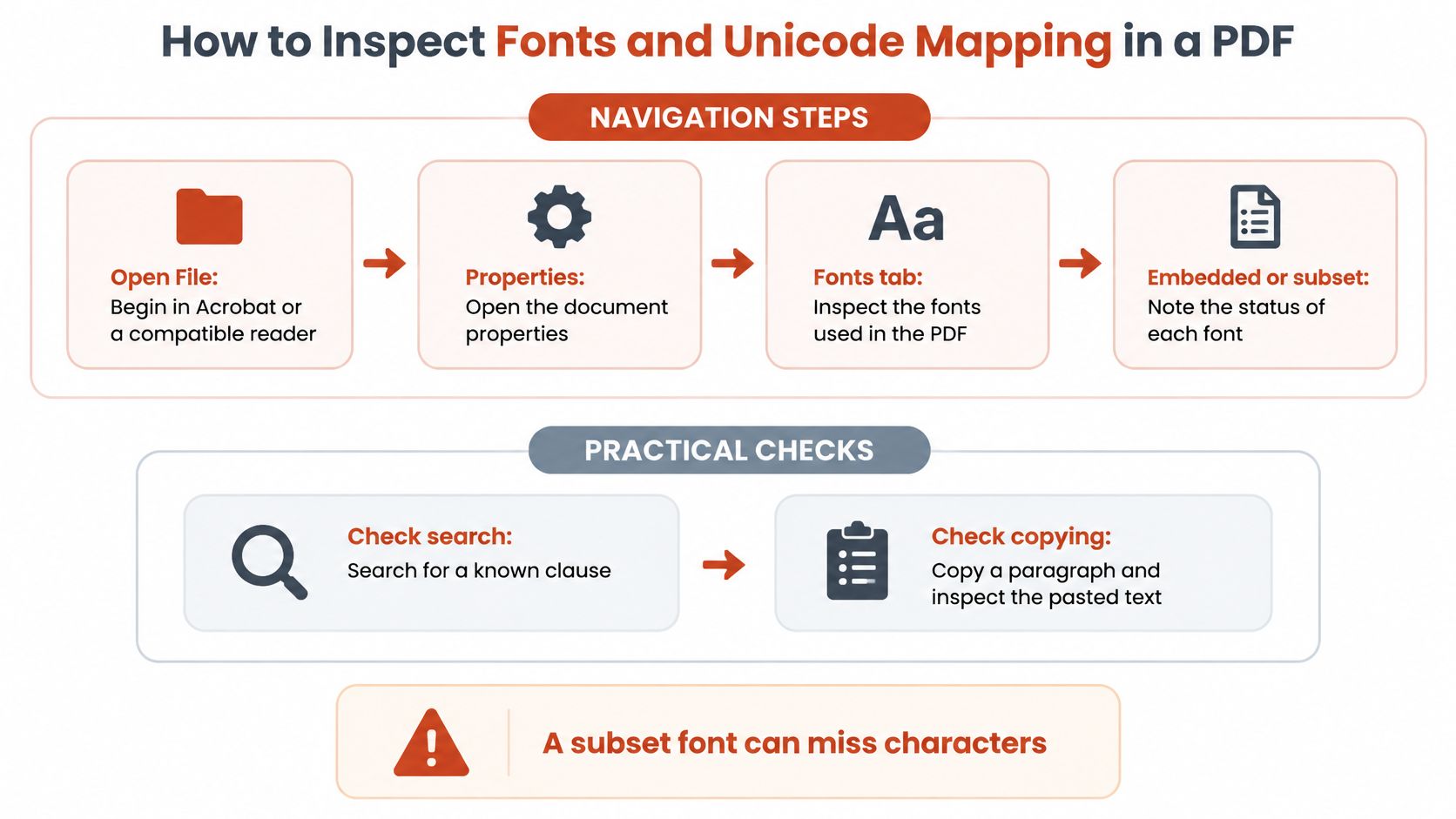
Work in two layers. The first two steps cover the font layer, what's embedded and what's subset. Steps three to six cover the Unicode layer, which is the part visual review can't see. The font layer checks that every actor is on stage. The Unicode layer checks that each one is wearing the right name tag, and a PDF can have a full cast with half the tags missing.
The Font Layer
- Open the document properties in your PDF reader and find the font information panel, then note each font as embedded or subset. Do this first because a subset font can miss characters added later, and you want that known before anyone edits the file.
- Run a command-line font lister on the file and read its embedded, subset, and Unicode columns. A "no" in the Unicode column means that font has no /ToUnicode map, so you've found a mapping gap without opening a page.
These two steps take minutes and give you an inventory. Writing down the font names also helps later if you're recovering and auditing embedded fonts from a PDF that arrived from someone else. A font-checking tool such as FontCheckerPro can help with the font inventory across a folder of files, but the Unicode checks below still require manual testing.
The Unicode Layer
- Copy a test paragraph containing accents, a ligature, and a symbol, then paste it into a plain-text editor and compare it with the source. Plain text strips away formatting, so any wrong character is immediately visible.
- Run a text extractor in layout mode and diff the output against the source text. A diff finds dropped or replaced characters that your eye would skip over in a long document.
- Test a multilingual sample with Arabic, Devanagari, and CJK text, plus an emoji and a math symbol, checking both the characters and their order. Order matters as much as presence for right-to-left and shaping-dependent scripts.
- Decompress the PDF into a readable form with a stream-level inspection tool, then open each /ToUnicode stream and look for bfchar or bfrange entries in UTF-16BE, with no replacement characters. This is the only step that shows you the map itself rather than its effects.
- Log each affected font and code point, fix the source, and rerun the whole sequence. A written log turns a vague complaint about broken text into a defect someone can reproduce.
If step two shows a "no" in the Unicode column, don't stop there. Steps three to six tell you how much damage that missing map causes.
Readers sometimes ask whether step six is overkill. For a casual handout, it might be. For contracts, public records, and anything feeding an index or archive, it's the step that separates a plausible file from a verified one. Byte-order or range errors in a CMap produce incorrect extraction while the page still renders correctly, so only the stream itself reveals them.
Keep the sample text you used. Reusing the same accents, ligature, symbol, and script sample on every export makes results comparable, and a regression shows up as a change against a known good baseline rather than a fresh surprise.
Licensing Checks Before You Share a PDF
This is informational guidance, not legal advice, and the controlling EULA is what governs your use. Read it before deployment, because terms vary by foundry and a font's price tells you nothing about what you're allowed to embed.
Desktop and Web Are Different Licences
A desktop licence generally covers installing OTF or TTF files on licensed users' computers for work in design software. A web licence covers serving WOFF or WOFF2 files through HTML and CSS using @font-face. One major foundry prices web licensing by the licensed fonts and monthly page views, whereas desktop licensing is based on the number of users, and its foundry EULA separating desktop and web font licensing states that a desktop licence does not authorize embedding the font in websites, software, or apps.
| Licence type | What it covers | Permitted files | Pricing metric | Does not automatically cover |
|---|---|---|---|---|
| Desktop | Installing on licensed computers for design work | OTF or TTF | Number of users | Embedding in websites, software or apps |
| Web | Serving webfonts through HTML and CSS with @font-face | WOFF or WOFF2 | Licensed fonts and monthly page views | Desktop installation use |
| Distributable PDF template | Not automatically covered by desktop licence | As stated in the EULA | As stated in the EULA | Confirm the EULA clause on PDF embedding |
Where PDFs Get Awkward
A font licensed for desktop artwork isn't automatically licensed for self-hosted website text or distributable PDF templates. Some EULAs treat embedding in documents sold to the public as a separate issue and condition PDF embedding on restrictions such as preventing extraction. That condition can clash directly with your accessibility and search needs, since a file that blocks extraction also blocks the text layer you've worked to make sound.
Getting this wrong has practical costs, even before anyone talks about fines or formal claims:
- Retroactive licence fees: You may have to buy the correct licence for use that already happened.
- Forced redesigns: Documents and templates get rebuilt in a different typeface under time pressure.
- Takedown requests: Published files come down until the licensing is settled.
- Unplanned replacement of brand typography: Your standard face disappears from client-facing PDFs.
Confirm three things in the EULA before you share. Check desktop use for the people creating the file, web use if the same face appears on your site, and document distribution for the PDF itself. A fuller walkthrough of font licensing for commercial use is worth reading before you standardize a face across deliverables, and never treat a font as free or safe without that check.
Set a Pass-Fail Gate for Every Exported PDF
A PDF ships only when it passes four gates. A failure at any gate sends it back to source rather than into a manual patch, because hand edits don't survive the next export. Think of it the way a well-run checklist works in any field, much like a five-day lesson plan printing checklist that stops a bad print run before it starts.
The Four Gates
- Gate one, font inventory: Every font in use is listed with its embedding status, and any subset is justified by the document lifecycle in the earlier table.
- Gate two, Unicode mapping: Every font used for text has a /ToUnicode map with valid UTF-16BE values and no replacement characters.
- Gate three, text behaviour: The copy, search, and extraction tests match the source for your Latin sample, and the multilingual sample passes for every script the document uses.
- Gate four, licence evidence: Licence records are stored for each font, covering the distribution scope and the EULA clause on PDF embedding.
On failure, fix the source, re-export, and rerun all four gates rather than editing the PDF by hand. Add the gates to your export pipeline so they run every time, following the pattern of automating font checks through a REST API in CI and CD, and rerun them on last quarter's PDFs to measure how wide the problem already is. Assign one owner to licence evidence so gate four doesn't depend on memory.
One gate protects search, accessibility, and legal review at the same time, because all three depend on the same readable text layer. Start with gate two today, since it's the one visual review has been missing.
Run your next exported PDF through Font Checker Pro to inventory every typeface it contains and check the licensing position before the file leaves your team. Pair that inventory with the copy, search, and extraction tests above, and you'll know your PDF Unicode font setup works rather than merely looks right.