An image text recognition API pulls text out of images or PDFs and turns it into data your systems can actually work with. Beyond simple character detection, many services now preserve reading order, locate text regions, extract tables, and return structured JSON or Markdown. That makes them genuinely useful for development tasks, design reviews, and licensing audits where structure matters.
Understanding Image Text Recognition API Capabilities
Traditional OCR answers a single question: what characters appear in this image? A modern image text recognition API goes further. It handles layout detection, field identification, and even suggests typefaces — capabilities that matter when a scanned contract, receipt, screenshot, or brand asset needs to feed directly into another workflow.
Recent systems have gotten impressively versatile. They process handwriting, multiple scripts, formulas, charts, and complex page layouts. That said, your mileage will vary depending on source quality. Blur, skew, low contrast, unusual fonts, curved text, and overlapping elements all chip away at confidence scores. Published benchmarks look great on paper, but nothing replaces testing with files that actually resemble what you'll be processing day to day.
For broader context on how current AI-powered OCR handles documents, this Ocr guide for content creators is a solid reference.

For typography work especially, the distinction matters. A specialized service can compare letterforms in a screenshot or PDF against known font families, whereas general OCR will only return the words. FontCheckerPro, for instance, provides multiple candidate matches alongside confidence scores, which helps teams quickly decide which assets deserve manual review. If you want to learn how image recognition software works before planning your integration, that's a good starting point.
| Capability | General OCR | Specialized font identification |
|---|---|---|
| Primary output | Recognized characters | Candidate typefaces and confidence |
| Best use | Search, indexing, data entry | Brand and typography audits |
| Main limitation | Layout or character errors | Visual similarity isn't licensing proof |
Recognition is evidence for investigation, not legal clearance.
Here's something that catches people off guard: a detected typeface doesn't prove its use is licensed. You still need to check the actual agreement and distinguish web font licensing from desktop font licensing, because rights, domains, seats, embedding, and distribution terms can differ significantly. Unauthorized use can lead to settlement demands, retroactive fees, or litigation, and penalties vary by jurisdiction. This article is informational, not legal advice.
For design teams, use recognition results to prioritize what gets verified first. For developers, store the original file, the API response, the confidence score, and the reviewer's decision together so your audit trail holds up if anyone questions it later.
Choosing an image text recognition API isn't just about headline accuracy numbers. Specialized enterprise systems tend to dominate on structured documents—think forms, invoices, ID cards—where the layout is predictable. Generalist models, on the other hand, often handle messy scene text better: street signs, product labels, screenshots pulled from a dozen different sources. Your specific files, tolerance for mistakes, and how much human review you can absorb should drive the decision.
Public benchmarks give you a rough starting point, but those rankings shift constantly as new models drop. Anyone serious about OCR evaluation will tell you to run your own tests on your actual images. Performance swings wildly depending on document type, language mix, layout complexity, and how rough the source files are. That's not a minor detail—it's the whole game.
Measure Real Production Accuracy
Don't sign anything until you've built a representative sample. Not just clean scans. Toss in screenshots, JPEG-compressed uploads, pages that are skewed or stretched, blurry phone captures, weird typefaces, and the exact PDFs your team deals with every week.
For every result, manually verify the transcription against a reference. What matters here isn't just "did it work?"—it's understanding how and where things break down. Track these four things:
- Character and field accuracy, particularly for names, license numbers, and identifiers where a single wrong digit causes real problems.
- Confidence scores, and more importantly, what threshold separates auto-accepts from items that need human eyes.
- Layout accuracy: reading order, table structure, whether it correctly identified which text block belongs where.
- Failure rates, not just the happy-path success rate.
A vendor benchmark shows potential. Your production sample shows whether the API is actually usable.
Accuracy also ties directly into compliance risk. A low-confidence font match might point you toward a candidate typeface, but it doesn't confirm licensing. Always verify the agreement yourself. Pay attention to the distinction between web font licensing and desktop font licensing—the permitted domains, seat counts, embedding rules, and distribution rights can differ significantly. Getting it wrong can mean retroactive fees, settlement demands, or worse. This is informational guidance, not legal advice.
Calculate Total Cost of Ownership
Per-page pricing is misleading. Basic text extraction costs far less than layout analysis, structured field extraction, or reprocessing files multiple times because the first pass failed on poor-quality inputs. Then there's storage, engineering time, monitoring infrastructure, retry logic, and the manual review burden—none of which shows up in the sticker price.
The real formula looks something like this:
Total cost = API processing + infrastructure + integration work + review labor + error remediation
For high-volume audits, calculate how many reviewer-minutes you'll spend on low-confidence outputs. A cheaper per-call API gets expensive fast when your team is constantly fixing omissions and false matches.
Before going live, run a fixed pilot. Compare accuracy per dollar, end-to-end processing time, and actual review workload—not just the advertised metrics. For typography-specific audits, FontCheckerPro can support this evaluation with confidence-ranked font matches and exportable reports. You can also read about REST API workflows for font audits and compliance to understand how results connect to your internal systems before building the integration.
7 Steps to Build a Typography Audit with an Image Text Recognition API
Typical audit requests come from a simple handoff: send a screenshot, a PDF page, or a zipped font set to an image text recognition API, then capture the candidate typefaces, confidence scores, and source-file metadata. Keep the request tied to an asset ID, a project name, and a reviewer name so every automated result carries context.
FontCheckerPro runs this workflow across more than 61,000 font families, returning up to five matches and exportable reports for legal and operations teams. Its REST API can feed results into an asset library, a ticket queue, or a CI check, while human reviewers confirm the underlying files and agreements.
The infographic below shows how teams can weigh recognition accuracy, processing cost, real production samples, and compliance checks before deployment.
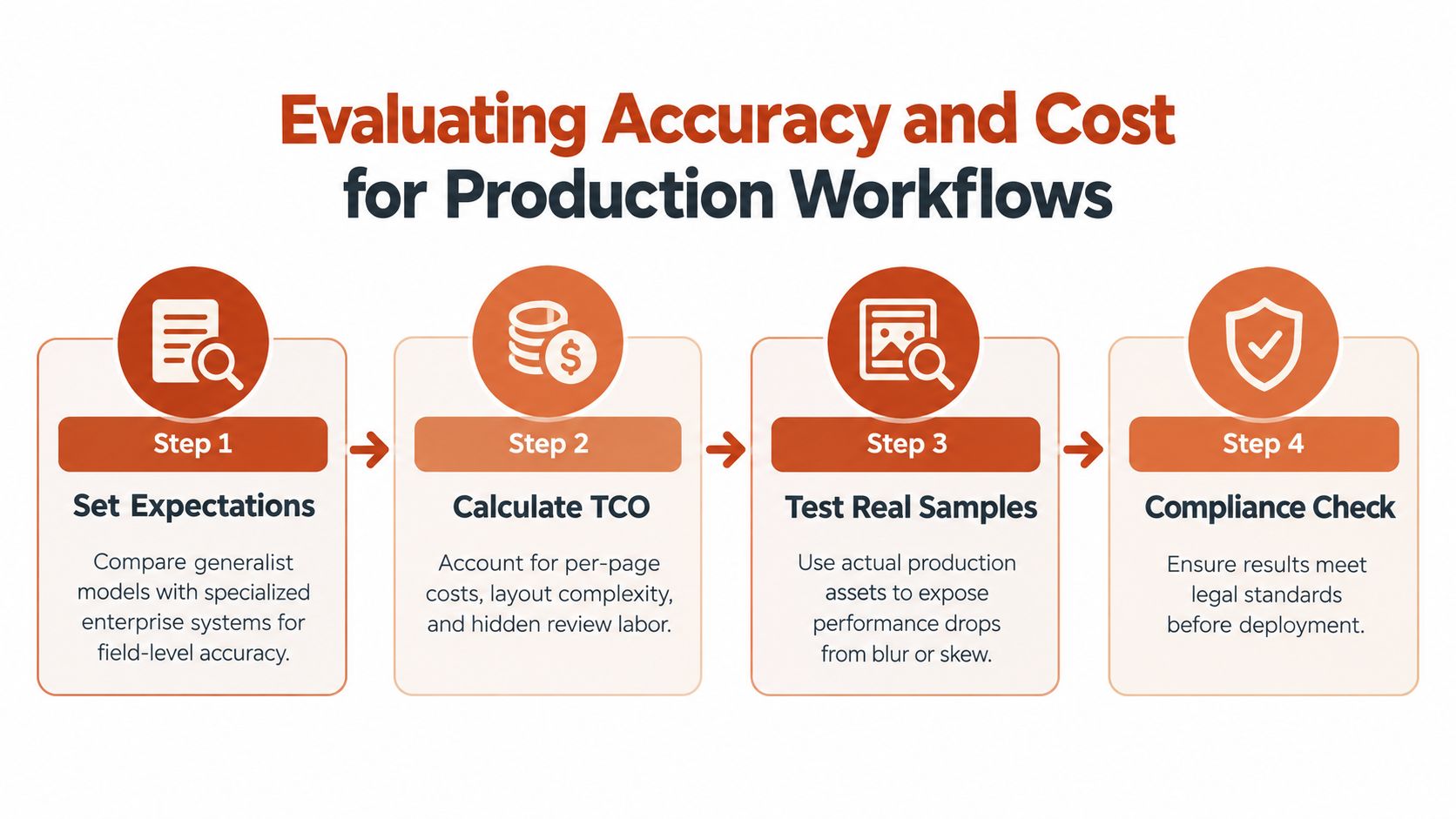
The key takeaway is straightforward: a confident visual match still needs a licensing review, particularly when production costs and legal exposure depend on it.
Map API Results to Review Queues
Store each response in a structured record that captures:
- Asset reference, including URL, PDF page, or archive filename.
- Detected family and confidence score, along with alternate candidates.
- Review status, such as pending, verified, rejected, or inconclusive.
- License evidence, including the agreement, purchaser, permitted domains, seats, and embedding terms.
A confidence score is useful for prioritization, but it isn't legal proof. A low score warrants immediate inspection. A high score moves a result into verification, not automatic approval.
Font recognition identifies what a design appears to use. It does not establish permission to use it.
That distinction matters because web and desktop font licensing are different. Web terms may govern domains, page views, hosting, and embedding. Desktop terms may govern seats, installations, client delivery, and commercial use. A font that looks correctly licensed for a website might still lack permission for desktop production, and the reverse is equally possible.
Build a Defensible Audit Trail
For agencies, archive the original client asset, timestamp, API response, reviewer decision, and agreement link together. FontCheckerPro can generate PDF reports for legal teams, CSV files for operations, and JSON ready for automated workflows.
Before treating any match as approved, verify the foundry's actual terms. Unauthorized font use can trigger retroactive fees, settlement demands, or litigation, with remedies that vary by jurisdiction. This content is informational and not legal advice. Consult qualified counsel for a disputed license or enforcement notice.
For a practical implementation example, read this guide to finding fonts from images and documenting the workflow. Then run a small sample audit, route uncertain matches to a reviewer, and record the evidence before expanding the integration.
Pre-processing Beats Model Swapping
Honestly, you'll get more mileage out of cleaning your images before upload than chasing the latest model. Before anything hits the API, deskew those pages, crop down to the actual text regions, strip out busy backgrounds, and normalize your resolution. Contrast adjustment pulls faint lettering out of the noise, and grayscale conversion kills color artifacts that throw off detection.
Cropping matters a lot for screenshots — surrounding UI elements, buttons, and navigation chrome can genuinely confuse text detection if you leave them in the frame.
The current best practice is to test localized crops against hand-checked ground truth, because performance swings wildly depending on document type and image quality. Always keep the original asset next to the processed version so anyone reviewing the output can trace exactly what decisions were made.

Set Thresholds by Risk
A confidence score is a prioritization signal, not a guarantee. A design inspiration search might accept a lower threshold, while a typography compliance audit should send uncertain matches to human review.
Use separate policies for each workflow:
- Exploration: accept likely candidates quickly, with visible uncertainty.
- Production indexing: reprocess low scores and preserve alternate matches.
- Legal review: require strong evidence, original files, and license verification.
Never convert a high-confidence visual match into automatic licensing approval.
Web and desktop font rights remain separate. Web licenses may restrict domains, embedding, or traffic, while desktop licenses may govern installations, seats, and client delivery. Unauthorized use can result in retroactive fees, settlement demands, or litigation, depending on the jurisdiction. This article is informational, not legal advice. FontCheckerPro can help organize confidence-ranked findings and exportable audit records, but teams should verify the underlying agreement directly.
Batch Safely and Recover Errors
Large site scans should use a queue rather than sending every page in one burst. Group jobs into manageable batches, limit concurrency, and record an idempotency key so a retry doesn't create duplicate audit entries. Exponential backoff helps with temporary rate limits, while per-file timeouts prevent one damaged PDF from blocking the queue.
Return a useful status for every asset:
- Accepted, when output meets the workflow threshold.
- Review required, when confidence is low or candidates conflict.
- Retry, when the service or network fails temporarily.
- Rejected, when the file is empty, encrypted, corrupted, or unsupported.
For PDF-specific workflows, learn more about text detection methods and font reports. Store errors, preprocessing settings, response timestamps, and reviewer decisions, then monitor latency by file type. Silent failures are worse than visible gaps because they can produce misleading compliance reports.
An image text recognition API has moved well beyond back-office document scanning. Teams now rely on OCR services to make creative archives searchable, identify typography in brand assets, and run repeatable compliance reviews. Modern document systems can preserve layout, tables, coordinates, and structured output, while focused image workflows handle screenshots, campaign files, and scanned PDFs. The choice of model matters — structured documents and scene text are fundamentally different problems, and no single approach nails both.
This expansion changes the buying question entirely. A design agency might need fast asset discovery, while an enterprise legal team needs durable evidence, reviewer decisions, and repeatable reports. Developers should assess privacy, retention, throughput, export formats, and integration controls alongside recognition quality.
Build Searchable Asset Operations
Typography oversight illustrates the shift clearly. A detected font can help locate unreviewed campaign files, but it doesn't prove ownership or permission. Web font licensing may cover domains, embedding, or traffic, whereas desktop licensing can govern installations, seats, client delivery, and commercial production. Unauthorized use can trigger retroactive fees, settlement demands, or litigation, depending on jurisdiction. This article is informational, not legal advice.
Recognition supports an investigation; it doesn't replace the license agreement or legal review.
For organizations managing thousands of assets, auditability is becoming as important as automation. Keep the source file, timestamp, API response, confidence score, reviewer decision, and licensing evidence together. FontCheckerPro can help organize this process by scanning images, PDFs, URLs, and font archives, then exporting records for legal, operations, or CI workflows.
Match Adoption to Risk
A sensible roadmap often looks like this:
- Exploration: index assets and surface likely matches for designers.
- Operational review: route uncertain findings to a queue and retain evidence.
- Continuous oversight: schedule scans, monitor changes, and alert owners when issues appear.
Teams should also consider how their asset library supports brand governance. Learn more about digital asset libraries for brand teams before connecting recognition results to broader content operations. The right image text recognition API isn't simply the one with the longest feature list. It's the service that fits your risk tolerance, review capacity, data policies, and operational maturity.
Can Recognition Results Prove Font Licensing?
No. An image text recognition API can identify likely typefaces, but a visual match isn't legal proof that your use is licensed. Web font licensing may cover domains, embedding, or traffic, while desktop licensing can govern installations, seats, and client delivery.
Use the result to locate assets, then verify the foundry's agreement, purchaser, permitted use, and distribution terms. Unauthorized use can lead to retroactive fees, settlement demands, or litigation. This article is informational, not legal advice.
How Should Teams Handle Low Confidence?
Treat confidence as a review-prioritization signal, not an approval decision. Set a lower threshold for design research, a stricter threshold for production indexing, and manual review for compliance reports.
Keep alternate matches instead of discarding them. Save the original image, processed copy, API response, score, timestamp, and reviewer decision so a legal or compliance team can reproduce the assessment later.
A high-confidence match identifies appearance, not permission.
Can Results Enter CI/CD Pipelines?
Yes, but make the pipeline fail safely. A pull request can submit a screenshot or asset, receive candidate fonts and scores, and return JSON to a policy check. Low-confidence findings should create a review ticket, not automatically block deployment unless your documented policy requires it.
For repeatable audits, use stable asset identifiers and idempotent jobs. Export reports for legal review and preserve machine-readable results for engineering systems. FontCheckerPro supports confidence-ranked image matches across more than 61,000 families, with exportable records for operational workflows.
Does Scanned Font Detection Show Web or Desktop Rights?
Usually, it shows only what the asset appears to contain. It cannot determine whether the underlying permission is a web license or a desktop license, so confirm both separately where relevant.
For practical auditing, FontCheckerPro can organize findings, confidence scores, and audit evidence. Verify every agreement directly and consult qualified counsel about disputes.
FontCheckerPro helps teams audit typography across live URLs, PDFs, images, and font archives. Start your review at FontCheckerPro.