You've found a font that makes a packaging mockup feel handmade rather than factory-made. It looks convincing on the cover, but the navigation feels cramped, the PDF needs to go to a client, and nobody's sure whether the download includes website rights.
That's the practical challenge with arts and crafts fonts: choosing the look is only part of the job. You also need to decide where the lettering stays readable and which permissions cover the files you'll deliver. The licensing guidance below is informational, not legal advice.
Arts and Crafts Fonts at a Glance
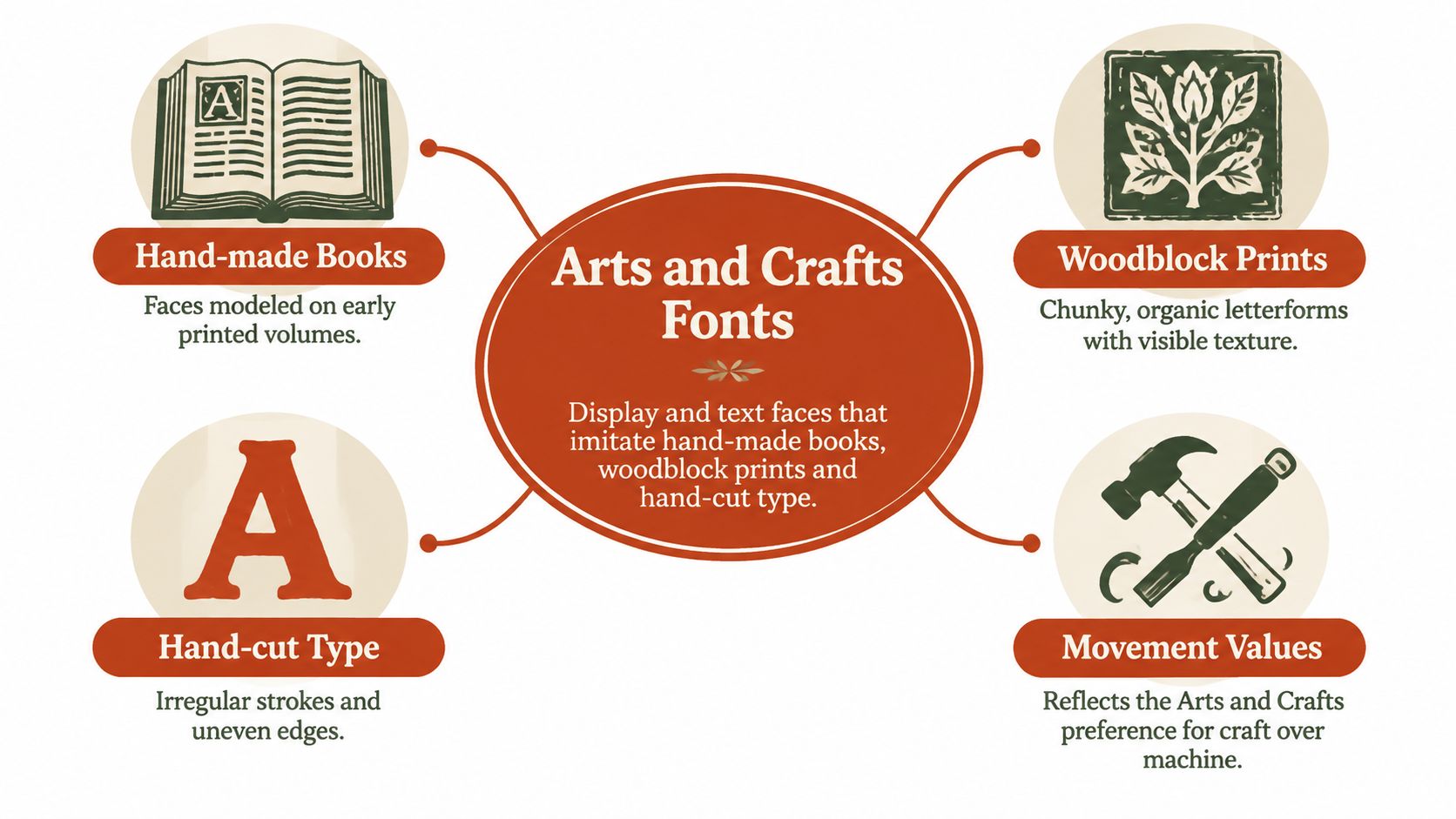
Arts and crafts fonts are display and text faces that imitate hand-made books, woodblock prints and hand-cut type, reflecting the Arts and Crafts movement's preference for visible craft over machine polish. Like a hand-thrown mug with an uneven rim, the letters suggest that a person shaped them.
That doesn't mean every letter should look damaged. A convincing face usually has a consistent underlying structure, even when its edges, proportions or terminals feel individually worked.
Core Traits of Arts and Crafts Fonts
| Trait | What It Looks Like | Why It Appears | Typical Place You See It |
|---|---|---|---|
| Irregular hand-cut edges | Strokes wobble and serifs look chiseled | Copies hand-cut punches and woodblock lettering | Posters, labels, invitations |
| Historical roman forms | Even, calligraphic roman with humanist curves | Revives early printed-book design | Book titles, editorial headings |
| Dense, dark texture | Heavy blackletter-style colour on the page | Treats the page as one designed object | Chapter openers, packaging |
| Decorative extras | Ornaments, alternates, ligatures, borders | Type integrated with the whole page | Logos, frames, certificates |
Look for a combination, not an isolated effect. As a practical selection rule, a candidate generally needs two or three of these traits to read clearly as Arts and Crafts. One rough edge might suggest grunge; an uneven baseline alone might suggest casual handwriting.
Historical roman designs deserve particular attention because they can express the style without looking distressed. The distinction becomes easier to judge when you understand old-style serif forms and their historical traits. Examine the rounded letters, the rhythm of thick and thin strokes, and how the serifs join the stems.
Selection rule: Judge the construction of the letters before judging the texture applied to them.
A distressed surface can disguise ordinary proportions. Conversely, clean outlines can still carry a strong handmade-book character through broad forms, calligraphic movement and carefully integrated ornaments.
These traits describe appearance, not legal status. An authentic-looking font file doesn't arrive with broader permissions just because its inspiration is historical. Hold each candidate against the table before deciding whether it fits the brand, the intended period look and the reader's expectations.
Named Arts and Crafts Typefaces Compared
A font can echo Arts and Crafts through its letterforms, its historical references, or the way it works with the page. Those are separate checks: visual resemblance does not establish a typeface's provenance, and a historical design's name does not settle the rights attached to a modern digital file.
William Morris established Kelmscott Press in Britain in 1891, after Emery Walker's 1888 lecture on historical printing. The William Morris Society's account of the press records that the press operated until 1898 and produced approximately 53 titles in 66 volumes. Its compact output shows how much character can come from coordinated bookmaking rather than a large selection of decorative fonts.
Named Arts and Crafts Typefaces and What to Check
Use the origin column to assess provenance, the defining trait to judge visual fit, and the licensing note to identify what needs checking before production.
| Typeface | Origin | Defining Trait | Licensing Note |
|---|---|---|---|
| Golden | William Morris, Kelmscott Press | Roman modelled on Nicolas Jenson's Venetian work | Digital availability and release terms unverified; check the publisher |
| Troy | William Morris, Kelmscott Press | Gothic inspired by early German printers | Digital availability and release terms unverified; check the publisher |
| Chaucer | Kelmscott edition of Geoffrey Chaucer's works | Smaller version of Troy for text setting | Digital availability and release terms unverified; check the publisher |
| P22 Arts and Crafts | P22 type foundry | Commercial display family in the same spirit | Verify website publishing, PDF embedding, self-hosting and volume-use permissions separately |
The William Morris Society's account of the press dates Golden to 1889–1890 and places Troy in the early 1890s. Golden drew on Nicolas Jenson's fifteenth-century Venetian printing; Troy took inspiration from early German printers. Golden's roman construction makes it a useful reference for headings and short passages. Look at its proportions and the overall colour of a page, rather than relying on a distressed surface to suggest age.
Troy gives a darker, heavier impression. Its Gothic forms can suit a title or chapter opener when the design needs weight, but small counters and tight spacing can close up at reduced sizes. Check the actual words and intended size: a striking specimen can turn into an indistinct patch on a small label.
Chaucer is a smaller version of Troy, made for the Kelmscott edition of Geoffrey Chaucer's works. Its historical text-setting role gives useful context, not an automatic reason to use it for contemporary screen paragraphs. Reading conditions, reproduction methods and audience expectations all affect whether its forms remain clear.
Historical References Versus Current Font Products
Morris designed borders, initials, ornaments, title pages, frames and printer's marks alongside his type. That page-wide approach is part of the style's logic. A single medieval-looking heading on a spacious modern page may suggest the period, while leaving out the relationships among type, ornament and layout.
P22 Arts and Crafts is a modern commercial family, not an original Kelmscott face. Judge it by its specimens and intended applications, not by the family name. Permissions also need separate attention. Adobe's font-licensing guidance distinguishes among uses such as commercial work and logo artwork, and rights in a typeface should not be assumed to transfer between those uses.
Marketplace labels such as Craft or Arts and Crafts help with searching, but do not establish historical classification. Nor does a shared name mean that separate digital releases carry the same permissions. The same care applies to serif italic examples and their licensing risks: identify the specific product and its terms, rather than relying on a familiar style or name.
Before shortlisting a face, ask:
- Visual fit: Does it combine several core traits, or depend on one decorative effect?
- Provenance: Is its origin documented, including who made the digital file?
- Permission: Which licence covers the output you plan to publish or hand over?
Using and Pairing Arts and Crafts Type
A rustic painted sign works above a plain shop window, but the window still has to let people read what the shop sells. Treat expressive typography the same way: give it a prominent role without asking it to handle every message.
Headings, logos, cover lettering, invitations, quote graphics and short packaging copy provide room to appreciate individual forms. Long paragraphs, small all-caps labels, captions and navigation menus demand faster recognition. Low-resolution mobile rendering can further blur narrow gaps and rough contours.
Make the Contrast Functional
- Keep display lines short. A few words give distinctive letters room to work. For an initial screen mockup, try an expressive heading at 32 px or above, then judge the actual font rather than treating that size as a guarantee.
- Give body copy a quieter voice. Start a prototype with a plain companion at 16–18 px. Choose a neutral humanist sans or a restrained serif with an open, clear x-height.
- Use one expressive face per layout. Build hierarchy through size, weight and spacing rather than adding another decorative family. Competing ornaments usually weaken the intended emphasis.
Those sizes are practical starting settings, not accessibility thresholds. The right result still depends on the letterforms, contrast, line length and viewing conditions.
For a heritage-themed cover or campaign, vintage image resources from Photo Speak can help you explore supporting imagery. Keep detailed textures away from the lettering's counters and thin strokes. A busy illustration and a busy font shouldn't have to compete for the same patch of attention.
Leave the companion face plain enough that the reader notices the message before noticing the typography.
Stress-Test the Pairing
Set a full paragraph, a menu, a price, punctuation and any accented names the brand uses. In a separate stress-test mockup, render the paragraph and menu at 14 px in both faces, then inspect them on a phone. That smaller setting is a diagnostic test, not a recommended production size for body copy or navigation.
Check ambiguous forms, crowded joins and words that become unusually wide. Use the practical website typography guide for design and code to turn the chosen pairing into consistent roles rather than scattered local overrides.
Loading Decorative Fonts Without Layout Shifts
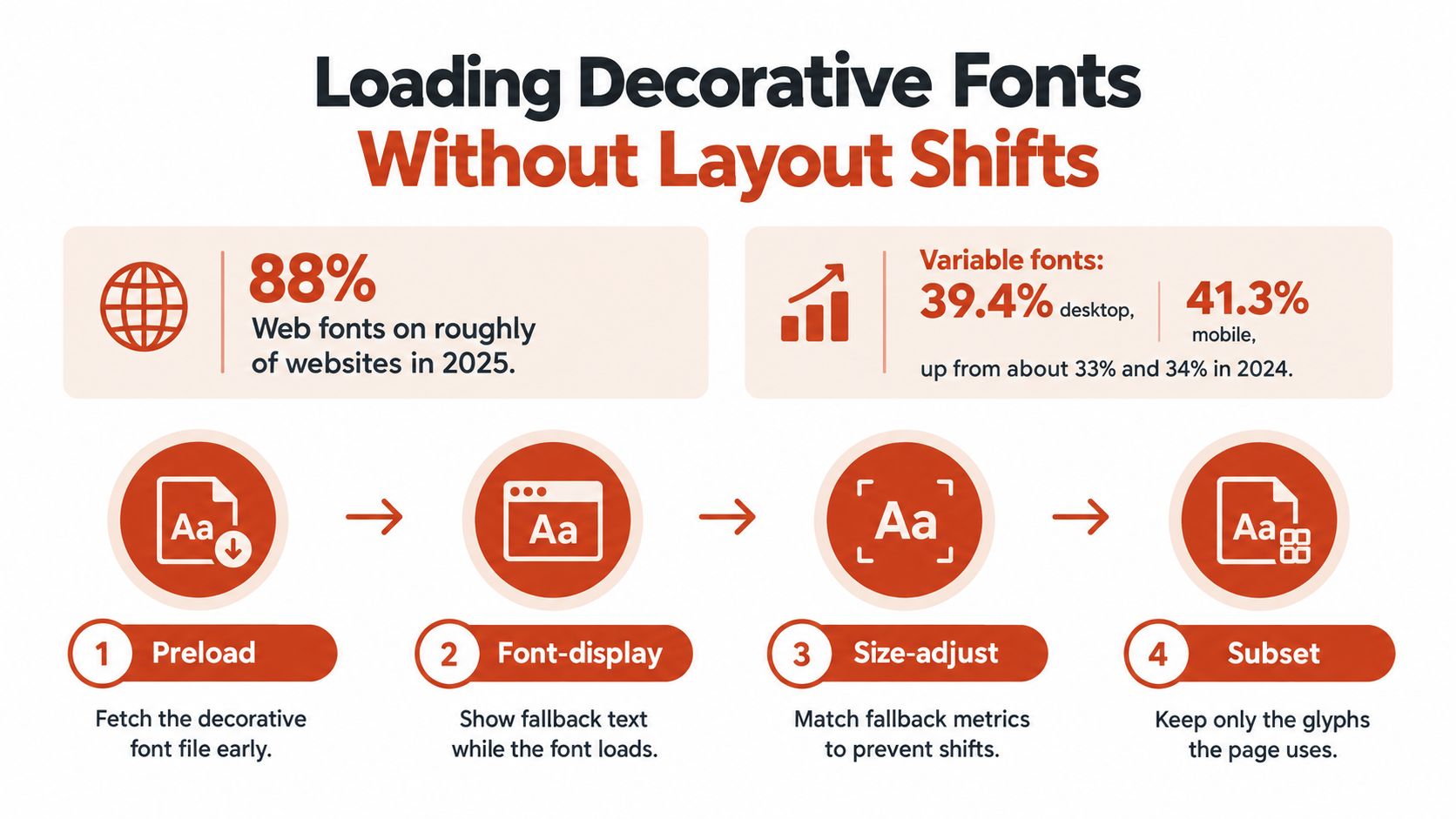
Web fonts appeared on roughly 88% of websites in 2025, while variable-font usage reached 39.4% of desktop and 41.3% of mobile websites, up from approximately 33% and 34% in 2024, according to the figures discussed in Creative Boom's font-trends coverage. Decorative files compete with images, styles and other resources, so a visually modest heading can still create unnecessary loading work.
Build a Deliberate Loading Path
Separate the decorative face. Give it its own
@font-facedeclaration and appropriateunicode-rangecoverage. Keep the accented Latin characters your content needs, including names and translated interface strings.Serve WOFF2 to modern browsers. Keep optional decorative symbols out of the body-text resource. Google Fonts' glyphsets documentation distinguishes production glyphsets from subsets used to minimise traffic, a useful distinction when preparing web files.
Choose the display behaviour by role. Use
font-display: swapwhen immediate heading visibility matters most; consideroptionalfor non-essential display lines where a late replacement would be distracting.Match the fallback's metrics. Start with a system face with similar x-height and line metrics, then tune
size-adjust. Similar mood isn't enough if the fallback changes the heading's width or height.Preload only the critical WOFF2 resource. Avoid fetching every weight or stylistic set early. Reserve that priority for the file the first visible layout actually needs.
Measure cumulative layout shift. Test a real heading at its target viewport under constrained loading conditions. Script-like faces can reflow more noticeably because connected shapes and irregular spacing differ sharply from conventional fallbacks.
The W3C CSS Fonts specification describes the font-fetching and display mechanisms behind these choices. Don't judge the result only after the browser cache is warm.
Inspect the Transfer, Not Just the Specimen
A variable font can replace several static resources, but its file may be larger than the display cut you need. Compare compressed payload, requested resources and transferred bytes in browser developer tools. Don't assume fewer files automatically means less downloading.
Use the guide to font-display swap, fallbacks and fixes when diagnosing flashes or replacement behaviour. If implementation work needs budgeting, Blu Dragonfly LLC's discussion of website performance optimization costs provides context for scoping that work rather than treating font loading as a purely visual adjustment.
Licence Rules and Pre-Publish Checklist
A font licence is a binding contract, not a general approval attached to a style name. Monotype's licensing guidance distinguishes desktop permissions for print and static-image use from web-content permissions for websites. The foundry or reseller EULA governs the actual use.
Map every delivery channel to an authorisation. A designer's workstation, a hosted website, a self-hosted font resource and an editable customer template present different questions. A marketplace description that says commercial use doesn't answer all of them.
Licence Channel for Each Arts and Crafts Font Use
| Use Case | Licence Channel | Typical Limit to Check | Proof to Keep |
|---|---|---|---|
| Desktop design for print or static images | Desktop licence | Number of users or seats | Invoice and EULA version |
| Website using a hosted font service | Web-content licence | Domains, sites or page-view limits | Dated licence page and plan name |
| Self-hosted WOFF or WOFF2 on your server | Web self-hosting licence | Often sold separately from desktop use | Licence naming self-hosting |
| PDF, template or pattern distribution | Embedding permission | Subsetting or protection required by the EULA | Export settings and EULA clause |
| Logo or brand mark | Font-use permission plus trademark and design-rights review | Typeface design rights differ from logo artwork rights | Font licence and written logo ownership agreement |
| Client handoff of source files | Transfer terms | Client usually needs its own licence | Handoff clause in the contract |
| Physical product or merchandise | Product or merch permission, including an extension where required | Explicit extension often required | Written product-use confirmation from the licensor |
The merchandise row is a prompt to investigate, not a claim that every licence charges separately for products. Likewise, a logo ownership agreement doesn't replace permission to use the font software that helped create the artwork. Keep the creative ownership question separate from the software-use question.
A font described as free may still restrict commercial use, embedding or redistribution. Don't label a candidate safe until the relevant terms have been checked against the intended channels, entities and recipients.
Inventory the Actual Assets
Start with what's deployed, not what the brand guideline lists. Inventory the live website, downloadable PDFs, campaign images, working documents and archived font packages. Include legacy landing pages and files supplied by outside designers.
FontCheckerPro supports this inventory step: we scan publicly accessible URLs, uploaded files and images, identify typefaces, and produce audit reports. Accepted inputs include PDFs and zipped font files, and a face can also be identified from an image. Identification isn't guaranteed error-free, and neither a match nor a report grants permission to use the typeface.
Treat an image match as a lead to verify against the original artwork or font file. Similar letterforms can come from different products, and a screenshot can't establish who bought the licence.
Match each asset to its delivery channel. Record the font's file name, version, source, licensed entity, users or seats, websites, media, term and permitted outputs. A useful register connects each font to the assets that depend on it.
Say an agency designs a bakery's packaging, website and editable seasonal menus. The agency's desktop permission may support its own design work, but it doesn't automatically establish the bakery's right to install the font or serve web files. The handoff needs its own documented decision.
Preserve Evidence Before Handoff
Save the invoice, EULA version and check date. Keep them with the project's rights records, not only in a designer's inbox. Record any written clarification from the licensor and the use that clarification addresses.
A dated licence page can help establish what the team relied on, but don't substitute a marketing page for the governing terms. If an account-based service supplies the face, record the relevant plan and who controls that account.
Audit principle: A tidy folder of font files proves possession. It doesn't prove permission.
Teams often lose track of rights when a contractor leaves or an agency relationship ends. Assign a named owner for licence records and renewal decisions. The website font-licensing guide for teams can help turn those responsibilities into a repeatable handoff process.
Check PDF embedding before distribution. Adobe's font product terms, for example, permit desktop-font embedding for printing and viewing subject to subsetting and protection or obfuscation requirements, without implying other embedding rights. That's a concrete reason to inspect the applicable EULA rather than assuming an export preset settles the issue.
Exporting a PDF isn't the same as distributing a complete installable font. It also doesn't automatically authorise editable templates, pattern files or assets from which customers can extract reusable font data. Preserve the relevant embedding clause and export settings with the released document.
Resolve Ambiguous Uses Before Release
Ask the licence holder or counsel to confirm logo, client-transfer and merchandise uses. Describe the actual workflow: who installs the font, who receives editable files, where the lettering appears and whether customers can customise the result. A vague request for commercial permission may produce an equally vague answer.
For client handoff, don't casually bundle the font archive with the source artwork. Establish whether the client needs its own licence, whether transfer is permitted and whether outlined deliverables satisfy the intended editing workflow. Converting letters to outlines doesn't erase restrictions already imposed by the applicable agreement.
Unlicensed deployment can lead to payment demands, removal requests, contractual disputes and replacement work. Don't budget around a supposed standard fine: the applicable terms and circumstances determine the exposure, and a generic penalty figure would be misleading.
The release decision should be explicit. Keep the font when the planned channel is licensed; otherwise buy the missing permission or replace it. This is general compliance information, not legal advice.
Font Checker Pro identifies typefaces across public URLs and uploaded assets and produces audit reports you can use to organise an Arts and Crafts typography review. Visit Font Checker Pro to inventory the faces in your project, then match the findings to the licences that govern your intended uses.