A brand acquisition is moving toward due diligence. The marketing site renders 14 typefaces, but only six appear on the master license certificate. The buyer's legal team flags the gap, the deal slips by two weeks, and the company starts searching PDFs, landing pages, email templates, and contractor archives for fonts that have been embedded over three years.
That situation is no longer unusual in principle, even if the exact details vary by company. Font recognition software has moved beyond identifying an attractive typeface in a poster. It now supports asset inventories, licensing reviews, technical audits, and evidence gathering before an auditor, claimant, or M&A counsel finds the problem first.
The practical question isn't “What font is this?” It's “Where is this font deployed, how certain is the identification, and can the organization prove it has the right to use it?” This guide treats recognition as a decision-grade compliance layer, not a designer's curiosity tool.
The Moment a Font Audit Stops Being Optional
The acquisition scenario becomes expensive because the company doesn't have one typography system. It has a collection of decisions made by designers, developers, agencies, and contractors at different times. A live website may load one family through CSS, a PDF may contain another, and a campaign image may use a third that has been converted to outlines.
A visual search can identify likely candidates, but a compliance review needs more. It must connect each finding to an asset, a location, a responsible team, a license document, and a remediation decision. That is why a structured digital asset audit framework matters. Font discovery is only the first record in the audit trail.
The hidden cost of incomplete inventories
A missing font on a certificate doesn't automatically prove infringement. It does establish an unresolved control gap. Legal teams then need to determine whether the typeface was licensed under another entity, included in a broader agreement, supplied by a contractor, or used outside the rights granted by the original purchase.
The exposure can come from several directions:
- Domain deployment: A font may be loaded on a website that wasn't included in the purchased web rights.
- Asset embedding: A PDF, application, presentation, or campaign file may contain a font under terms that don't permit that use.
- Contractor installation: A designer may have installed a commercial family locally without transferring the appropriate rights to the client.
- Untracked substitutions: A fallback or replacement may have entered production without updating the brand or license register.
Per-seat, per-domain, and usage-based fee structures make casual assumptions unreliable. A font that appears harmless in one asset can become a material issue when it is deployed across websites, documents, applications, and client deliverables.
What recognition changes
Recognition software gives the team a repeatable way to surface typography that isn't visible in procurement records. It can support a pre-deal review, a post-acquisition consolidation, or a recurring check for newly introduced assets.
That doesn't make the software a legal authority. It makes the software an evidence collection layer. A defensible process records the source asset, the extracted or inferred font, the confidence level, the date of the scan, and the human decision that followed.
Practical rule: Treat an identification result as a finding to verify, not as permission to use the font.
The rest of the buying decision should follow that rule. The strongest tool isn't necessarily the one that produces the most attractive match. It's the one that helps a team distinguish certainty from inference, connect findings to licensing records, and explain its remediation decisions later.
What Font Recognition Software Actually Does
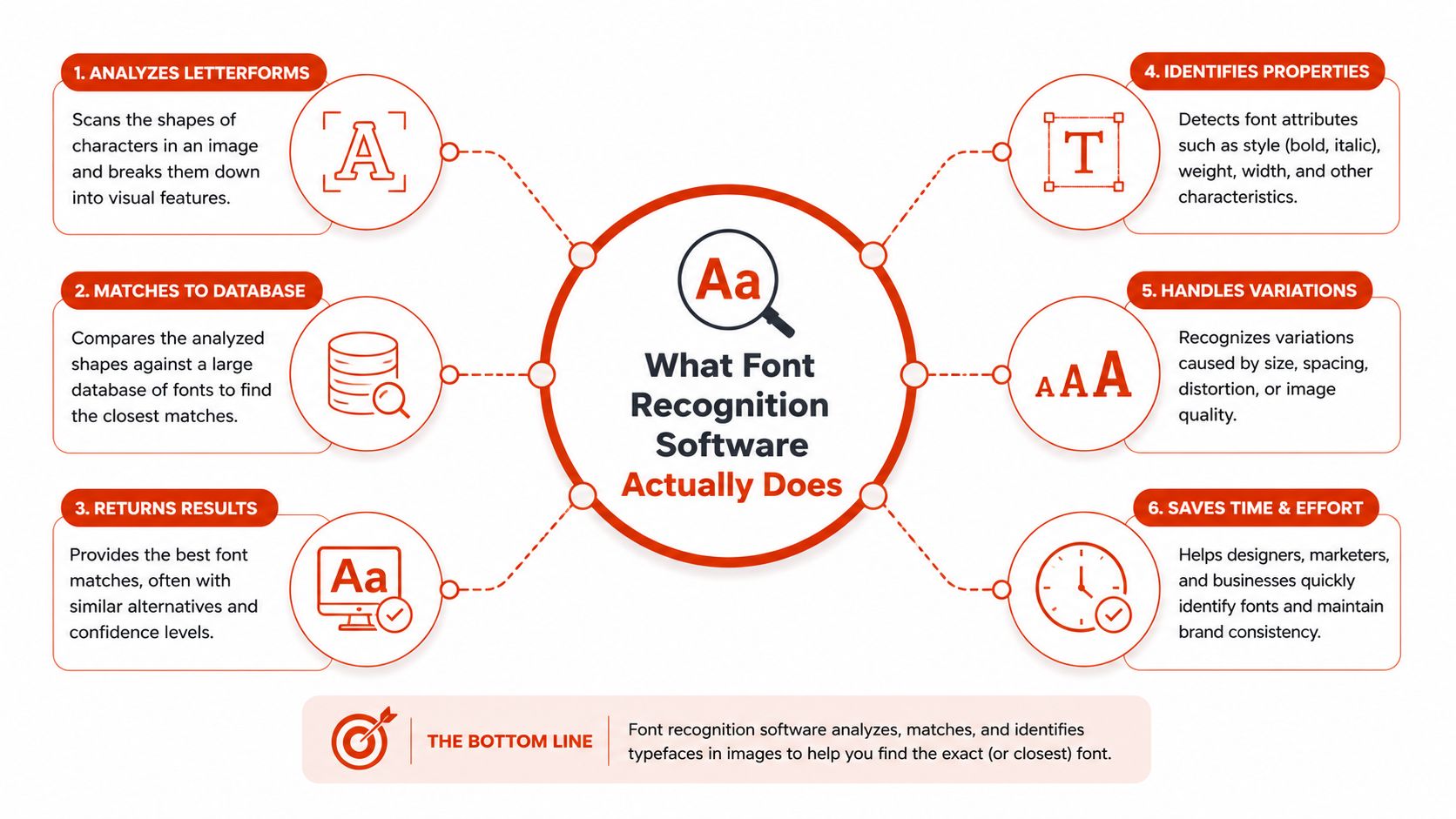
Font recognition software examines a digital asset and proposes the typeface or typefaces used inside it. The input may be a live URL, rendered screenshot, PDF, PSD, static image, or packaged font set. The output may include candidate names, confidence scores, font-file identifiers, licensing information, or a report linking each result to the asset where it was found.
Start by identifying which technical family a vendor uses. Every product page should make this clear.
CSS and DOM detection
CSS and DOM detection reads the page or document structure rather than guessing from pixels. It can inspect computed styles, @font-face declarations, requested font files, and the relationship between an element and the file that renders it.
If a stylesheet requests a file identified as Montserrat-Regular, the result is a direct observation of the implementation. That makes this method useful for live web inventories, code review, and continuous integration checks. It also creates a stronger trail for licensing review because the report can point to the declaration or file that caused the font to load.
This method still has boundaries. It may miss text embedded in an image, a PDF that has been rasterized, a design file where letters have been converted to curves, or a third-party asset that isn't represented in the page's accessible structure.
Image-based identification
Image-based systems analyze rendered pixels. They may inspect letter contours, stroke contrast, spacing, kerning geometry, and other visual features before matching the result against a reference catalog. Some systems use perceptual hashing, deep-learning classifiers, OCR-assisted cropping, or contour-matching engines.
The advantage is coverage. A screenshot, scanned document, video frame, signage photograph, or flattened design export can still provide evidence when no source code survives. The cost is uncertainty. Similar typefaces can produce similar shapes, and the result depends on image quality, text length, catalog coverage, and how much text the system can isolate.
How to inspect a vendor's claims
Ask four questions before paying:
- What assets can it ingest? Live URLs and screenshots aren't enough for a company with PDFs, design files, and archived campaigns.
- Which method does it use for each asset? A result from a stylesheet isn't equivalent to a visual guess.
- What does the output preserve? Legal and operations teams may need the asset path, page location, font file, confidence, timestamp, and exportable evidence.
- What happens when the font isn't in the catalog? The system should identify uncertainty rather than force a misleading nearest match.
Typography also affects perceived product quality and credibility. Teams evaluating font workflows may benefit from Raze's guide to typography trust in SaaS, especially when visual consistency is part of a broader product trust program.
For a more technical explanation of the processing pipeline, see this font identification tool guide. The important buying distinction is simple: source inspection tells you what an implementation requests, while visual recognition estimates what a rendered asset resembles.
CSS and DOM Detection vs Image-Based Identification
The choice isn't about which method is universally superior. It's about whether the asset still contains inspectable typography information.
CSS and DOM detection should be the default for live websites and shipped front-end code. Image-based identification should be the fallback for flattened, archived, or visually rendered material. A serious audit program uses both, but it shouldn't confuse their evidence quality.
| Dimension | CSS/DOM Detection | Image-Based Identification |
|---|---|---|
| Primary input | Live pages, HTML, stylesheets, computed styles, and font files | Screenshots, scans, PDFs, flattened design exports, and photographs |
| Result type | Direct observation of requested files and declarations | Candidate matches with confidence and possible alternatives |
| Precision | High when the source structure is intact | Variable, especially with similar typefaces or poor imagery |
| Licensing traceability | Strong, because the report can identify the loaded file and page context | Requires matching the candidate to a license record and confirming the actual asset |
| Blind spot | Rasterized text, outlined letters, and image-only content | Fonts outside the reference catalog and visually similar families |
| CI integration | Well suited to automated checks on code and deployed pages | Usually requires asset ingestion, review, or a separate processing queue |
| Batch work | Efficient for site-wide inventories | Useful for archive cleanup and large collections of visual assets |
| Best audit use | Live web inventory and release review | Brand-asset forensics and legacy archive investigation |
What each method can prove
A CSS or DOM finding can usually answer, “What file did this page request?” It may not answer whether the organization owns the correct license, whether the file was modified, or whether the same family appears elsewhere in an untracked asset.
An image result answers a different question: “Which known typeface most closely resembles the letters in this image?” That can be enough to locate a likely license record or trigger manual review, but it shouldn't be treated as definitive identification when the distinction affects a legal decision.
Where false positives matter
False positives have different costs by workflow. In a design exploration, a close visual match may be useful. In a compliance report, incorrectly naming a family can send legal staff toward the wrong foundry, distort remediation priorities, and create an audit trail that is difficult to defend.
The same issue appears with visually similar families such as Helvetica and Arial, or Inter and Roboto. A tool should expose alternatives and confidence rather than hide ambiguity behind one polished answer. Teams wanting to connect visual inspection with broader document processing can review this image text recognition software explanation.
Use CSS/DOM detection for what the site loads. Use image recognition for what the organization has already rendered. Neither method replaces a license review.
Why Accuracy Numbers Deserve a Closer Look
A vendor's accuracy percentage means little until you know the test corpus, the image conditions, the font catalog, and the definition of a correct answer. Clean laboratory samples can contain large, well-cropped text with known labels. Production assets often contain compression, rotation, low contrast, multiple typefaces, unusual rendering, and insufficient text.
Published benchmarks show the spread
Early optical font recognition work treated the task as a classification problem rather than a casual visual lookup. A 1998 Bayesian system tested 280 fonts, reached about 97% font recognition accuracy on high-quality images, and exceeded 99.9% for weight and slope detection. The study also found that results were sensitive to text length, although they held steady across document language and text content. See the published optical font recognition study for the original context.
Later research widened the task. An active-learning study on historical documents reported 89% correct classification while labeling only 17% of the data. A CNN-based study reported 98.8% line-level accuracy on a 40-font Arabic database, compared with a prior best of 96.1% on a 20-font subset. The same paper discussed earlier results including 97.35% on 10 English font classes, 99.1% on text blocks, and 92.27% on a dataset of 6,628 fonts. Those results show why a benchmark's class count and asset type matter. Read the deep-learning font classification paper before comparing vendor claims.
Open-world recognition is harsher. A recent benchmark found that the best evaluated vision-language model achieved about 31% accuracy in an easy zero-shot setting, dropping to roughly 15% in harder settings. Sentence-based recognition performed better under a multiple-choice setup, with the best closed-source model reaching nearly 67%. The open-world font recognition benchmark demonstrates how much prompting and task framing can change the result.
| Asset Type | Vendor Claim Typical | Realistic Range | Failure Mode |
|---|---|---|---|
| Clean, straight, high-quality text sample | High accuracy | Often strong when the font is in the catalog | The sample doesn't represent production conditions |
| Compressed screenshot | High accuracy may still be advertised | Variable | Compression artifacts alter counters, terminals, and spacing |
| Rendered HTML mockup | High accuracy on isolated text | Variable | Browser rendering, antialiasing, and variable axes affect shapes |
| Low-contrast display type | Often not separately reported | Uncertain | OCR and contour extraction lose letter boundaries |
| Reverse-out text | Often not separately reported | Uncertain | Background noise and edge treatment distort the glyphs |
| Outlined or converted text | Usually treated as image input | Variable | No font metadata remains, so the system can only infer visually |
| Large, mixed-font document | May be summarized as one score | Variable by region | The model may focus on the largest or clearest text block |
Questions buyers should ask
Request accuracy on a known-fixture set that resembles your own assets. Include compressed PNGs, rendered pages, scanned PDFs, stripped-EXIF screenshots, low-contrast text, reverse-out text, ligatures, and variable font axes.
Ask how the vendor defines success. Is the answer correct only when the exact family and cut are identified, or does a close substitute count? A useful procurement test records top candidates, confidence, abstentions, and false positives. The buyer needs to know not just how often the system is right, but how often it knows that it might be wrong.
Web and Desktop Licensing Risks You Need to Understand
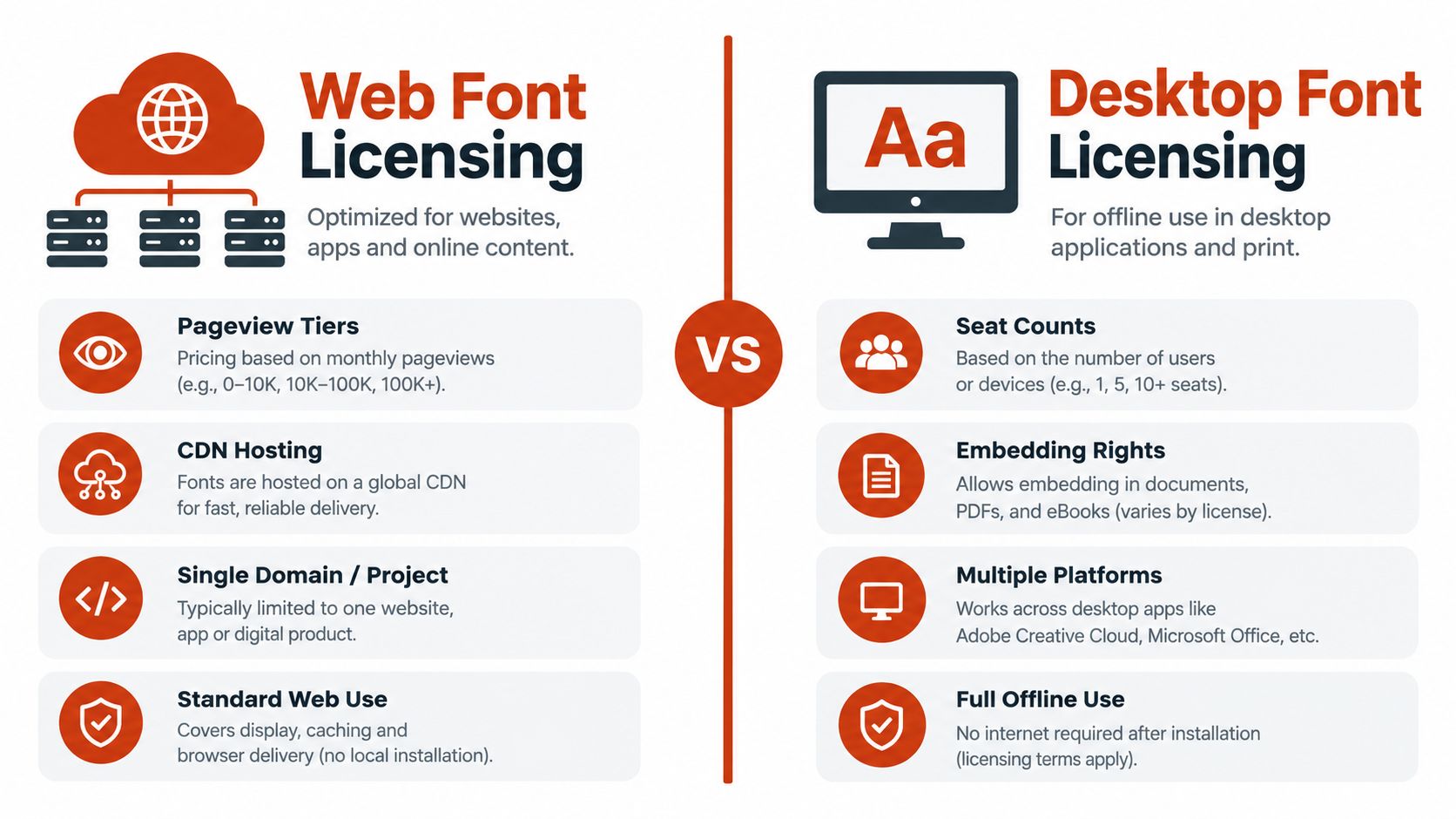
Font licensing divides sharply between web use and desktop use. A webfont license generally authorizes embedding through CSS @font-face, while a desktop license generally covers installation by licensed users to create static materials such as logos, print pieces, and images. These rights aren't interchangeable, and the licensing distinction between web and desktop fonts explains why a file that works technically may still be deployed incorrectly.
Web delivery is a deployment right
A webfont license may be tied to a domain, URL, hosting arrangement, or usage threshold. Some foundries calculate web rights using monthly pageviews rather than granting an unrestricted deployment right. A team therefore needs to record the approved domains, the hosting method, the license tier, and the usage metric that controls continued authorization.
Recognition software can surface:
- Third-party CSS files: A page may load a commercial font from an external stylesheet that no one in procurement remembers approving.
- Self-hosted files: A font may sit in an asset repository without proof that self-hosting is permitted.
- Unapproved domains: A campaign microsite or regional site may use a family outside the licensed domain scope.
- Stale deployments: A redesign may remove a font from the brand system while leaving the file in production.
A desktop license may authorize installation on licensed users' computers, but that doesn't automatically authorize web embedding, server conversion, or broad distribution inside an application.
Desktop use creates a different record
For desktop and creative assets, inspect installed font inventories, design files, PDFs, presentations, exported images, and contractor handoffs. A PDF can preserve font data even when the source design file is gone. A logo may contain outlined letters, which removes the metadata but doesn't remove the underlying licensing question.
Application embedding deserves special attention. Adobe states that its font licensing doesn't permit embedding fonts inside mobile or desktop applications and that a separate license must be obtained from the foundry or an authorized reseller. Its font licensing guidance also limits website coverage to fonts added through the provided embed code.
The financial exposure is real
Unlicensed use may lead to retroactive fees for the full infringement period. One industry source cites U.S. statutory damages of $750 to $30,000 per work infringed, rising to $150,000 per work for willful infringement. Review the enterprise font licensing risk guidance for the stated legal context, and have counsel assess how it applies to the relevant jurisdiction and facts.
Before remediation, legal should receive:
- The original license agreement, including amendments and order records.
- The deployment inventory, with domains, applications, documents, and user groups.
- The asset evidence, including URLs, file hashes where available, screenshots, and scan dates.
- The contractor and agency agreements, including ownership and compliance clauses.
- The proposed resolution, whether that means removal, replacement, purchase, or negotiated authorization.
This article is informational, not legal advice. A recognition result can prioritize review, but counsel must interpret the agreement and the applicable law.
For a practical discussion of web deployment exposure, use this web font performance and licensing risk guide. Performance findings and licensing findings should sit in the same remediation queue because the same unused or rogue file can create both technical and contractual work.
A Practical Checklist for Evaluating Font Recognition Tools
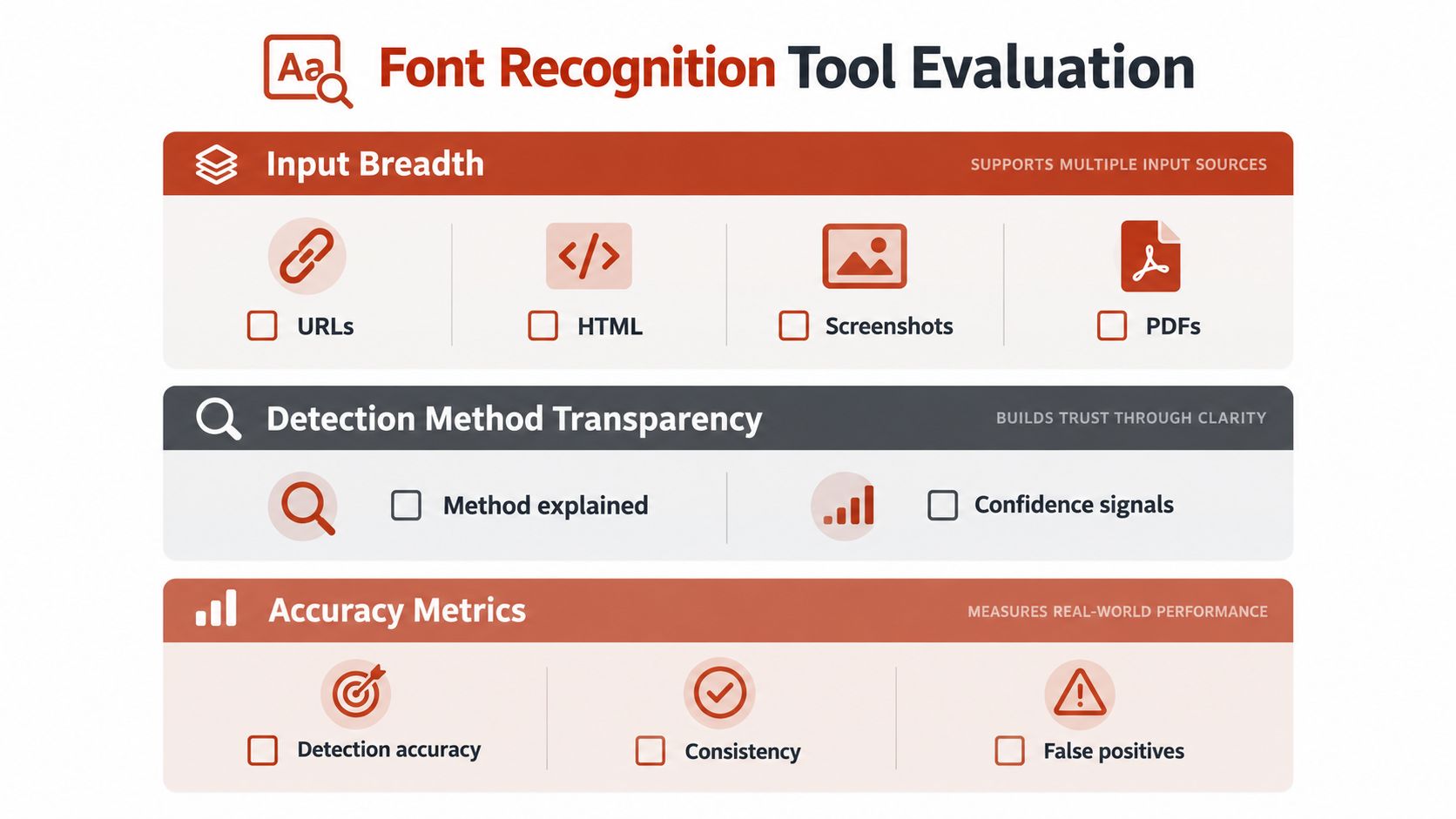
Run the evaluation against your own assets, not a vendor's demonstration image. A focused procurement test can be completed quickly if every shortlisted product receives the same URLs, PDFs, screenshots, and known-font fixtures.
Start with input breadth
Check whether the tool accepts:
- Live URLs: It should identify fonts across representative page templates, not just the homepage.
- HTML and rendered captures: Source and visual output can diverge.
- PDFs: Include both text-based and image-only documents.
- Images: Test screenshots, campaign exports, scans, and low-quality assets.
- Design files or packaged sets: Confirm whether the tool can inspect the formats your teams exchange.
Then record what the system does with multiple fonts on one asset. It should distinguish headlines, body text, navigation, logos, and fallback behavior instead of returning one family for the entire page.
Test transparency and evidence
A black-box confidence score isn't enough for legal or engineering use. Ask whether each result includes the inspected location, input asset, detection method, candidate alternatives, confidence, timestamp, and reviewer notes.
Create a known-fixture set containing fonts your team can identify independently. Measure false positives, missed fonts, and cases where the system correctly abstains. A tool that says “uncertain” is safer than one that confidently assigns the wrong commercial family.
Score operational fit
| Evaluation Area | Pass Condition | Procurement Question |
|---|---|---|
| Input coverage | Handles the formats used by design, engineering, and legal | Can one workflow cover web, documents, and image archives? |
| Detection transparency | Separates source inspection from visual inference | Can a reviewer explain why the result was produced? |
| Evidence export | Produces usable PDF, CSV, or structured records | Can legal and operations work from the same finding? |
| Automation | Supports API, scheduled scans, or pipeline checks | Can the team detect a new font before release? |
| Alerting | Signals new or changed typography | Who receives the alert, and is the event retained? |
| Access control | Supports appropriate roles and review rights | Can agencies, developers, and counsel see only what they need? |
| Audit history | Preserves scan dates, decisions, and remediation | Can the team reconstruct what happened later? |
Teams building a broader website review program can use this enterprise-grade site review tools resource to compare operational requirements beyond typography.
Apply weighted scoring
Give the highest weight to evidence quality, accuracy on your fixtures, and licensing traceability. Give meaningful weight to integration and alerting if the organization ships frequently. Treat convenience features as secondary unless they reduce manual review without hiding uncertainty.
Deal-breakers include no API for a workflow that requires CI checks, no audit log for a regulated environment, confidence scores without definitions, and exports that force legal staff to reconcile findings by hand. Font Checker Pro scans live URLs, PDFs, images, and zipped font sets, then produces reports for legal, operations, and CI workflows. Its image matching returns candidate results with confidence scores, while scheduled scans and alerts support ongoing review.
A procurement team can document the final choice in one page: fixture results, evidence quality, integration fit, license workflow, security requirements, and total operating cost. That justification will serve finance and legal better than a feature list.
For teams considering API-based automation, this REST API guide for font audits and compliance provides useful implementation context.
Putting It Together and Answering Common Questions
A defensible typography audit follows a loop:
- Detect the implementation. Scan live pages and code for requested font files, declarations, and computed styles.
- Inspect rendered assets. Use image-based recognition for screenshots, PDFs, flattened design files, and other assets without usable metadata.
- Normalize the findings. Map family names, styles, weights, file names, and likely foundries into a consistent inventory.
- Match rights. Compare each deployment with the relevant web, desktop, application, document, or usage-based license.
- Assign a decision. Mark the finding as verified, needs review, authorized, replace, remove, or escalate to counsel.
- Preserve evidence. Store the asset, location, detection method, confidence, scan date, license record, and reviewer decision.
- Rescan after remediation. Confirm that the unauthorized file disappeared and that an approved replacement works across the required assets.
Font Checker Pro can support this loop by combining live URL, PDF, image, and font-set scanning with image-based matches, license-oriented reporting, recurring scans, alerts, and export formats for different teams. It should still sit inside a human review process. A tool can find and organize evidence, but it can't interpret every contract or decide whether a particular deployment is legally authorized.
How often should scans run?
Scan before a major launch, rebrand, acquisition, or agency handoff. Add recurring scans for active websites and automated checks for release workflows where new assets enter production frequently. Static archives can follow a scheduled review cycle based on their business importance and how often teams reuse them.
What counts as defensible evidence?
Keep the original asset, the URL or repository location, the detected font and style, the method used, the confidence or alternatives, the scan date, and the license document reviewed. A screenshot alone is weak evidence because it doesn't establish how the font was delivered or whether the same family appears elsewhere.
How should teams handle false positives?
Don't overwrite them without review. Route uncertain results to manual review, retain the competing candidates, and record the final decision with its reason. If the distinction affects a license purchase or a legal notice, obtain the font file or a higher-quality source asset before making the decision.
Can one tool replace manual review?
No. One platform can reduce fragmented searching and create a consistent evidence trail, but humans still need to validate ambiguous matches, interpret contract terms, check ownership and scope, and approve remediation. The right objective is not zero human involvement. It's fewer untracked assets and better decisions about where human attention is required.
The buying decision is straightforward. Choose source inspection for live implementation, visual recognition for flattened assets, and a combined workflow when the organization needs a complete inventory. Reject any product that treats a laboratory accuracy score as a guarantee for blurry, rotated, low-contrast, or legally sensitive assets.
Font Checker Pro scans live URLs, PDFs, images, and zipped font sets to identify typography, connect findings with licensing information, and produce exportable audit reports. Visit Font Checker Pro to evaluate your current assets and build a repeatable recognition and compliance workflow before the next review.